
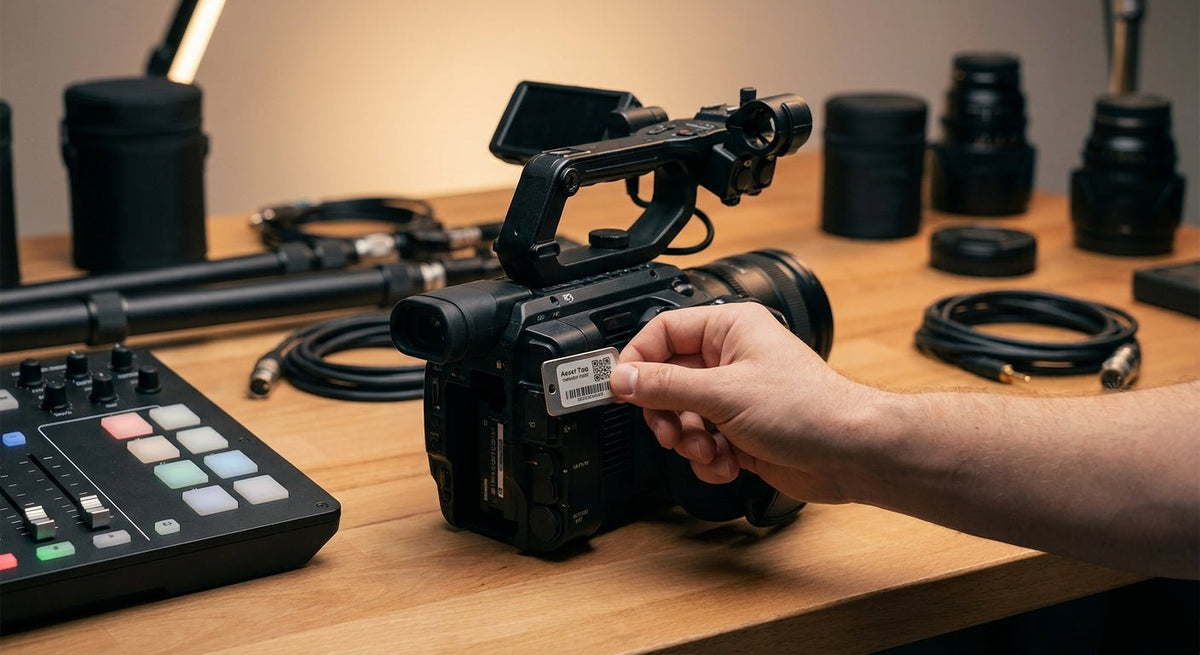
Asset tags for audio and video production equipment need to survive handling, heat, and the kind of environments where gear moves constantly between sets, studios, and storage.
TL;DR: The best asset tags for audio video production equipment in 2026 are metalized silver polyester labels with a pressure-sensitive adhesive rated for smooth and painted metal surfaces — durable enough for XLR cables, mixing boards, and camera bodies alike. McAuley Labels' metallized silver barcode asset tags are the direct buy for production houses, rental houses, and touring crews tracking gear across multiple locations. Avoid paper labels and low-tack vinyl — neither survives a full production season.
Why this matters in 2026
Production gear is expensive, portable, and frequently shared across departments, contractors, and off-site shoots. A single film production in 2026 can involve 200–400 individual assets — cameras, lenses, monitors, audio interfaces, cables, stands, and rigging — moving across multiple locations within a single week. Without durable, scannable asset tags, equipment audits become manual headcounts, lost gear goes unreported until the next rental cycle, and insurance claims fail for lack of documentation. The right label sticks once, scans every time, and doesn't peel off inside a pelican case.
Who this is for
This guide targets production managers, equipment coordinators, and technical directors at film and television production companies, live event AV companies, rental houses, broadcast facilities, and touring sound crews. You're managing gear that ships, gets handled by multiple people in a single day, and lives on surfaces ranging from powder-coated aluminum to anodized carbon fiber. You need asset tags that function in that reality — not in an office.
What to look for in asset tags for audio and video production equipment
Material: metalized silver polyester, not paper
Paper labels tear, absorb moisture, and fail when gear gets packed into cases. Metalized silver polyester (also called metallized polyester) resists abrasion, moisture, and the kind of surface contact that happens when cables coil against a tag inside a bag. For camera bodies, audio interfaces, and powered speakers, polyester is the minimum viable material in 2026.
Adhesive: pressure-sensitive with high-tack backing
Production surfaces are varied — painted aluminum rack rails, powder-coated steel stands, anodized camera bodies, and ABS plastic housings. A pressure-sensitive adhesive rated for both smooth and slightly textured surfaces covers most of these. 3M-backed adhesives hold on curved surfaces and don't lift at the edges after a few months of handling. Avoid standard office-grade adhesive — it fails below 40°F and on any surface with residual oils.
Barcode or QR format: machine-readable from day one
A tag that only carries a serial number in human-readable text slows down every scan. Tags pre-printed with barcodes or QR codes connect directly to asset management software — you scan a camera body in under 2 seconds instead of manually entering a 12-digit serial. Code 128 and QR formats are both supported by standard handheld scanners and smartphone apps. Either works; what matters is that the code prints at sufficient resolution to scan reliably at 6–12 inches.
Print resolution: 300 DPI minimum for barcodes
A barcode printed at 203 DPI works for large shipping labels but starts to misread on a 1.5" × 0.75" asset tag. For equipment tags in the 1"–2" range, 300 DPI is the floor; 600 DPI gives you reliable scans on small formats and dense QR codes. McAuley Labels prints tags at resolutions that support clean scanning on compact label sizes — which matters when you're tagging a shotgun mic or a lens cap tether.
Sequential numbering and custom fields
Production houses need tags numbered sequentially so that an asset report shows gaps — missing numbers flag missing gear immediately. Custom fields like department code, purchase year, or value tier let you sort an audit by category without cross-referencing a second spreadsheet. Tags printed with custom data before they arrive save a full day of in-house printing per major gear inventory.
Tamper evidence or destructive construction
For rental-grade gear, a tag that destroys itself on removal — leaving a visible "VOID" pattern on the surface — deters casual removal and documents tampering. Not every production context requires this, but rental houses and broadcast facilities that loan equipment to third-party crews benefit from tamper-evident construction on high-value items like cinema cameras, lenses, and wireless systems.
Top picks for audio and video production asset tags
The reliable workhorse — metallized silver barcode asset tags
The safe pick for most production environments. McAuley Labels' metallized silver barcode asset tags use metalized silver polyester stock with a pressure-sensitive adhesive rated for metal, painted, and plastic surfaces. Tags arrive pre-printed with sequential barcodes and human-readable serial numbers. Minimum order quantities support both small independent production companies and large rental houses. The silver finish is professional-looking on camera bodies and rack-mount gear without looking like a warehouse logistics label.
Spec that matters: Polyester construction survives temperatures from below freezing to well above 150°F — a relevant range for outdoor shoots in summer heat or cold-weather location work.
Verdict: Buy. This is the correct tag for the majority of audio and video production equipment in 2026.
The precision print option — GoDEX RT863i at 600 DPI
For rental houses and facilities that want to print their own tags on demand. The GoDEX RT863i thermal printer at 600 DPI prints asset tags in-house at a resolution that produces clean, scannable barcodes and QR codes on labels as small as 0.75". For a facility adding 30–50 new assets per month, in-house printing pays back the printer cost within the first year compared to ordering pre-printed tags in small batches. 600 DPI is specifically worth it for small-format tags on audio gear — wireless receivers, DI boxes, and lens elements where tag real estate is limited.
Spec that matters: 600 DPI resolution; thermal transfer printing for long-lasting output that won't fade in UV exposure on outdoor sets.
Verdict: Buy if your facility prints 20+ tags per month. Consider if you print fewer — the pre-printed route is simpler at low volume.
The everyday print workhouse — 4" × 6" thermal label printer
For facilities that need both asset tags and shipping labels from one machine. The 4" × 6" thermal label printer handles standard label sizes used for asset tags, equipment room labels, and outbound shipping. If your production company or rental house also prints shipping labels for gear transport, this covers both use cases without a second printer. It won't match the RT863i at tiny tag formats, but for 2" × 3" and larger asset tags it delivers reliable output.
Spec that matters: Handles label widths up to 4", covering the full range of standard asset tag sizes.
Verdict: Consider if you need dual-purpose printing. Buy the RT863i if asset tags are your primary use case.
What to avoid
- Paper labels on any gear that leaves the building. Paper absorbs sweat, moisture, and case grime. A paper tag on a boom mic or a follow focus motor will be unreadable within 60 days of active use.
- Low-tack vinyl intended for packaging or retail. Vinyl stretches and curls on curved surfaces like microphone bodies, cables, and lens barrels. It lifts at the edges when gear goes from cold storage to a warm set, taking the barcode with it.
- Tags sized for office furniture (3" × 1.5" or larger) on portable audio/video gear. Oversized tags on small items peel because they can't conform to the surface geometry. Size the tag to the mounting surface — a 1" × 0.5" tag stays flat on a wireless transmitter; a 3" tag doesn't.
Verdict comparison table
| Tag / Product | Material | Adhesive | Barcode-ready | Best for | Verdict |
|---|---|---|---|---|---|
| Metallized silver barcode asset tags | Metalized polyester | Pressure-sensitive, high-tack | Yes, pre-printed | All production gear | Buy |
| GoDEX RT863i (in-house printing) | Prints on polyester stock | Depends on stock selected | Yes, 600 DPI | High-volume facilities | Buy / Consider |
| 4×6 thermal label printer | Prints on polyester stock | Depends on stock selected | Yes, up to 300 DPI standard | Dual-use shops | Consider |
| Paper labels | Paper | Standard | Optional | Office assets only | Skip |
| Low-tack vinyl | Vinyl | Low-tack | Optional | Packaging, not gear | Skip |
FAQ
What are the best asset tags for audio and video production equipment in 2026? Metalized silver polyester tags with pressure-sensitive adhesive are the best asset tags for audio and video production equipment in 2026. They survive temperature swings, handling, and case storage without peeling. Pre-printed barcode or QR formats save time on setup.
Can I use regular label maker tags on camera bodies and audio gear? No. Standard label maker output uses paper or low-grade vinyl that fails on metal surfaces and in variable temperature conditions. Equipment that ships, gets cased, or operates outdoors needs polyester-based tags with a high-tack adhesive.
What size asset tag works best for small audio gear like wireless receivers and DI boxes? 1" × 0.5" to 1" × 0.75" tags fit small audio gear without overlapping connectors or control surfaces. Printing at 300–600 DPI keeps barcodes scannable at those small dimensions.
How do asset tags connect to asset management software? Barcode and QR code tags connect to software through any USB or Bluetooth handheld scanner, or a smartphone camera app. Scan the tag, the software logs the asset ID with a timestamp and user record. Most production and rental management platforms (including FileMaker, Asset Tiger, and EZOfficeInventory) accept Code 128 and QR imports.
Is a 300 DPI or 600 DPI printer better for asset tags on production equipment? 600 DPI is better for small-format tags (under 1.5") because the higher resolution produces tighter barcode bars that scan reliably. For tags 2" and larger, 300 DPI is sufficient. The GoDEX RT863i prints at 600 DPI and handles both sizes. For a detailed comparison, see 300 DPI vs 600 DPI: which resolution do you need.
Do asset tags work on curved surfaces like microphone bodies and cables? Flexible polyester tags in small formats conform to moderate curves. Tags larger than 1.5" on a surface with a radius under 1" will lift at the edges over time. Size the tag to the surface and use a high-tack adhesive rated for curved applications.
How many asset tags does a typical production company need? A mid-size production company tracking audio, video, and lighting gear typically tags 150–500 individual items. A large rental house tags 1,000–5,000 assets. Pre-printed tags ordered in bulk runs of 500–1,000 reduce per-tag cost significantly compared to small orders.
What happens if an asset tag gets removed from expensive gear? Tamper-evident tags leave a visible "VOID" residue on the surface when removed, documenting the tampering attempt. For rental-house cinema cameras, wireless systems, and lenses valued above $5,000 per unit, tamper-evident construction adds a meaningful deterrent.
One last thing
Production equipment depreciates faster than most industries track. A camera body purchased in 2022 that's never been properly tagged has no documented service, location, or transfer history — which directly reduces its resale or insurance value. Tags applied on day one create a paper (and digital) trail that pays back when the asset is audited, insured, or sold. A roll of 500 polyester asset tags in 2026 costs less than 30 minutes of equipment coordinator time per year.