
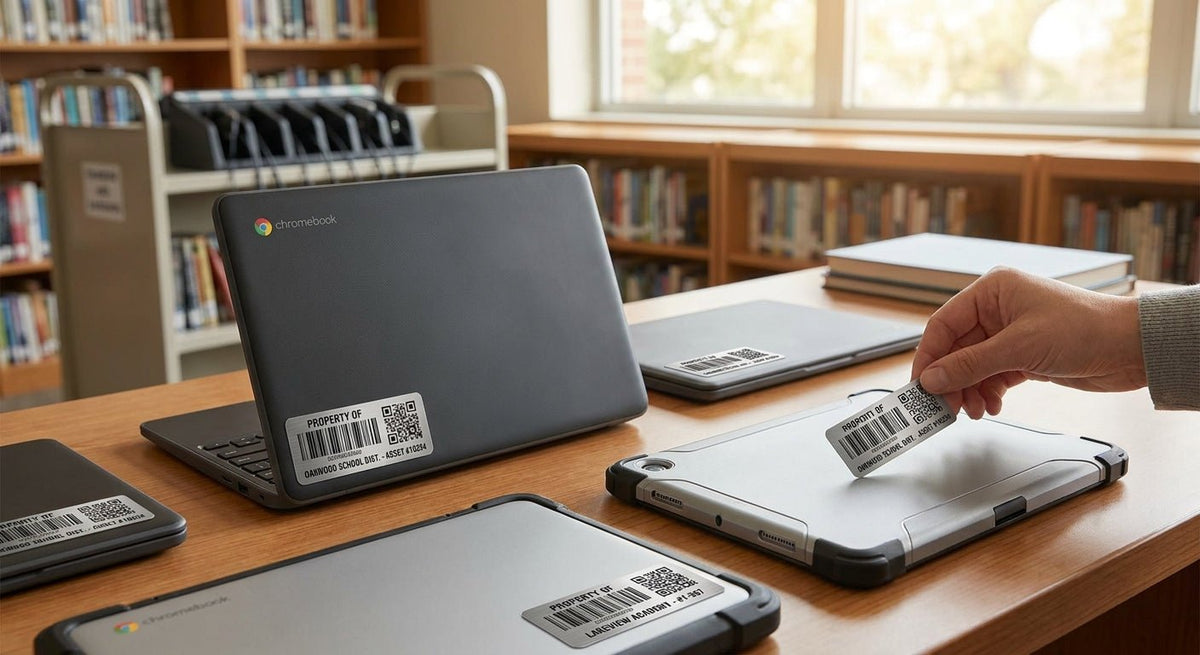
School IT coordinators and district tech directors dealing with 1:1 Chromebook or tablet programs need asset tags that stick, scan, and survive four years of student handling — this guide covers exactly which label type fits that use case and what to order.
TL;DR: For asset tags for school Chromebooks in 2026, metalized silver polyester is the standard call — it resists peeling, scans cleanly after years of daily handling, and carries a sequential barcode or QR code your asset management system can read. Semi-gloss white works on lighter-colored tablets where a silver label looks out of place. Avoid paper-stock labels entirely; they fail within one semester. McAuley Labels ships US-manufactured options in all three materials with custom school name, district ID, or barcode sequence built in.
Why this matters in 2026
School districts running 1:1 programs routinely manage 500 to 10,000+ devices. A lost Chromebook with a peeled or unreadable tag costs the district its only recovery leverage — no serial tie, no room assignment, no student record link. CIPA compliance audits and E-rate reimbursement documentation both require verifiable asset records. The label is the first link in that chain. Get the material wrong and you rebuild the chain every year.
Who this is for
This guide is written for K-12 IT coordinators, district technology directors, and school business administrators who are sourcing asset tags for Chromebooks, iPads, Android tablets, or any thin-client device issued to students. If you manage fewer than 50 devices and reorder annually, the semi-gloss white option is your floor. If you manage a district fleet of 1,000+ devices on a 3–5 year refresh cycle, you need metalized silver polyester with permanent adhesive — full stop.
What to look for in asset tags for school Chromebooks
Adhesive that holds on polycarbonate and aluminum
Chromebook shells are polycarbonate plastic or aluminum-magnesium alloy — both low-surface-energy materials that reject weak adhesives. A standard office label peels within 60–90 days. You need a permanent pressure-sensitive adhesive rated for plastic substrates. McAuley Labels' metalized silver tags use adhesive systems that bond to these surfaces on day one and do not release under normal handling through a 4-year device lifecycle.
Scratch resistance for daily backpack handling
A student backpack generates abrasion equivalent to hundreds of wipe cycles per semester. The label face must resist scratching without losing barcode contrast. Metalized silver polyester has a hard surface layer that maintains scan-grade contrast — a 1D barcode needs at least 80% bar-to-space contrast ratio for reliable reads. Paper and semi-gloss white degrade faster under the same abrasion.
Barcode or QR code format compatible with your asset management system
Most K-12 asset systems — Incident IQ, Destiny, Follett, custom Google Sheets setups — accept either Code 128 barcodes or QR codes. In 2026, QR codes are increasingly preferred because a phone camera doubles as a scanner. Confirm your system's input format before ordering. McAuley Labels prints both formats with custom sequential numbering baked in at production — no in-house printing step required.
Label size that fits without covering ports or vents
Standard Chromebook bottom panels give you roughly 2" × 1" of clear real estate near the hinge or battery compartment. Avoid labels wider than 2.5" — they risk covering USB-C ports or thermal vents, which creates a support problem when a device needs service. A 2" × 1" or 1.5" × 0.75" tag fits every major Chromebook form factor including 11" Acer Spin and HP G-series devices.
Tamper-evident construction for loss deterrence
When a student removes an asset tag, the district loses its physical recovery anchor. Tamper-evident labels fracture or leave a "VOID" pattern on the substrate when peeled — this is a visible deterrent and a forensic signal. For districts issuing devices to students who take them home, tamper-evident metalized silver is the right call. See the tamper-evident asset tags for IT assets guide for more detail on void constructions.
Readability after cleaning and sanitization
School devices get wiped with isopropyl alcohol or disinfectant wipes multiple times per year, especially post-2020 protocols that carried into 2026. The label face and adhesive must hold through repeated chemical exposure. Metalized polyester handles IPA wipes without face degradation. Semi-gloss paper does not.
Top picks for school Chromebook and tablet asset tags
The standard pick — Metalized Silver Barcode Asset Tag
Hook: The safe, auditable choice for any district with a formal asset management workflow.
- Material: metalized silver polyester
- Format: sequential barcode (Code 128 or Code 39)
- Best for: Chromebooks, MacBooks, Windows laptops, Android tablets
- Adhesive: permanent, rated for polycarbonate and aluminum
This is the label format schools have standardized on because it scans at every stage — receiving, classroom assignment, annual audit, and surplus/disposal. The silver face survives 4+ years of student handling without barcode degradation. Custom field options include district name, school name, sequential number range, and a secondary human-readable number below the barcode.
Verdict: Buy — asset tags for equipment metallized silver barcode label
The ID-only pick — Metalized Silver ID Label
Hook: For districts that rely on human-readable IDs rather than scanner-based workflows.
- Material: metalized silver polyester
- Format: text/ID only, no barcode
- Best for: small districts, private schools, 1:1 programs under 200 devices
If your inventory process is a spreadsheet and a visual check rather than a scanner, the ID-only version gives you the same durable silver face without a barcode. Easier to read at a glance. The same permanent adhesive and scratch-resistant face applies.
Verdict: Consider — asset tags metallized silver ID label
The budget-floor pick — Semi-Gloss White Barcode Tag
Hook: Lower cost per label, acceptable for tablets that stay in-classroom.
- Material: semi-gloss white
- Format: barcode or ID
- Best for: in-room tablets, shared carts, short-cycle refresh programs
Semi-gloss white costs less per unit than metalized silver and prints cleanly. It is not the right choice for take-home devices — adhesion on worn plastic degrades faster and abrasion dulls barcode contrast within 18–24 months. For shared classroom tablets on a 2-year refresh that never leave the building, it is a defensible choice.
Verdict: Consider for in-room only — asset tags semi-gloss white barcode
The heavy-duty option — 3M Heavy-Duty Silver Barcode Tag
Hook: When standard metalized silver is not enough — outdoor carts, vocational programs, high-abuse environments.
- Material: 3M heavy-duty silver
- Adhesive: 3M permanent, rated for textured and painted metal surfaces
- Best for: AV carts, charging stations, outdoor-use tablets, vocational shop equipment
For devices or equipment that live on metal charging carts in a gym, outdoor education tablets, or any surface with texture or powder coat, the 3M adhesive system outperforms standard metalized silver. Per-label cost is higher — order this for the 20% of your inventory in harsh environments, not the entire fleet.
Verdict: Buy for high-abuse assets — asset tags heavy duty silver barcode
The QR code option — Custom QR Code Asset Tags, Metalized Silver Polyester
Hook: For districts moving to phone-based scanning or linking devices to digital records in 2026.
- Material: metalized silver polyester
- Format: QR code with custom URL or ID encoded
- Best for: districts using Incident IQ, Google-based asset systems, or any QR-scan workflow
A QR code tag lets any staff member with a smartphone scan a device and pull up its record instantly — no dedicated barcode scanner hardware required. The metalized silver face holds QR module contrast through the same 4-year device lifecycle. Custom QR codes can encode a URL pointing directly to the device record in your system.
Verdict: Buy if your system supports QR input — custom QR code asset tags metalized silver polyester
What to avoid
- Paper-stock asset labels. They peel from polycarbonate within one semester, especially on take-home devices that live in backpacks. The adhesive is not rated for low-surface-energy plastics, and the face scuffs to illegibility faster than any other stock. No school IT program should be on paper labels in 2026.
- Generic office labels printed in-house on a desktop inkjet or laser. Inkjet ink smears when wet. Laser toner on paper delaminates from heat and cleaning chemicals. Neither survives a year of student use. In-house printing works for temporary identification; it is not an asset tag.
- Oversized labels (wider than 2.5"). They cover USB ports, charging contacts, and ventilation slots. Tech teams spend support hours dealing with overheating complaints and port-blockage issues that trace back to a label placement error at deployment.
Comparison table
| Label | Material | Adhesive | Tamper-evident | Take-home suitable | Best use |
|---|---|---|---|---|---|
| Metalized Silver Barcode | Silver polyester | Permanent | Optional | Yes | Standard fleet |
| Metalized Silver ID | Silver polyester | Permanent | Optional | Yes | Small district, no scanner |
| Semi-Gloss White Barcode | Semi-gloss white | Standard | No | No | In-room tablets only |
| 3M Heavy-Duty Silver | 3M silver | 3M permanent | Optional | Yes | Carts, outdoor, metal surfaces |
| QR Code Metalized Silver | Silver polyester | Permanent | Optional | Yes | Phone-scan workflows |
FAQ
What's the best asset tag for school Chromebooks in 2026? Metalized silver polyester with a sequential barcode is the standard. It holds on polycarbonate plastic and aluminum shells, survives 4 years of student handling, and scans reliably for annual audits and E-rate documentation.
How do I stop students from removing Chromebook asset tags? Order tamper-evident metalized silver labels. When peeled, the face fractures and leaves a "VOID" pattern on the device. This deters removal and flags attempted tampering during inspections.
Is a QR code better than a barcode for school asset tags? Neither is universally better — it depends on your workflow. Barcodes require a dedicated scanner but are faster in bulk audit scenarios. QR codes let any smartphone serve as a scanner and can encode a URL to the device record. If your district is on a modern asset platform like Incident IQ, QR is worth ordering.
What size asset tag fits a Chromebook? 2" × 1" is the most common size for Chromebook bottom panels. It fits every major 11" and 13" form factor without covering ports or vents. Confirm placement on a sample device before deploying a full order.
Can I order asset tags with my school district's name pre-printed? Yes. McAuley Labels prints custom text — district name, school name, "Property of" line, sequential number range — at production. No in-house printing step required.
How many asset tags should I order per device? One per device is standard. Some districts order a second tag for the charging cable or carrying case. If you run a district-wide auditing system that also tags charging carts, order quantities by device count plus 10–15% for replacements and new deployments mid-cycle.
Do asset tags for Chromebooks survive cleaning with disinfectant wipes? Metalized silver polyester does. Isopropyl alcohol wipes and quaternary ammonium disinfectants do not degrade the face or adhesive of a properly rated polyester label. Semi-gloss white and paper stocks do not hold up to repeated chemical cleaning.
What's the minimum order quantity for custom school asset tags? Check the custom quote page for current minimums — they vary by label type and customization level. Small districts can typically order pre-configured non-custom tags in smaller runs.
One last thing
E-rate reimbursement (Category 2, internal connections) requires districts to maintain asset records for equipment funded under the program — devices must be tracked for the duration of the funding commitment period, which runs 5 years. A label that fails at year 2 creates a documentation gap during a potential audit. Metalized silver polyester with permanent adhesive is rated to outlast that 5-year window. That is not a selling point — it is a compliance requirement the label specification has to meet.