
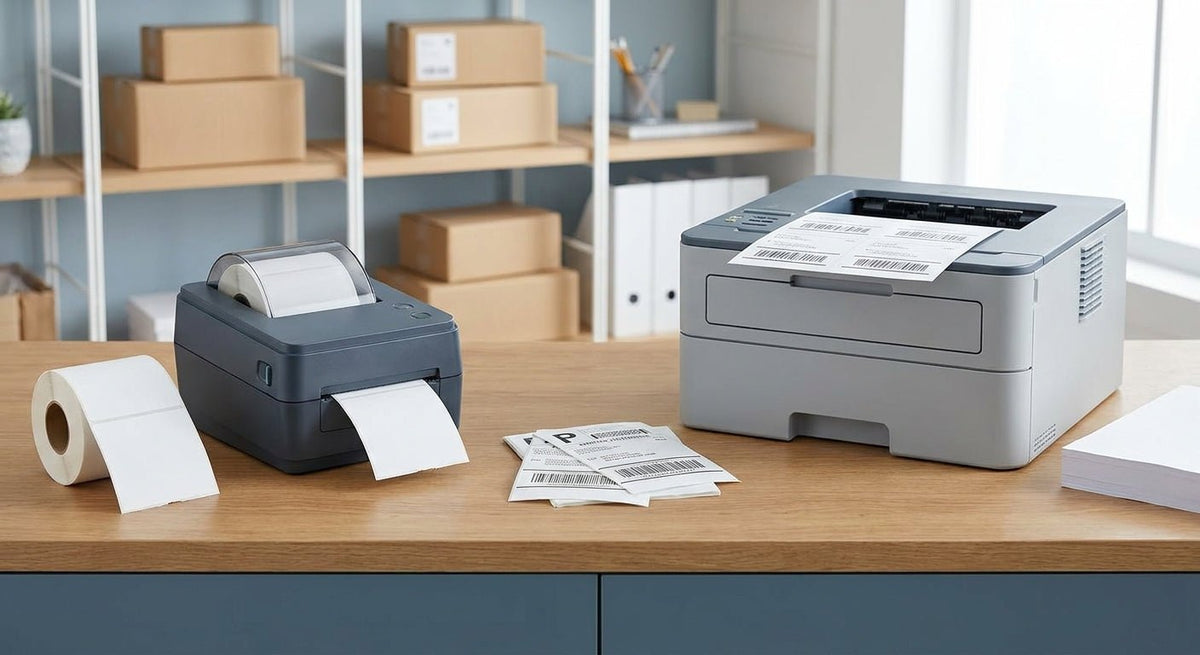
Direct thermal and laser are the two most common technologies for printing shipping labels in 2026 — and they are not interchangeable. The right choice depends on your volume, label format, and total cost per label.
TL;DR: For shipping labels in 2026, direct thermal wins in almost every fulfillment scenario. It prints a standard 4×6 label in under 2 seconds with no toner, no ink, and no warm-up time. Laser printers can handle shipping labels on sheet stock, but the per-label cost runs 3–5× higher once toner and paper costs are factored in. If you ship more than 10 packages a day, a dedicated direct thermal printer is the correct tool. The Godex DT230 at 300 DPI is the cleanest entry point for small-to-mid-volume operations.
Why This Matters in 2026
Carrier label requirements from UPS, FedEx, and USPS specify a minimum barcode scanability rate — a blurry or smeared label causes a scan failure at the sortation hub, which delays delivery and triggers a re-label fee. Laser-printed labels on plain paper curl under heat and moisture. Direct thermal labels on 4×6 stock stay flat, scan clean, and cost roughly $0.02–$0.04 per label in media alone. That gap compounds fast at 50, 100, or 500 shipments a day.
How We Ranked
The printers and configurations below are evaluated on five criteria: print speed (labels per minute), resolution (DPI), media cost per label, consumable overhead (toner vs. no consumable), and carrier compliance. Laser printers are included as a legitimate option for low-volume or occasional shippers; direct thermal units dominate above any meaningful daily volume. All prices and specs referenced here are current as of 2026.
Ranked: Direct Thermal vs. Laser for Shipping Labels
1. Godex DT230 — 300 DPI Direct Thermal
The volume workhorse.
The Godex DT230 direct thermal printer at 300 DPI prints a 4×6 label in approximately 1.5 seconds at 4 inches per second. No ribbon. No toner cartridge. The 300 DPI head produces sharp enough output that USPS, UPS, and FedEx barcodes scan on the first pass. Media cost lands around $0.03 per label on standard fanfold thermal stock. In 2026 this is the benchmark direct thermal configuration for e-commerce and small fulfillment operations.
The DT230 connects via USB and serial, runs ZPL-compatible label software, and fits on a packing bench without occupying the footprint of a laser unit. The only limitation is label width — it maxes out at 4.25 inches, which covers every standard shipping label format.
Verdict: Buy — the first printer to specify for any operation shipping 10+ packages per day.
2. Godex GE300 — 203 DPI Direct Thermal
The entry-level pick.
The Godex GE300 at 203 DPI covers standard shipping barcode output at a lower hardware price than the DT230. At 203 DPI, Code 128 and QR barcodes on 4×6 labels scan reliably — carrier compliance is not a concern at this resolution for a standard shipping label. Print speed sits at 4 inches per second, identical to the DT230.
203 DPI becomes a limitation only if you need to print small-font text under 8pt or dense 2D barcodes at reduced label sizes. For a standard FedEx, UPS, or USPS shipping label, 203 DPI is sufficient in 2026.
Verdict: Buy — correct for budget-conscious shippers with standard label sizes.
3. Godex RT230i — 300 DPI Thermal (Direct Thermal + Transfer)
The dual-mode option.
The Godex RT230i at 300 DPI supports both direct thermal and thermal transfer printing. For shipping labels, you run it in direct thermal mode — no ribbon needed, same speed and resolution as a dedicated direct thermal unit. The thermal transfer mode becomes relevant if the same printer also needs to produce durable asset tags or outdoor labels that require a ribbon.
If your operation prints shipping labels and also needs barcode labels for warehouse shelving or equipment, the RT230i avoids a second printer on the bench.
Verdict: Buy — justified when shipping label volume combines with an asset tagging or inventory labeling requirement.
4. Office Laser Printer (Sheet Label Stock)
The occasional-shipper fallback.
A standard monochrome laser printer — any 600 DPI desktop unit — can print shipping labels on 8.5×11 sheet stock (2-up or 1-up label sheets). Label quality is acceptable at low volume. The practical problems start at scale: sheet label stock costs $0.15–$0.30 per sheet, toner adds another $0.05–$0.10 per page, and each label requires cutting or pre-scored sheet separation. Warm-up time runs 15–30 seconds after sleep mode.
Laser also fails in humid environments. Heat from the fuser unit combined with moisture causes curl — labels peel at corners during transit and trigger scan failures. In 2026, no high-volume fulfillment center runs laser for shipping labels.
Verdict: Hold — acceptable only for 1–5 shipments per day where a dedicated label printer is not yet justified.
5. Inkjet Printer (Sheet Label Stock)
The option to avoid.
Inkjet printing on shipping labels is the lowest-cost hardware entry point and the highest-friction day-to-day experience. Inkjet ink is water-soluble on most label stocks, which means a label that gets wet during transit — any rain exposure, any condensation — smears. Carrier sortation equipment can reject a smeared barcode, and re-labeling at a hub costs time and money. Print speed on a standard inkjet for a single label sheet is 20–45 seconds.
Verdict: Skip — inkjet does not meet the durability standard for outbound shipping labels in 2026.
Comparison Table
| Godex DT230 (300 DPI) | Godex GE300 (203 DPI) | Godex RT230i (300 DPI) | Office Laser | Inkjet | |
|---|---|---|---|---|---|
| Print speed | 4 ips | 4 ips | 4 ips | 15–30 sec warm-up | 20–45 sec/sheet |
| Resolution | 300 DPI | 203 DPI | 300 DPI | 600 DPI | 300–600 DPI |
| Media cost/label | ~$0.03 | ~$0.03 | ~$0.03 | $0.20–$0.40 | $0.20–$0.40 |
| Consumables | None | None | Ribbon (transfer mode only) | Toner | Ink |
| Moisture resistance | High | High | High | Low | Very low |
| Carrier compliance | Yes | Yes | Yes | Marginal | No |
| Verdict | Buy | Buy | Buy | Hold | Skip |
What to Avoid
Laser on high-volume lines. Above 20 shipments a day, the per-label cost differential between laser ($0.20–$0.40) and direct thermal ($0.03) adds up to hundreds of dollars per month. Hardware cost recovery on a direct thermal unit happens inside 60 days at that volume.
203 DPI for small labels. If your shipping workflow includes small 2×1 packing slips, serial number labels, or any label under 3 inches wide with dense text, 203 DPI produces fuzzy output. Specify 300 DPI from the start.
Generic thermal paper from non-label suppliers. Thermal coating thickness varies by supplier. Undercoated stock produces faded output after 30–60 days — a problem for any label that needs to survive a return transit window. Use media rated for the specific printer head.
Where to Buy
- Direct thermal printers from McAuley Labels — Godex hardware ships from the US and includes setup documentation. The DT230 and GE300 cover most shipping label use cases without configuration overhead.
- Fanfold thermal label stock — 4×6 fanfold is the standard format for desktop direct thermal units. Avoid roll stock unless the printer specifies roll compatibility.
- Sheet laser labels — if a laser printer is already in place and volume is under 5 shipments daily, Avery 5163 or equivalent 2-up sheet stock is the practical stopgap before a dedicated unit is justified.
FAQ
What is the best printer for shipping labels in 2026? A direct thermal printer at 203 or 300 DPI is the correct choice for any operation shipping more than 10 packages per day. The Godex DT230 at 300 DPI produces carrier-compliant labels at approximately $0.03 per label with no toner or ink consumables.
Can I use a laser printer for shipping labels? Yes, on pre-scored sheet label stock. The per-label cost runs $0.20–$0.40 versus $0.03 for direct thermal, and laser-printed labels are more vulnerable to moisture curl during transit. It is a viable option at 1–5 shipments per day.
Is direct thermal or laser better for FedEx and UPS labels? Direct thermal. Both FedEx and UPS accept either format, but direct thermal labels on 4×6 stock scan more reliably because they stay flat and resist ambient moisture that causes laser-printed labels to curl.
Do direct thermal printers require ink or toner? No. Direct thermal printing uses heat-activated paper — the printhead applies heat directly to the label surface. There is no ribbon, no ink cartridge, and no toner. Running cost is media only.
What DPI do I need for shipping labels? Shipping label barcodes (Code 128, QR) scan reliably at 203 DPI on standard 4×6 format. 300 DPI is the better specification if the same printer will also handle smaller labels or dense text fields.
How long do direct thermal shipping labels last? Direct thermal labels fade with prolonged UV or heat exposure. For shipping labels in normal transit conditions — 1 to 14 days in a box — they hold print quality without issue. For labels that need to last years, thermal transfer with a resin ribbon is the correct technology.
Is a direct thermal printer vs laser for shipping labels a close decision? Only at very low volumes. At 10+ shipments per day in 2026, direct thermal wins on cost, speed, and scan reliability. The decision is only close if a laser printer is already owned and daily shipment count is under 5.
What size labels do direct thermal printers use? Most desktop direct thermal label printers support 4×6 inch labels — the standard format for USPS, UPS, FedEx, and DHL. Some units also support 4×4, 2×1, and other sizes depending on media width capacity.
One Last Thing
Direct thermal labels stored in a hot delivery vehicle — think a van cab in July — can begin to darken from ambient heat before the package is even scanned. The thermal activation threshold on standard label stock sits around 140°F. Specify labels rated for extended heat exposure if any part of your outbound chain includes vehicle storage in warm climates.