
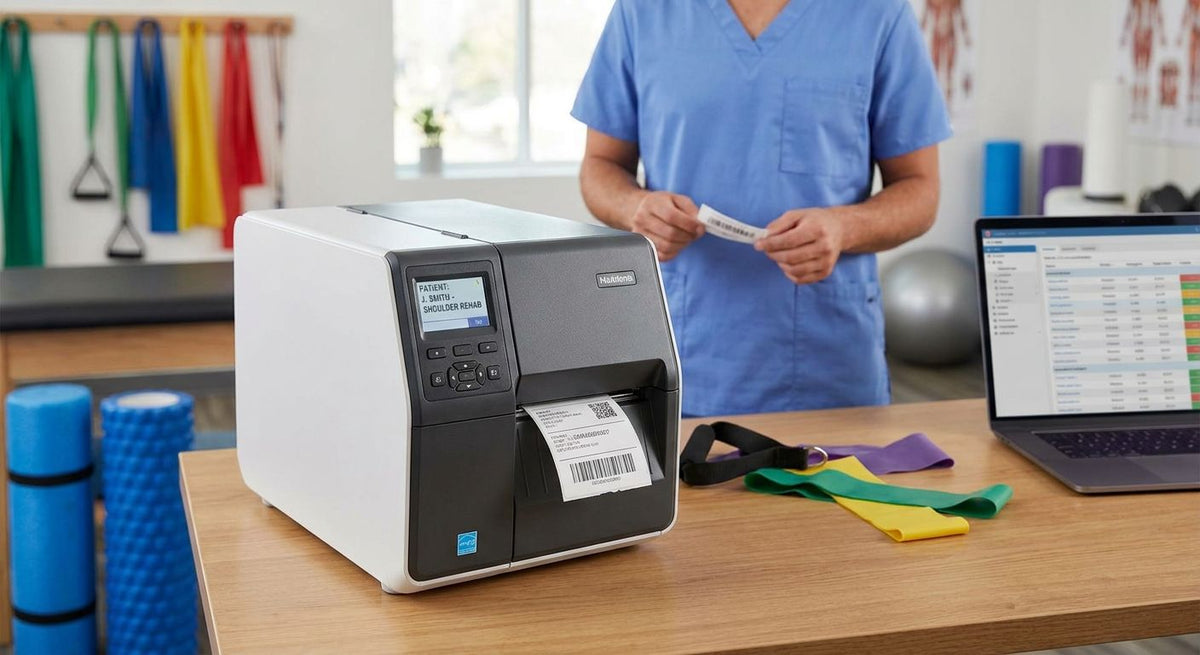
A medical label printer for physical therapy clinic use handles equipment asset tags, patient file labels, and therapy-supply IDs without hospital-scale bulk or complexity.
- PT and rehab clinics need durable asset tags plus file labels—not full hospital lab systems.
- Thermal transfer at 203–300 DPI covers most clinic equipment and chart labeling in 2026.
- McAuley Labels thermal printers suit clinics that tag modalities, tables, and supply bins in-house.
- Skip consumer label makers for metal frames and wet treatment rooms; they peel and smear.
- Map label types first, then pick stock and DPI before buying hardware.
Why this matters
Physical therapy and rehab clinics move patients, modalities, and rental equipment all day. Labels that peel off ultrasound units, fade on cold packs, or smear on chart folders create inventory gaps and audit risk. A purpose-built medical label printer for physical therapy clinic workflows keeps asset IDs readable and file labels consistent through 2026 compliance checks.
Physical therapy clinic medical labeling defined
Physical therapy clinic medical labeling is on-demand printing of durable ID tags and chart labels with the aim of tracking therapy equipment, patient records, and clinical supplies. Hospital systems chase specimen tubes and UDI device marks. PT and rehab shops chase treatment tables, traction units, TENS units, exercise bikes, cold packs, and paper charts that leave the front desk every hour.
That difference drives hardware choices. You need small desktop footprint, fast single-label jobs, and stock that sticks to painted metal and plastic housings—not cryogenic vials or blood tubes.
Why a medical label printer matters for PT and rehab clinics
Multi-location outpatient groups and single-site practices share the same failure modes: missing serial numbers on loaner wheelchairs, unlabeled electrode packs, and chart stickers that smudge under alcohol wipes. In-house thermal printing cuts the lag of outsourcing rolls and lets staff reprint a lost tag in under a minute.
Equipment rooms look like light gyms. Surfaces get wiped with disinfectant. Labels need polyester or metalized stock with permanent adhesive, not paper office stickers. File labels need crisp barcodes at 203 DPI minimum so scanners at checkout catch every chart. A GoDEX RT700i thermal printer sits on a counter and covers both jobs without a server room footprint.
How to set up labeling for a physical therapy clinic
Map every label type you print
List the jobs before you buy hardware. Most clinics need three buckets only.
- Equipment asset tags with serial or barcode on modalities, tables, and cardio gear
- Patient chart and folder labels with name, DOB, and account ID
- Supply and bin labels for electrodes, wraps, and loaner devices
- Optional: locker or cubby labels for multi-therapist rooms
- Optional: quarantine or out-of-service tags for broken gear
Choose direct thermal or thermal transfer
Direct thermal needs no ribbon and works for short-life chart labels. Thermal transfer uses ribbon and holds up on equipment that sees daily cleaning.
- Use direct thermal for paper chart labels and temporary bin tags
- Use thermal transfer for metalized asset tags and polyester equipment IDs
- Keep both media on hand if you print charts and assets from one unit
- Avoid pure consumer inkjets—ink runs under disinfectant
- Match ribbon type (wax/resin) to polyester stock when durability matters
Match resolution and width to your jobs
Clinic labels rarely need 600 DPI. 203 DPI covers barcodes and large type; 300 DPI helps dense QR codes and small serial fields.
- 203 DPI for standard asset barcodes and folder labels
- 300 DPI when QR codes link to maintenance logs
- 4-inch print width covers most asset and chart formats
- Compact 2-inch units only if you print wristbands or tiny supply tags
- Color display units cut setup errors for multi-user front desks
McAuley Labels stocks GoDEX dual-thermal models that switch media without a second machine, which fits clinics that share one counter printer between front desk and equipment room.
Select stock that survives the treatment floor
Paper fails on wet packs and wiped metal. Spec material by surface.
- Metalized silver polyester for painted frames and plastic housings
- 3M heavy-duty adhesive for textured or curved equipment surfaces
- Semi-gloss white for indoor bins and clean plastic carts
- Direct thermal paper only for charts that stay dry
- Test one sheet on your cold pack and ultrasound before bulk order
Metalized silver barcode asset tags hold up on therapy tables and modality carts that get wiped between patients.
Build an equipment asset-tag workflow
Tag every capital item once, then scan at inventory and service.
- Assign a unique ID or barcode per serial number
- Place tags on flat metal away from heat vents and grip points
- Log purchase date, location, and last PM in a simple sheet or CMMS
- Reprint damaged tags the same day—do not leave bare serial plates
- Train aides to refuse unlabeled loaner gear at checkout


Print patient and file labels at the desk
Front-desk volume is bursty—dozens of labels at open and close, almost none midday. Design templates once.
- Lock a template with name, DOB, MRN, and visit date fields
- Print on direct thermal stock sized to your chart folder lip
- Keep a spare roll at the desk so a jam never stops check-in
- Barcode the MRN so scanners pull the chart without typing
- Avoid handwritten stickers; they fail audits and slow pull times
Guidance on how to choose a label printer for a medical office walks through desk footprint, connectivity, and media tradeoffs that map cleanly to outpatient PT layouts.
Maintain the printer on a clinic schedule
Thermal printheads fail when adhesive dust builds up. Schedule cleaning with your equipment PM day.
- Wipe the printhead with approved cleaner after every ribbon or roll change
- Calibrate gap sensors when labels skew or double-feed
- Store media sealed and away from treatment-room humidity
- Keep one spare printhead and one spare roll of each stock on site
- Log firmware and driver versions when you add a second location
Scale the same system across sites
When you open a second clinic, clone the template set and media SKUs. Do not let each site invent its own tag format.
- Standardize ID schemes so loaner gear can move between locations
- Ship the same printer model and the same polyester SKU to every site
- Train one super-user per location on GoLabel or your design tool
- Review tag loss rates quarterly and fix placement before buying more stock
- Tie asset IDs to the same inventory sheet format network-wide
Clinics that invest in marketing your therapy clinic still lose referrals when loaner equipment walks out unlabeled. Consistent asset tags protect the revenue those campaigns create.
Comparison of labeling options for PT clinics
| Option | Best for | Key limitation |
|---|---|---|
| Desktop thermal (203–300 DPI) | Most outpatient PT and rehab clinics | Not built for cryogenic or high-speed line work |
| Industrial thermal | Multi-site groups with heavy daily volume | Larger footprint; overkill for single-desk shops |
| Consumer label makers | Home organizers and light office stickers | Fail on disinfectant, metal, and long-term assets |
| Outsourced printed rolls | One-time branding runs | Slow reprints; no same-day asset recovery |
| McAuley Labels GoDEX setups | Clinics that need asset tags plus chart labels in-house | Requires basic media and template setup |
McAuley Labels is best for physical therapy clinics that want durable equipment tags and chart labels from one counter printer without hospital lab complexity.
Common mistakes PT and rehab clinics make
- Buying a consumer label maker, then watching tags peel off ultrasound units after two wipe-downs
- Using paper stock on cold packs and wet treatment tables where moisture lifts the adhesive
- Skipping barcodes so inventory still depends on handwritten serial lists
- Placing tags under hand grips or heat vents where friction and temperature destroy print
- Ordering one giant custom roll, then waiting weeks when a serial format changes
FAQ
What is the best medical label printer for a physical therapy clinic in 2026?
A 203–300 DPI desktop thermal printer that handles both direct thermal chart labels and thermal-transfer asset tags. McAuley Labels GoDEX models fit that dual-media pattern for outpatient clinics.
Do physical therapy clinics need thermal transfer or direct thermal?
Use thermal transfer for equipment asset tags that face disinfectant and handling. Use direct thermal for short-life chart and folder labels that stay dry.
What DPI do rehab clinics need for barcode asset tags?
203 DPI is enough for standard 1D barcodes and large type. Step up to 300 DPI when you print dense QR codes linked to maintenance records.
Can one printer handle equipment tags and patient file labels?
Yes. Dual-thermal desktop units switch between polyester asset stock and direct thermal chart stock without a second machine.
What label material sticks to therapy equipment?
Metalized silver or white polyester with permanent or 3M heavy-duty adhesive. Paper office stickers peel under daily cleaning.
How should a multi-location PT group standardize labels in 2026?
Clone one ID scheme, one printer model, and one media SKU across sites. Shared templates stop loaner gear from going untracked between clinics.
Are consumer label makers good enough for rehab clinics?
No. They smear under alcohol wipes and lift off metal frames. Spec a thermal unit with polyester stock for equipment IDs.
How often should a clinic clean a thermal printhead?
Clean after every ribbon or roll change and during regular equipment PM. Adhesive dust is the main cause of faded barcodes.
One last thing
The clinics that win audits in 2026 are not the ones with the most printers. They are the ones that tag every modality the day it arrives, reprint damaged tags the same shift, and refuse to check out unlabeled loaners. Hardware is the easy half—discipline is the half that protects inventory and liability.