
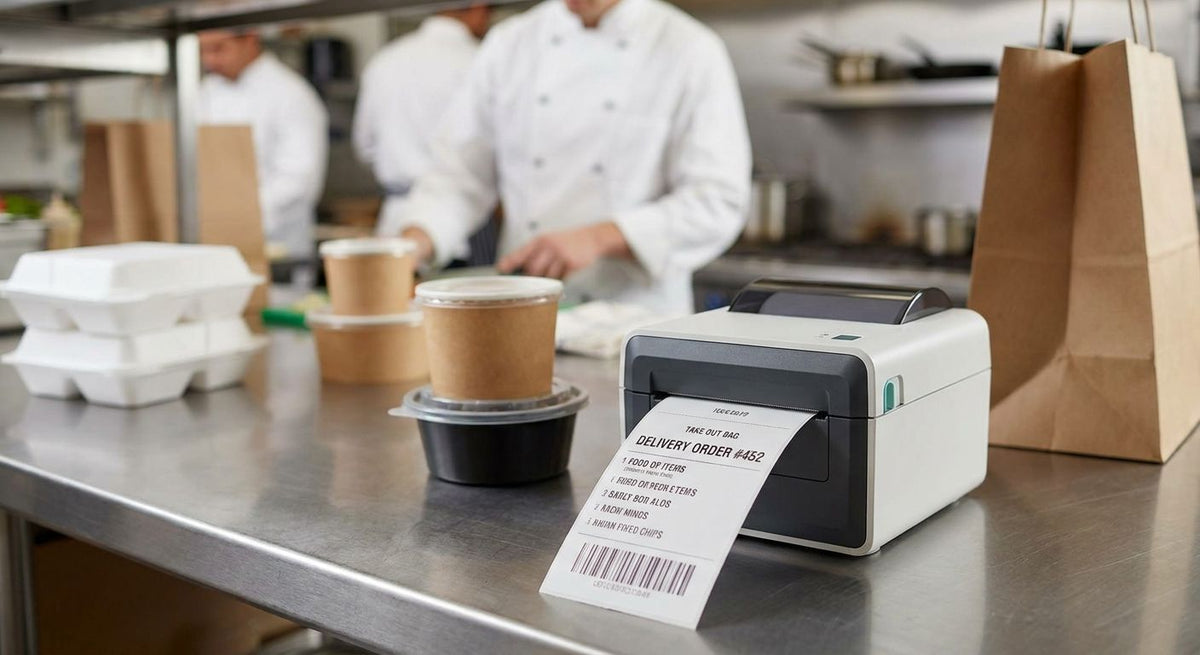
Restaurant delivery order labels need a thermal label printer that survives a dinner rush without jamming, smudging under grease, or running dry of ribbon halfway through a shift in 2026. A single-counter QSR and a five-location delivery brand don't need the same machine, and picking the wrong one costs more in reprints and delayed bags than the printer itself.
- The GoDEX DT200L direct thermal printer wins for single-counter restaurant delivery order labels in 2026 at $374.
- Direct thermal beats thermal transfer for one-time order tickets: no ribbon to swap mid-rush, lower cost per label.
- Multi-location delivery brands need a 300 DPI printer like the GoDEX ZX430i+ ($945) for sharper barcodes drivers scan.
- Match label width to your ticket format before buying: 2 inch linerless tickets print faster than 4x6 formats.
Why a thermal label printer matters for restaurant delivery orders
A restaurant running DoorDash, UberEats, and Grubhub next to dine-in and pickup prints far more labels per hour than a standalone retail counter. Every delivery order can need a kitchen ticket, a bag label for the driver printed on direct thermal labels, and a receipt-style slip the customer sees when the bag opens — three prints for one order instead of one.
That volume compounds fast during a Friday dinner rush, which is exactly when a slow or unreliable printer turns into the bottleneck a kitchen can least afford. A machine rated for light retail use, a few dozen labels an hour, stalls out the moment three delivery apps stack tickets on the same line.
The other difference is the environment. A restaurant kitchen runs hotter, greasier, and steamier than a boutique counter or a warehouse shelf, and a printer built for a quiet office desk rarely survives six months next to a fryer station.
1. Count your peak-hour order volume
Before comparing printers, know your number. Grab a tally sheet for one full dinner rush and count every ticket the kitchen prints during the busiest single hour, tracked separately from any labels a delivery app tablet already prints on its own.
- Track ticket counts by hour for at least one full weekend of service, not a single night
- Separate dine-in and pickup tickets from DoorDash, UberEats, and Grubhub order labels, since some platforms print both a kitchen ticket and a driver bag label
- Add walk-in and phone-order labels to the same count if one printer will handle all of it
- Multiply your busiest single hour by two to leave room for holiday spikes and marketing pushes
- Note whether any ticket needs a barcode or QR code a driver or customer scans at pickup
2. Decide between direct thermal and thermal transfer for your ticket type
Direct thermal labels darken under a heated printhead with no ribbon involved: cheaper per label, faster to print, simpler to restock. Thermal transfer runs a ribbon between the printhead and the label, which costs more per print but resists grease, heat, and sunlight far longer.
- Choose direct thermal for order tickets and bag labels read once and thrown away — most restaurant delivery labels fall here
- Choose thermal transfer only for labels that need to survive months of handling, like durable ingredient or allergen tags on reusable containers
- Factor in ribbon cost and changeover time if you go thermal transfer; a ribbon swap mid-rush costs minutes you don't have
- Read the full comparison in direct thermal vs thermal transfer before locking in a printer type
- Confirm your delivery-app labels don't need heat resistance beyond a normal kitchen counter — most don't
3. Match printer speed and resolution to your ticket format
Ticket width and print speed matter more than any spec sheet claim. A 2 inch linerless printer clears small order tickets fast with zero liner waste; a 4 inch printer handles wider bag labels or shipping-style formats.
- For 2 inch tickets, a linerless direct thermal printer like the GoDEX DT200L eliminates the liner that has to be peeled and thrown away, speeding up backline printing
- For wider 4x6 delivery bag labels, look at a 4 inch 203 DPI printer such as the GoDEX RT200i
- 203 DPI is sharp enough for text and standard barcodes; step up to 300 DPI only if drivers scan small QR codes with a phone camera
- Check the printer's inches-per-second rating against your peak-hour count from step one — anything slow bottlenecks a busy line
- Confirm the connection type (USB, serial, Ethernet) matches your POS terminal before ordering


4. Protect the printer from kitchen heat, grease, and steam
Placement decides how long a printer lasts near a cook line. Keep it clear of steam tables and fryer splash, and build a light cleaning habit into the shift routine.
- Mount the printer at least a few feet from steam vents, fryer stations, and wash sinks
- Wipe the printhead weekly with isopropyl alcohol to clear the grease film that causes streaked or faded prints
- Use a splash-resistant enclosure or cover near any wet station
- Keep a spare printhead on hand if the kitchen can't absorb downtime during a rush
- Check label rolls for grease contamination before loading — a dirty roll transfers residue straight to the printhead
5. Integrate the printer with your POS and delivery-app queue
A printer is only as useful as the queue feeding it. Confirm before go-live that every order source, dine-in POS, DoorDash, UberEats, Grubhub, routes to the same print station without manual re-entry.
- Confirm the printer's connection (USB, serial, Ethernet) matches what your POS terminal supports
- Route delivery-app tickets to the same print queue as in-house orders wherever your POS allows it
- Test full ticket formatting (order number, items, allergens, platform name) before a live shift
- Keep a manual order pad on hand for the first week in case of a connectivity hiccup
- Confirm printer drivers are current; outdated drivers are a common cause of garbled prints after a POS update
6. Plan for label and ribbon restocking
Running out of labels mid-rush is a worse failure than a slow printer. Track usage against your peak-volume number from step one and order ahead of it.
- Track weekly label roll usage against your busiest-hour count
- Order label stock at least two weeks ahead of a known busy period
- If running thermal transfer, keep at least one spare ribbon roll on-site at all times
- Standardize on one label size across stations to simplify ordering and cut SKU confusion
- Buy printer and label rolls from one supplier to remove compatibility guesswork
Printer options for restaurant delivery order labels
| Printer | Best for | Starting price | Key limitation |
|---|---|---|---|
| GoDEX DT200L (2 inch linerless, 203 DPI) | Single-counter QSR printing small order tickets | $374 | 2 inch width caps label size for wider bag formats |
| GoDEX RT200i (203 DPI) | Standard-volume restaurants needing 4 inch ticket or bag labels | Check current pricing | 203 DPI limits clarity on very small QR codes |
| GoDEX ZX430i+ (300 DPI, color display) | Multi-location delivery brands needing sharper barcodes and status at a glance | $945 | Higher cost than a single-counter operation needs |
| GoDEX GE330 (thermal transfer, 203 DPI) | Kitchens that also print durable, grease-resistant ingredient tags | Check current pricing | Requires ribbon, adding a consumable and changeover step |
The GoDEX DT200L wins for single-location restaurant delivery order labels in 2026: Buy it if you're running one counter and printing 2 inch tickets. The GoDEX ZX430i+ wins for multi-location delivery brands: Buy it if you need 300 DPI clarity on driver-scanned barcodes across stores. GoDEX RT200i: Buy for standard-volume single-location kitchens needing 4 inch labels. GoDEX GE330: Skip it unless you also print durable ingredient tags that need to survive grease and months of handling.
“If a printer can't clear a normal print speed, it becomes the bottleneck on a Friday night rush, not the fix for one.”
Common mistakes restaurants make with delivery order labels
- Buying a 300+ DPI industrial printer for one counter. Most order tickets need 203 DPI at most; the extra resolution and cost buy nothing for a single dine-in-plus-delivery location.
- Running delivery-app tickets and kitchen tickets through separate printers. Splitting the workflow doubles the chance a bag goes out with the wrong label attached.
- Skipping the printhead cleaning schedule. Grease film builds up fast in a working kitchen, and streaked prints usually show up mid-rush, not during a slow Tuesday lunch.
- Choosing thermal transfer ribbon for one-time order tickets. Ribbon adds real per-label cost for slips that get thrown away within minutes of printing.
- Not stocking a backup label roll before a holiday weekend. A stockout during a Friday dinner rush costs more in refunds and delayed orders than ordering two weeks early ever would.
FAQ
What's the best thermal label printer for restaurant delivery orders in 2026?
The GoDEX DT200L is the best thermal label printer for single-counter restaurant delivery orders in 2026 at $374. Multi-location brands printing higher volumes should look at a 300 DPI printer like the GoDEX ZX430i+ instead.
Is direct thermal or thermal transfer better for restaurant order tickets?
Direct thermal is better for restaurant order tickets because it needs no ribbon and costs less per label. Thermal transfer only makes sense for durable ingredient or allergen tags meant to last months.
How much does a thermal label printer for restaurants cost?
A direct thermal printer built for restaurant use, like the GoDEX DT200L, starts around $374 in 2026. Higher-resolution, multi-location printers like the GoDEX ZX430i+ run closer to $945.
Can one printer handle DoorDash, UberEats, and Grubhub tickets together?
Yes, one printer can handle DoorDash, UberEats, and Grubhub tickets together if it's routed through the same POS print queue. Confirm the printer's connection type matches your POS terminal before going live.
What label size do restaurants use for delivery orders?
Most restaurants use 2 inch tickets for kitchen order slips and 4x6 labels for delivery bag tags. The right size depends on whether the label needs to carry a barcode or QR code for driver scanning.
How fast does a restaurant delivery order label printer need to print?
The printer needs to clear your busiest single hour of tickets without a backlog, which for most single-location restaurants means a standard 203 DPI direct thermal printer. Track your peak-hour ticket count first, then match printer speed to that number.
Do restaurant delivery labels need a QR code?
Not always, but a QR code helps when drivers or customers need to scan for order verification or tracking. If you add one, a 300 DPI printer prints it sharper than a 203 DPI model.
How do I stop a thermal printer from jamming during a rush?
Clean the printhead weekly with isopropyl alcohol and keep the printer away from steam and grease sources. Loading label rolls straight from a clean, sealed pack also cuts jams caused by debris on the roll.
One last thing
Most restaurants overbuy resolution and underbuy backup hardware. A second $374 GoDEX DT200L sitting in a drawer costs less than one lost Friday night of delayed orders when the primary printhead finally gives out mid-rush in 2026.