
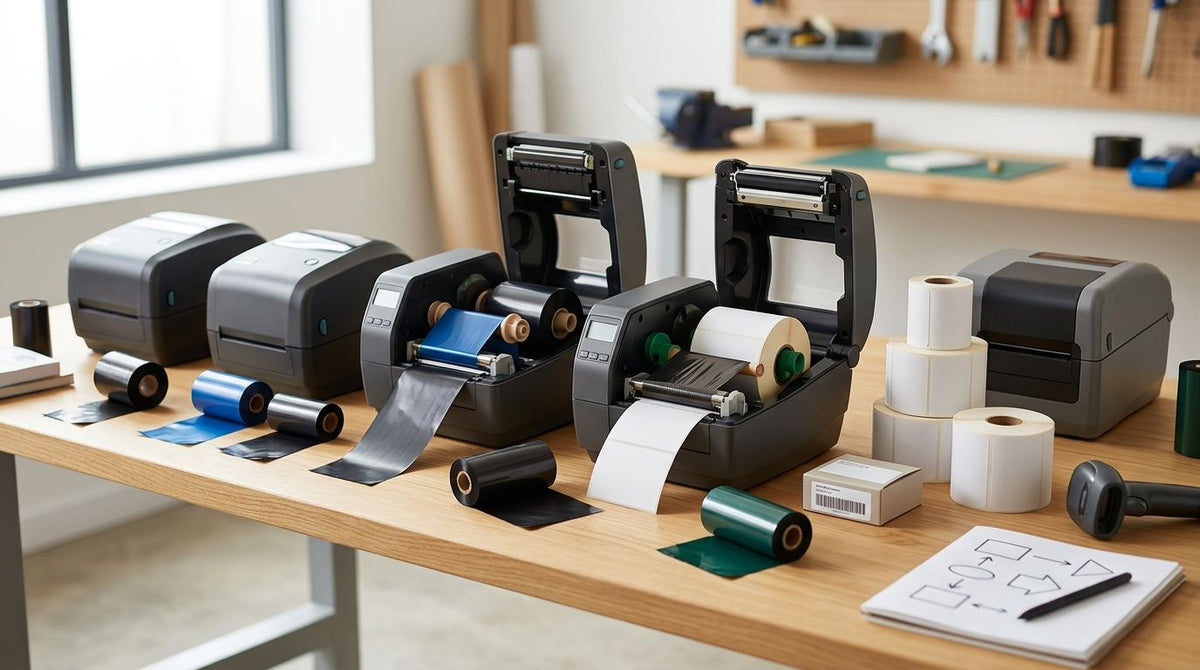
Best overall for thermal transfer printer ribbon compatibility in 2026: the GoDEX RT700i+. Best for resin-ribbon work on synthetic and metalized stock: the GoDEX ZX430i+. Best for 600 DPI fine-detail ribbon printing: the GoDEX RT863i+.
- GoDEX RT700i+ wins thermal transfer printer ribbon compatibility overall: dual thermal, wax and wax-resin ribbon, 203 DPI.
- GoDEX ZX430i+ is the pick for resin ribbon on polyester and metalized asset tags at 300 DPI.
- GoDEX RT863i+ covers 600 DPI ribbon printing for micro-barcodes and serial text.
- GoDEX EZ6350i handles wide 6-inch ribbon runs; the Plant Label Printer 203 DPI is the RT700i+ engine tuned for nursery tags.
- Ribbon chemistry, not the printer brand, decides whether a label prints clean or smears.
Why this matters
A thermal transfer printer is only as good as the ribbon it can run. Feed a 600 DPI head a wax ribbon built for a 203 DPI machine and the print smears once the ribbon starts backing off the platen roller unevenly — the printer isn't broken, the ribbon just doesn't match the head.
Ribbon compatibility comes down to three variables locked together: the printhead's resolution, the ribbon's chemistry, and the print width the head physically supports. McAuley Labels stocks the GoDEX lineup because each model ties those three together instead of leaving buyers to guess which ribbon grade a given DPI actually needs.
This ranking sorts five GoDEX thermal transfer printers by which ribbon jobs each one is built to run in 2026, not by price and not by brand loyalty. Every model here is dual thermal, meaning it can also run direct thermal labels with no ribbon at all when a job doesn't call for one.
Ribbon types explained: wax, wax-resin, and resin
Wax ribbon is the cheapest option and prints fine on uncoated paper labels — think shipping labels and basic inventory tags. Wax-resin splits the difference: it holds up on coated or semi-gloss stock and resists light smudging better than wax alone.
Resin ribbon is the durable end of the spectrum. It's what a polyester or metalized silver asset tag needs to survive outdoor exposure, chemical contact, or years on a piece of equipment. Running resin ribbon on a 203 DPI head wastes its durability; running wax ribbon on a 600 DPI head wastes the head's resolution. Matching chemistry to resolution is the single biggest factor in thermal transfer printer ribbon compatibility.
What makes a thermal transfer printer ribbon-compatible
- Ribbon chemistry match — wax ribbons work on paper labels, wax-resin on coated stock, resin on polyester and metalized film.
- Resolution vs. ribbon grade — 203 DPI heads run wax ribbon fine; 300-600 DPI heads need finer resin or wax-resin stock to justify the extra detail.
- Print width and ribbon core fit — 4-inch heads and 6-inch heads take different ribbon roll widths; mismatched cores jam the ribbon path.
- Dual thermal switching — a printer that runs both direct thermal and thermal transfer without a hardware swap saves a second machine on the floor.
- Interface and onboard calibration — USB, Serial, and Ethernet ports paired with a color display make ribbon sensor calibration a five-minute job instead of a support call.
- Printhead warranty — ribbon friction wears the printhead first; a 3-year warranty on that part matters more than one on the chassis alone.
Thermal transfer printers ranked by ribbon compatibility: at a glance
| Printer | Best for | Standout feature | Key limitation |
|---|---|---|---|
| GoDEX RT700i+ | General ribbon compatibility across asset and inventory labels | Dual thermal engine runs wax or wax-resin ribbon at 203 DPI | Not fine enough for sub-millimeter serial text |
| GoDEX ZX430i+ | Resin-ribbon work on synthetic and metalized stock | 300 DPI dual thermal head with color display | Resin ribbon costs more per label than wax |
| GoDEX RT863i+ | 600 DPI fine-detail ribbon printing | Highest resolution in the GoDEX ribbon-capable lineup | Overkill for standard 4x6 shipping labels |
| GoDEX EZ6350i | Wide-format 6-inch ribbon runs | 6-inch dual thermal head at 300 DPI | Needs more bench space than 4-inch models |
| Plant Label Printer 203 DPI | Nursery and greenhouse tag printing | Same RT700i+ dual thermal engine, tuned for tag stock | Plant tag stock is currently unavailable |
1. GoDEX RT700i+: best thermal transfer printer for general ribbon compatibility
The GoDEX RT700i+ is a 4-inch dual thermal printer running at 203 DPI with a color display. Dual thermal means it switches between direct thermal (no ribbon) and thermal transfer (wax or wax-resin ribbon) without swapping hardware, which is what makes it the default pick for mixed label runs — inventory tags one day, plain shipping labels the next.
GoDEX RT700i+ pros:
- Runs wax and wax-resin ribbon without a printhead swap
- Color display simplifies ribbon and gap sensor calibration
- USB, Serial, and Ethernet cover most warehouse network setups
GoDEX RT700i+ cons:
- 203 DPI is soft for tiny barcodes or dense serial text
- Dual thermal mode still means keeping ribbon stock on hand for the transfer side
Best for: general asset tags, inventory labels, and warehouse barcodes.
Verdict: Buy.
2. GoDEX ZX430i+: best for resin-ribbon compatibility on synthetic labels
The GoDEX ZX430i+ steps up to 300 DPI on the same dual thermal architecture, with a color display and the same USB/Serial/Ethernet spread as the RT700i+. The extra resolution is what makes resin ribbon worth running — resin holds up on polyester and metalized silver stock where wax and wax-resin ribbons scuff or fade.
GoDEX ZX430i+ pros:
- 300 DPI resolves fine text and small barcodes resin ribbon is built for
- Dual thermal switching still available for direct thermal jobs
- Color display keeps calibration on-screen instead of in a manual
GoDEX ZX430i+ cons:
- Resin ribbon runs through faster per label than wax stock
- Not the pick if most of the label run is plain paper tags
Best for: metalized and polyester asset tags that need resin ribbon durability.
Verdict: Buy.
3. GoDEX RT863i+: best for 600 DPI fine-detail ribbon printing
The GoDEX RT863i+ is the highest-resolution model in this ranking at 600 DPI, still built on the same dual thermal engine as the rest of the lineup. At that resolution, ribbon becomes the limiting factor rather than the printhead — resin ribbon is close to mandatory for a clean print at 600 DPI on small labels. For a closer look at ribbon selection on this model, see the GoDEX RT863i+ industrial label guide.
GoDEX RT863i+ pros:
- 600 DPI resolves micro-barcodes and small serial numbers other GoDEX models can't
- Dual thermal engine still handles direct thermal for simple jobs
- 3-year warranty covers the printhead most likely to wear from ribbon friction
GoDEX RT863i+ cons:
- Resolution this high is wasted on standard 4x6 shipping labels
- Costs more to run than a 203 DPI printer for the same label volume
Best for: lab specimen labels, electronics serial tags, and micro-barcode work.
Verdict: Buy for fine-detail work, skip for standard shipping labels.
4. GoDEX EZ6350i: best for wide-format 6-inch ribbon runs
The GoDEX EZ6350i is a 6-inch dual thermal printer at 300 DPI, built for label widths the 4-inch GoDEX models can't touch. Ribbon compatibility here means a wider ribbon roll and a wider platen, not a different chemistry — the same wax, wax-resin, and resin options apply, just in a 6-inch format.
GoDEX EZ6350i pros:
- 6-inch print width covers pallet labels and wide compliance tags
- 300 DPI dual thermal engine matches the ZX430i+ on resolution
- 3-year warranty standard across the GoDEX lineup
GoDEX EZ6350i cons:
- Larger footprint than any 4-inch model on this list
- Overkill if every label on the floor is 4 inches or narrower
Best for: pallet labels, wide compliance tags, and shipping labels over 4 inches.
Verdict: Hold unless label width already exceeds 4 inches.
5. Plant Label Printer 203 DPI: best for nursery and greenhouse tag ribbon printing
The Plant Label Printer 203 DPI is the GoDEX RT700i+ engine repackaged and tuned for nursery and greenhouse tag stock, running the same dual thermal, 203 DPI setup as the general-purpose RT700i+. Ribbon compatibility doesn't change from the base model — the difference is the tag material it's calibrated to run.
Plant Label Printer pros:
- Same wax and wax-resin ribbon compatibility as the RT700i+
- 203 DPI dual thermal engine already proven on general labels
- Calibrated out of the box for nursery tag stock
Plant Label Printer cons:
- Plant tag stock is currently unavailable
- No resolution advantage over the standard RT700i+ for buyers who don't need tag-specific calibration
Best for: nurseries and greenhouses printing plant and tree tags.
Verdict: Wait until plant tag stock is back in stock.


How this ranking works
Each printer above is scored against the six criteria listed earlier: ribbon chemistry support, resolution-to-ribbon match, print width and core fit, dual thermal switching, interface and calibration, and printhead warranty. The GoDEX RT700i+ tops the list because it clears all six for the widest range of everyday labeling jobs without forcing a resin ribbon buyers don't need. The other four models earn their spot by covering a use case the RT700i+ doesn't: finer resolution, wider format, or tag-specific calibration.
None of the five models loses points for price in this ranking — ribbon compatibility and price are separate decisions, and mixing them hides which printer actually fits the label job in front of you.
Which thermal transfer printer should you choose?
If you're not sure where to start, buy the GoDEX RT700i+. It runs wax and wax-resin ribbon at 203 DPI, switches to direct thermal when a job doesn't need ribbon at all, and covers the label types most warehouses and shops print day to day in 2026.
Step up to the GoDEX ZX430i+ the moment a label needs to survive outdoors or on metal — that's a resin ribbon job, and 300 DPI is what makes resin worth running. Reach for the GoDEX RT863i+ only when a barcode or serial number is small enough that 203 or 300 DPI starts to blur. Anyone printing labels wider than 4 inches lands on the GoDEX EZ6350i, and nurseries printing plant tags wait on stock before ordering the Plant Label Printer.
FAQ
What is thermal transfer printer ribbon compatibility?
It's whether a printer's resolution and print width match the ribbon chemistry (wax, wax-resin, or resin) a label job requires. A 600 DPI head needs resin-grade ribbon to justify its detail; a 203 DPI head runs fine on wax.
Which GoDEX printer supports resin ribbon best?
The GoDEX ZX430i+ at 300 DPI is built for resin ribbon on polyester and metalized labels. The GoDEX RT863i+ at 600 DPI supports it too, for finer detail work.
Can I run resin ribbon in a 203 DPI printer like the RT700i+?
Yes, but the extra durability of resin ribbon is wasted at 203 DPI. Wax or wax-resin ribbon is the better match for that resolution.
What's the difference between direct thermal and thermal transfer for ribbon needs?
Direct thermal uses heat-sensitive paper and needs no ribbon at all. Thermal transfer needs a ribbon matched to the label stock, which is why dual thermal printers like the GoDEX RT700i+ can do both.
Do all GoDEX printers use the same ribbon width?
No. 4-inch models like the RT700i+, ZX430i+, and RT863i+ take 4-inch ribbon rolls, while the GoDEX EZ6350i takes a 6-inch roll for its wider print head.
Is 600 DPI worth it for standard barcode labels?
Usually not. 600 DPI on the GoDEX RT863i+ is built for micro-barcodes and small serial text; standard 4x6 shipping labels print fine at 203 DPI.
What happens if ribbon width doesn't match the printer's rated width?
The ribbon can jam the feed path or wrinkle mid-print. Ribbon width should always be checked against the printer's rated print width before ordering a case.
Is the Plant Label Printer different from the GoDEX RT700i+ on ribbon compatibility?
No. It runs the same dual thermal, 203 DPI engine and the same wax and wax-resin ribbon range as the RT700i+, just calibrated for nursery tag stock.
One last thing
Ribbon compatibility problems almost never trace back to the printer itself — they trace back to a ribbon width or core diameter that doesn't match the print head. Check ribbon width against the printer's rated print width before ordering a case, not after the first jam.