
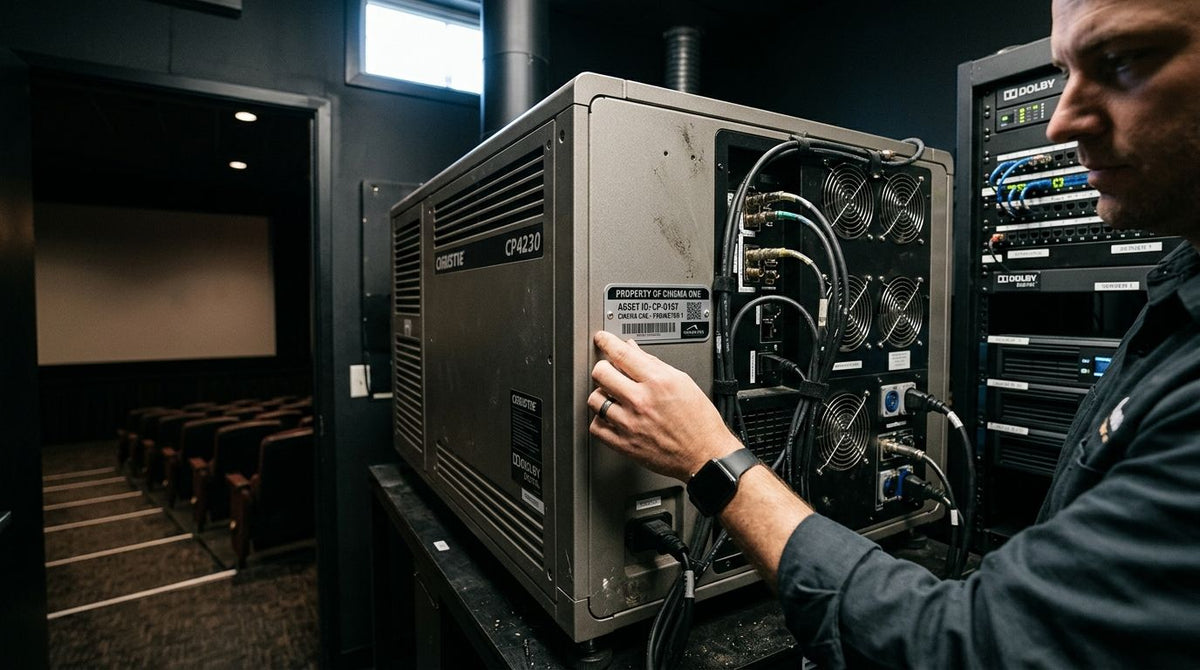
Movie theater and cinema equipment asset tags are barcoded or QR-coded labels applied to projectors, sound processors, concession machines, and box office hardware so multiplex staff can track location, service history, and depreciation across every auditorium without a walkthrough. Cinema equipment sits in dark rooms, runs hot for hours at a stretch, and often repeats the same make and model six or eight times per building, so the tagging system has to solve for identical units and near-zero light more than a typical office or warehouse does.
- Metalized silver barcode asset tags handle multiplex handling and humidity - verdict for 2026 cinema tagging is buy.
- 3M heavy-duty silver tags survive projector booth heat above 120°F where standard barcode labels degrade within months.
- QR code asset tags scan with a phone flashlight in dark auditoriums where handheld barcode readers struggle.
- A GoDEX GE300 desktop printer at 203 DPI lets multiplexes print tags in-house instead of reordering pre-numbered rolls.
- Tag box office cash-handling equipment separately from projection gear - most theaters skip this and lose the audit trail.
Why asset tags for movie theater and cinema equipment matter
A twelve-screen multiplex can run twelve identical digital projectors and twelve identical sound processors, all installed the same week. Without a serialized metalized silver barcode asset tags on each unit, a work order for "Auditorium 7 projector" is only as reliable as whoever remembers which box that actually is.
Outside AV integrators service most cinema equipment on rotation, not full-time staff, and they need proof of which unit they touched last and when. A tagged asset gives them a scan and a service log instead of a guess. That matters more in 2026 as digital projection servers, laser light engines, and networked sound processors replace older analog gear at a pace that outstrips most theaters' spreadsheets.
How to tag movie theater and cinema equipment
Audit your equipment inventory by auditorium, not by category
Walk each screen room and the booth before ordering a single tag. A category-only list misses which specific unit sits where when three auditoriums run the same projector model.
- Digital projectors and lamp or laser modules
- Sound processors and amplifier racks
- Screen and masking motors
- Concession machines: poppers, warmers, soda fountains
- Box office POS terminals and cash-handling equipment
- Booth HVAC and dehumidification units
Match the tag material to booth heat and concession grease
A standard barcode label built for an office copier will not survive a projection booth. 3M heavy-duty silver barcode tags are built for equipment that runs hot for hours at a time, which is most of what sits in a booth.
- Metalized silver polyester for general auditorium equipment and frequent handling
- 3M heavy-duty stock for anything mounted inside a projector booth running above 120°F
- Semi-gloss white for box office and admin equipment kept away from butter and grease
- Thermal transfer printing over direct thermal so text and barcodes don't fade under booth heat
- A test batch on one auditorium before ordering for the whole circuit
Standardize ID numbers so no two auditoriums share a code
A numbering scheme that reads "Auditorium-Equipment Class-Sequence" avoids the single most common failure in multi-screen tagging: two identical projectors with the same visible ID.
- Auditorium number as the first segment (07 for screen 7)
- Equipment class code (PROJ, SND, CONC, POS)
- A sequential unit number, never reused after equipment retires
- A separate database field for install date and vendor, not printed on the tag itself
- A master spreadsheet or asset system that mirrors the physical numbering exactly
Choose barcode or QR based on how staff actually scan in the dark
A handheld barcode scanner needs a clean line of sight and steady light, both in short supply in a dimmed auditorium. QR code asset tags for equipment read at an angle with a phone's camera and flashlight, which is why more multiplexes standardized on QR through 2026.
- QR for staff scanning with personal or shared smartphones
- Traditional barcode for high-volume box office or storeroom counts with a dedicated scanner
- A hybrid tag with both formats for equipment shared between projection and concession teams
- A scanning app that logs the timestamp and staff ID automatically, not just the asset number
Print tags in-house or order pre-numbered rolls
Single-location theaters usually come out ahead printing their own tags. Chains tagging several properties at once tend to order pre-serialized rolls to keep numbering consistent across sites without manual tracking.


Apply tags to the surface that survives handling, not just the surface that's easy
Where a tag sits matters as much as what it's made of. A tag on a projector's side panel gets bumped during filter changes; a tag near the lens or lamp housing bakes.
- Rear or top panel on projectors, away from the lamp and lens housing
- Front rack ear on sound processors and amplifiers
- Underside or rear plate on POS terminals, away from customer-facing surfaces
- Stainless housing low-heat zone on concession machines, never near the heating element
- Interior motor housing (not the visible masking track) for screen and masking motors
Build a scan-in/scan-out workflow staff and outside vendors actually use
A tag only pays off if someone scans it. Require AV vendors and internal techs to scan the asset before opening a service ticket, the same discipline covered in guidance on AV equipment asset tags for shared conference-room and booth gear.
- A scan-in requirement before any work order opens
- A scan-out log when equipment moves between auditoriums or leaves for repair
- Vendor sign-off tied to the asset ID, not just the auditorium number
- Shift-change reconciliation for shared equipment like handheld radios or POS scanners
Schedule audits during dark hours and reconcile cash-handling gear separately
Run the physical audit while the theater is closed and every auditorium is dark and empty - it's the only window where nothing gets missed behind a closed curtain. Box office cash-handling equipment needs its own reconciliation pass, since it carries a security requirement the projection booth doesn't: the same logic that governs choosing secure cash drop safes for daily deposits applies to deciding which box office units get treated as high-security assets versus routine inventory.
- A quarterly full-building audit, minimum
- An extra audit after any renovation, screen replacement, or seating overhaul
- A separate reconciliation cycle for cash-handling and safe hardware
- Cross-checks between the physical tag count and the digital asset register
Comparing tag options for cinema equipment
| Option | Best for | Key limitation |
|---|---|---|
| Metalized Silver Barcode Asset Tags | General auditorium equipment and frequent handling | Barcode needs a clean line-of-sight scan |
| 3M Heavy-Duty Silver Barcode Tags | Projector booths and other high-heat equipment | Costs more per tag than standard silver stock |
| Custom QR Code Asset Tags (Heavy-Duty Metalized) | Multi-vendor AV service tracking via smartphone | Staff need a QR-reading app, not just any scanner |
| Semi-Gloss White ID/Barcode Tags | Box office, office, and admin equipment away from grease | Adhesive underperforms near concession heat and moisture |
| Custom bulk order | Chains tagging ten or more screens in one pass | Turnaround runs longer than an off-the-shelf roll |
Verdict: metalized silver for general equipment, 3M heavy-duty for the booth, and QR for anything a smartphone-carrying vendor will scan. That split covers nearly every multiplex layout without over-tagging low-risk equipment.
Common mistakes theaters make tagging cinema equipment
- Tagging projectors but skipping box office cash-handling gear - this leaves the highest-risk equipment in the building with no audit trail at all.
- Relying on a handheld barcode scanner as the only scan method - it fails in near-zero light auditoriums where a phone camera works fine.
- Placing tags where butter, cleaning solvent, or condensation hits them - grease breaks down adhesive faster than booth heat does.
- Never retagging after a seating or screen renovation - the asset registry drifts from what's actually installed within one remodel cycle.
- Auditing once a year instead of quarterly - by the time missing or damaged equipment turns up, the paper trail is months stale.
FAQ
What's the best asset tag material for movie theater equipment?
Metalized silver barcode tags handle general auditorium equipment, but 3M heavy-duty silver tags are the better call for anything mounted inside a projector booth, where heat regularly runs above 120°F. Semi-gloss white tags work fine on office and box office gear kept away from concession grease.
Do cinema chains need QR code or barcode asset tags?
QR code asset tags scan faster in dark auditoriums because a phone's flashlight and camera read them at odd angles, while handheld barcode scanners often need a clean line of sight. Multiplexes running mixed AV vendor fleets tend to standardize on QR for that reason.
How hot does it get inside a digital projector booth?
Projector booths commonly run above 120°F during a full day of screenings, warm enough to soften standard paper-based barcode labels within months. 3M heavy-duty polyester tags are built to survive that heat cycle for years, not weeks.
What equipment in a movie theater actually needs an asset tag?
Tag digital projectors, sound processors, screen and masking motors, concession machines, POS terminals, box office cash-handling equipment, and booth HVAC units. Anything serviced by an outside vendor or moved between auditoriums during a renovation belongs on the list.
How often should a multiplex re-audit its asset tags?
Run a full physical audit once a quarter, ideally during closed hours when auditoriums are dark and empty. Renovations, screen replacements, and seating overhauls all call for an extra audit outside the normal schedule.
Can one printer handle asset tags plus general label jobs?
A 203 DPI desktop unit like the GoDEX GE300 prints asset tags plus general barcode labels without swapping hardware, which covers most single-location theaters. Chains printing above a few thousand tags a month usually step up to a 300 DPI model for finer barcode detail.
Is a barcode scanner or a smartphone better for scanning cinema tags?
A smartphone camera is usually the more practical choice in a movie theater because staff already carry one and it works in low light without a dedicated scanner. Dedicated barcode scanners still make sense for high-volume box office or storeroom counts.
One last thing
Most theaters tag the projector and skip the masking motor six feet away, treating it as "building equipment" rather than AV gear. It gets serviced by the same rotating vendor list as the projector and sound rack, and it fails just as often during a busy 2026 release schedule - tag it the same way, with the same class code, or it stays invisible to every audit until it breaks mid-show.