
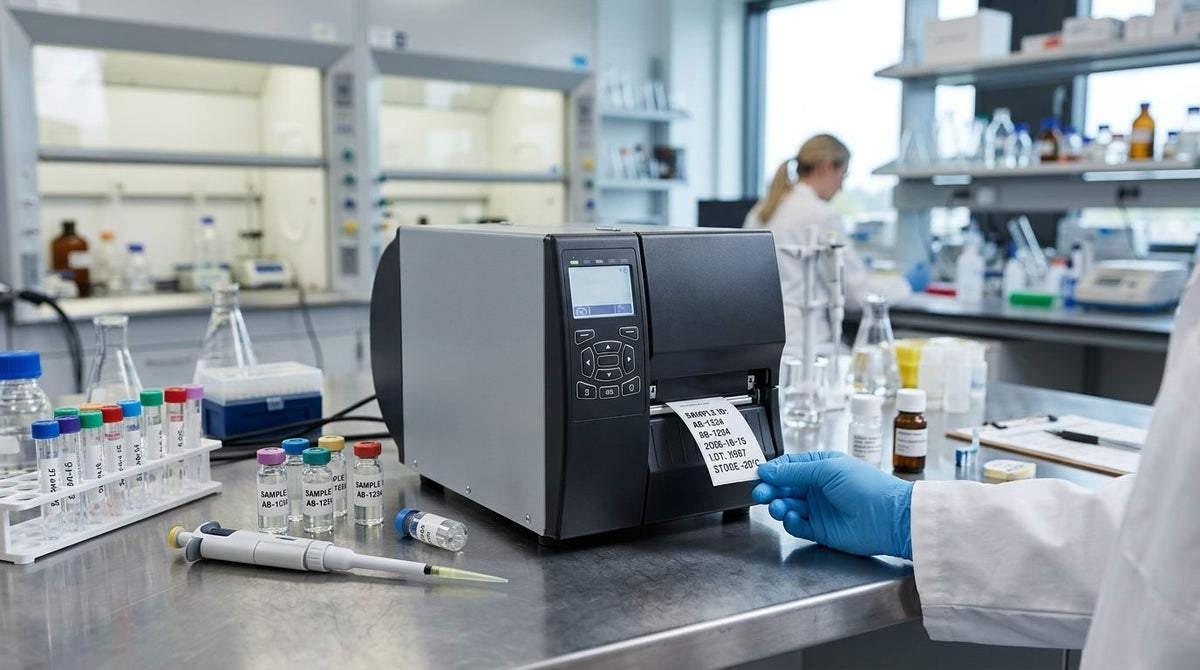
Lab benches don't need the flashiest printer on the market - they need one that survives cold storage, prints a barcode small enough for a 12mm tube, and doesn't die mid-batch. Best overall lab label printer: GoDEX RT700i+. Best for small-tube barcodes: GoDEX ZX430i+. Best budget lab label printer: GoDEX RT200i. This guide ranks five GoDEX printers carried by McAuley Labels from entry-level to industrial-grade, and names a default pick for the reader who just wants an answer. Because online pricing shifts, exact figures for each model sit in the product cards further down the page rather than in the text.
- GoDEX RT700i+ is the best overall lab label printer in 2026: 203 DPI, dual thermal, color display, 3-year warranty.
- GoDEX ZX430i+ steps up to 300 DPI for barcodes that have to fit on small tubes and vials.
- GoDEX RT200i is the budget lab label printer pick for labs printing fewer than a few hundred labels a day.
- GoDEX GE330 is thermal transfer only, built for ribbon-backed labels that survive freezer and solvent exposure.
- GoDEX G530 is the network pick for labs sharing one printer across multiple stations.
Why This Matters
A lab label printer is judged on three things: can the barcode still scan after a freezer cycle, does it fit the tube or vial you're actually labeling, and does it survive daily use without a service call. McAuley Labels sells the GoDEX line specifically because these three questions have different answers depending on resolution and thermal technology, not brand loyalty.
Picking the wrong lab label printer in 2026 usually isn't about the machine failing outright - it's about a 203 DPI printer being asked to print barcode density it was never built for, or a direct-thermal label fading two weeks into cold storage. Get the resolution and thermal type right first; everything else is a convenience feature.
What Makes the Best Lab Label Printer
- Print resolution (203 vs. 300 DPI) - determines whether a barcode stays scannable on a narrow tube or vial surface.
- Direct thermal vs. thermal transfer - direct thermal skips the ribbon but fades faster under heat or light; thermal transfer costs a consumable but resists solvents and cold storage.
- Connectivity - USB, serial, and Ethernet support decide whether the printer drops into an existing lab network or sits isolated on one bench.
- Footprint - bench space in a lab is tighter than a warehouse floor, so desktop dimensions matter more than they would in a shipping room.
- Warranty and duty cycle - a printer rated for continuous runs holds up differently than one built for occasional batches.
- Network readiness - shared lab spaces need one printer serving several workstations, not one printer per bench.
Lab Label Printers at a Glance
| Printer | Best for | Standout feature | Key limitation |
|---|---|---|---|
| GoDEX RT200i | Low-volume labs | Entry point in the 203 DPI class | Not built for continuous, high-volume runs |
| GoDEX RT700i+ | Daily specimen labeling | Dual thermal engine plus color display | 203 DPI ceiling on fine barcode detail |
| GoDEX ZX430i+ | Small tube and vial barcodes | 300 DPI on the same dual thermal frame | Overkill for large bags or shelf labels |
| GoDEX GE330 | High-volume batch labeling | Thermal transfer only, ribbon-backed durability | No direct thermal fallback |
| GoDEX G530 | Shared, multi-station labs | Network deployment across workstations | One printer, one bottleneck if it jams |
1. GoDEX RT200i: Best Budget Lab Label Printer for Low-Volume Labs
GoDEX RT200i is the entry point in the 203 DPI class, built for labs printing specimen or sample labels in small daily batches rather than around-the-clock production. It handles standard barcode and text labels sharply enough for tube caps, specimen bags, and shelf labels wider than roughly half an inch.
GoDEX RT200i pros:
- Lowest-tier entry into the same 203 DPI family as the higher-end RT series
- Compact desktop footprint for a single bench
- Simple enough setup that one technician can run it without IT support
GoDEX RT200i cons:
- 203 DPI starts to look coarse once barcodes shrink onto narrow tube diameters
- Built for occasional runs, not continuous production
Best for: labs printing fewer than a few hundred specimen labels a day. Verdict: Buy - if your lab is small and you don't need barcode density headroom yet.
2. GoDEX RT700i+: Best Overall Lab Label Printer for Daily Specimen Labeling
GoDEX RT700i+ is a 4-inch dual thermal printer running at 203 DPI, meaning it prints either direct thermal labels or ribbon-backed thermal transfer labels without swapping the print engine. It ships with a color display for checking job status at a glance, and it carries the same 3-year warranty as the rest of the GoDEX lineup McAuley Labels sells.
GoDEX RT700i+ pros:
- Dual thermal engine covers both disposable and durable label needs on one machine
- Color display and USB/serial/Ethernet connectivity fit into an existing lab network
- 3-year warranty matches a lab's daily-use duty cycle
GoDEX RT700i+ cons:
- 203 DPI ceiling means fine barcode text on very small tubes still looks coarse
- Thermal-transfer mode requires ribbon as an added consumable
Best for: labs needing one printer that handles both throwaway specimen bags and ribbon-backed durable labels. Verdict: Buy - the default lab label printer pick for most labs in 2026.
3. GoDEX ZX430i+: Best for High-Resolution Barcodes on Small Tubes and Vials
GoDEX ZX430i+ steps the resolution up to 300 DPI on the same 4-inch dual thermal frame as the RT700i+. That extra resolution is the difference that matters once labels shrink to fit a 12mm or 16mm test tube - a 300 DPI engine packs more dots into the same barcode width, so a Code 128 or 2D barcode stays scannable where a 203 DPI printer starts smearing at that scale.
GoDEX ZX430i+ pros:
- 300 DPI resolution built for small-surface barcode density
- Same dual thermal, color display, and 3-year warranty as the RT700i+
- USB/serial/Ethernet connectivity
GoDEX ZX430i+ cons:
- Higher resolution than large specimen bags or shelf labels actually need
- Still requires ribbon for the thermal-transfer side
Best for: labs labeling small-diameter tubes, vials, or slides where barcode density is tight. Verdict: Buy - if barcodes on your current printer are failing scans on small tubes.
4. GoDEX GE330: Best for High-Volume Batch Labeling With Ribbon-Backed Labels
GoDEX GE330 is a 4-inch, 203 DPI thermal transfer printer, meaning it always runs on ribbon rather than switching between direct thermal and transfer like the RT and ZX series. That ribbon dependency is an advantage in labs storing samples in solvent, cold storage, or freezer conditions, since thermal-transfer print resists smearing and fading far better than direct thermal ink pressed straight into the label stock.
GoDEX GE330 pros:
- Built specifically for ribbon-backed labels that need to survive harsh storage
- 203 DPI is enough resolution for standard barcode formats
- Fits a lab already running thermal-transfer consumables
GoDEX GE330 cons:
- No direct-thermal fallback, so running out of ribbon stops printing entirely
- Not the pick if you need 300 DPI for small tubes
Best for: labs archiving samples in freezer or solvent-exposed environments where durability outranks resolution. Verdict: Buy - for cold-storage or long-term specimen archives; skip it for everyday bench printing.
5. GoDEX G530: Best for Shared, Multi-Station Lab Printing
GoDEX G530 fits labs running more than one label station off a shared printer instead of a dedicated machine per bench. Rather than buying one printer per workstation, a lab routes print jobs from multiple computers to a single G530 over the network and lets it queue the backlog.
GoDEX G530 pros:
- Network-ready, so one printer serves several benches
- Cuts down the number of printers a facility has to calibrate and maintain
- Fits into an existing GoDEX fleet alongside RT or ZX models
GoDEX G530 cons:
- Shared access means one jam or backlog affects every station on the queue
- Not the fastest option for a single high-throughput bench
Best for: shared lab spaces, university departments, or multi-technician benches printing off a common queue. Verdict: Hold - only makes sense if your lab genuinely shares one printer across stations.


How We Ranked These Lab Label Printers
Each printer is judged against the criteria above: resolution against the smallest label surface it's likely to print, thermal type against storage conditions, connectivity against how the lab is networked, and warranty against duty cycle. The GoDEX RT200i and RT700i+ share the 203 DPI tier but split on connectivity depth and thermal versatility; the ZX430i+ earns its slot purely on resolution; the GE330 and G530 are ranked by the specific problem they solve rather than a general leaderboard position.
“A 203 DPI printer starts to smear once a barcode has to fit the width of a standard test tube - that's when 300 DPI stops being a nice-to-have.”
Which Lab Label Printer Should You Choose?
For most labs, the GoDEX RT700i+ is the right default in 2026 - it covers direct thermal and thermal transfer on one machine, which handles the majority of specimen and sample labeling without a second printer. Step up to the GoDEX ZX430i+ the moment your barcodes are on tubes or vials narrow enough that 203 DPI starts failing scans. If the lab is small and just getting its labeling system running, the GoDEX RT200i covers occasional batches without paying for capacity you won't use yet. Reserve the GoDEX GE330 for cold-storage or chemical-exposed archives, and the GoDEX G530 for labs that genuinely share one printer across multiple stations rather than running one per bench.
FAQ
What is the best lab label printer in 2026?
The GoDEX RT700i+ is the best overall lab label printer in 2026 for labs printing specimen and sample labels daily. It runs a 203 DPI dual thermal engine, so it prints direct thermal or ribbon-backed thermal transfer labels without swapping hardware.
Do I need 300 DPI or 203 DPI for lab specimen labels?
You need 300 DPI when barcodes or small text have to fit a narrow tube or vial surface, because 203 DPI print heads produce visibly coarser dots at that scale. Standard specimen bags, boxes, and larger containers print fine at 203 DPI.
Is direct thermal or thermal transfer better for lab labels?
Thermal transfer, which uses a ribbon, holds up better against solvents, cold storage, and repeated handling than direct thermal. Direct thermal is cheaper to run because it skips the ribbon, but the print fades faster under heat or light.
Can a lab label printer handle cryogenic or freezer storage labels?
Yes, as long as the label stock and ribbon combination is rated for sub-zero storage; the printer just needs a thermal transfer engine like the GoDEX ZX430i+ or GE330. Check the label material rating before assuming any printer-and-label pair survives deep freezer conditions.
What is the cheapest lab label printer for a small lab?
The GoDEX RT200i is the budget entry point in the same 203 DPI class as the higher-tier RT700i+, built for labs running occasional batches rather than continuous production.
Can multiple lab stations share one label printer?
Yes, network-ready models like the GoDEX G530 let several workstations queue print jobs to one shared printer over Ethernet instead of each bench needing its own unit.
How long do GoDEX lab label printers last?
GoDEX printers sold through McAuley Labels include a 3-year warranty, which reflects the duty cycle they're built for in continuous lab and industrial settings.
What is the difference between the GoDEX RT700i+ and ZX430i+?
The RT700i+ prints at 203 DPI for general specimen and sample labeling, while the ZX430i+ steps up to 300 DPI for sharper barcodes on smaller tubes and vials. Both are dual thermal engines with color displays and 3-year warranties.
One Last Thing
The printer's resolution is rarely where a lab's labeling actually fails - the label material is. A 300 DPI printer loaded with room-temperature direct thermal stock will still peel or fade in a freezer, so match the label material to the storage condition before shopping for DPI. That single check saves more re-labeling headaches in 2026 than any printer spec on this page.