
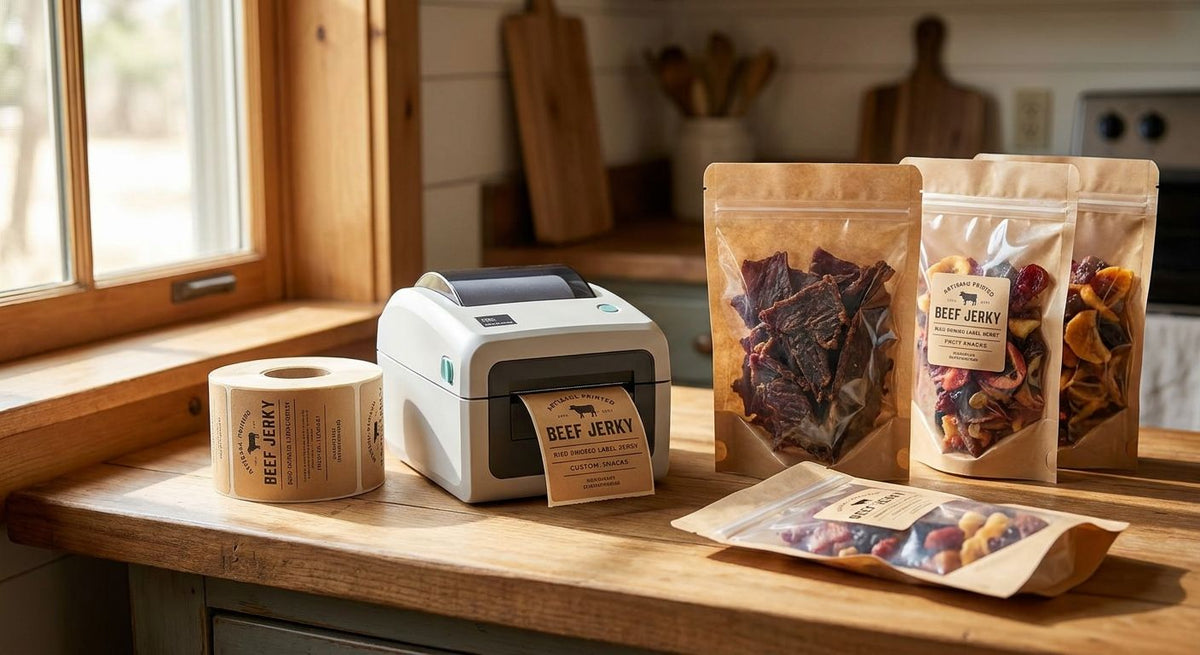
Jerky and dried snack packaging punishes the wrong label printer fast: grease bleeds through direct-thermal prints, small nutrition-facts type turns to mush at 203 DPI, and humid storage rooms smear anything that isn't rated for it. Best overall for jerky and dried snack packaging in 2026: the GoDEX ZX430i+ Thermal Printer. Best for high-volume co-packing: the GoDEX RT730i Thermal Printer. Best budget option: the GoDEX RT200i Thermal Printer.
- GoDEX ZX430i+ wins as the best label printer for jerky packaging in 2026 at 300 DPI and $945.
- GoDEX RT730i handles multi-SKU co-packing runs; GoDEX RT200i is the budget entry point for small-batch makers.
- Thermal transfer beats direct thermal for jerky because grease and oil smear direct-thermal prints within weeks.
- 203 DPI is the floor for barcodes; 300 DPI is the floor for legible nutrition-facts panels on small pouches.
Why this matters
A jerky bag or dried-snack pouch gives you maybe 2 square inches for the UPC, nutrition facts, ingredient list, allergen statement, and a lot/date code. Cram all of that onto a 203 DPI print and the fine type blurs. Add grease from the product itself and a direct-thermal label can smear or fade before the bag leaves the warehouse.
That's a different failure mode than shipping labels or asset tags, and it's why a generic label printer from a big-box store underperforms here. The right printer for jerky packaging balances resolution, ribbon compatibility for oil resistance, and enough throughput to keep a packing line moving in 2026.
What makes the best label printer for jerky packaging
- Print resolution — 300 DPI for dense nutrition-facts and ingredient panels; 203 DPI is fine for simple barcodes and lot codes
- Thermal transfer vs. direct thermal — thermal transfer with ribbon resists grease and oil far better than direct thermal alone
- Label stock compatibility — polyester or coated paper stock that survives handling in humid storage
- Connectivity — USB, serial, or Ethernet so the printer plugs into an existing packing-line workflow
- Warranty coverage — hardware warranty matters on a printer running daily production batches
- Price versus volume — a $374 desktop unit and a $2,400 industrial unit solve different problems
Label printers for jerky packaging at a glance
| Printer | Best for | Standout feature | Starting price | Key limitation |
|---|---|---|---|---|
| GoDEX ZX430i+ Thermal Printer | Dense nutrition-facts panels | 300 DPI dual thermal, color display | $945 | Costs more than 203 DPI models |
| GoDEX RT700i+ Thermal Printer | Standard barcode and lot codes | 203 DPI dual thermal, color display | $581 | Resolution too coarse for tiny type |
| GoDEX RT730i Thermal Printer | High-volume co-packing | RT-series dual thermal design | Check product page | No listed throughput spec |
| GoDEX GE330 Thermal Transfer Printer | Grease-resistant, long shelf life | 4" thermal transfer, 203 DPI | Check product page | Requires ribbon consumable |
| GoDEX RT200i Thermal Printer | Small-batch, budget setup | Lowest-cost RT-series entry | Check product page | No color display, 203 DPI only |
1. GoDEX ZX430i+ Thermal Printer: best label printer for jerky packaging with dense nutrition panels
The ZX430i+ is a 4" dual thermal printer running at 300 DPI with a color display, built to handle both direct thermal and thermal transfer printing on the same machine. That resolution is what separates a readable ingredient list from a blurred one on a 2-inch-wide jerky pouch.
GoDEX ZX430i+ pros:
- 300 DPI renders small nutrition-facts type and barcodes cleanly
- Dual thermal supports direct thermal for short runs and thermal transfer for grease resistance
- Color display simplifies daily operation on a packing floor
- Backed by GoDEX's 3-year hardware warranty
GoDEX ZX430i+ cons:
- Priced above the 203 DPI models in the lineup
- More printer than you need for simple lot-number stickers alone
GoDEX ZX430i+ pricing: $945.
Best for: jerky and dried-snack brands printing dense nutrition panels on stand-up pouches.
Verdict: Buy.
2. GoDEX RT700i+ Thermal Printer: best for standard barcode and lot-code printing
The RT700i+ is a 4" dual thermal printer at 203 DPI with a color display, positioned for high-volume, professional label runs. It's the mid-tier option when nutrition-facts resolution isn't the bottleneck but daily barcode volume is.
GoDEX RT700i+ pros:
- Dual thermal handles both label stock types on one machine
- Color display and controls built for repeat daily use
- 3-year warranty on the hardware
- Priced under the 300 DPI tier at $581
GoDEX RT700i+ cons:
- 203 DPI is coarse for tiny nutrition-facts type
- No published throughput speed to compare against faster industrial units
GoDEX RT700i+ pricing: $581.
Best for: shops printing UPC barcodes and date/lot codes on standard-size pouch labels.
Verdict: Buy.
3. GoDEX RT730i Thermal Printer: best for high-volume co-packing
The RT730i sits in the same RT-series family as the RT700i+, built around the dual-thermal design that lets one printer run direct-thermal and thermal-transfer jobs back to back. Co-packers running jerky, trail mix, and dried fruit through the same facility need that flexibility more than they need extra resolution.
GoDEX RT730i pros:
- Shares the RT-series dual-thermal design for mixed label runs
- Fits operations rotating multiple snack SKUs on one line
- Covered by GoDEX's standard hardware warranty
GoDEX RT730i cons:
- Pricing isn't listed publicly; confirm on the product page
- Only worth the step up from the RT700i+ if you're running multiple shifts
GoDEX RT730i pricing: check current pricing on the product page.
Best for: contract co-packers rotating several dried-snack SKUs through one print station.
Verdict: Hold — confirm your daily volume before choosing this over the RT700i+.
4. GoDEX GE330 Thermal Transfer Printer: best for grease-resistant, long-shelf-life labels
The GE330 is a 4" thermal transfer printer at 203 DPI, built specifically around ribbon-based printing rather than direct thermal. For jerky with a 12-month-plus shelf life, that ribbon is what keeps the lot code readable after months in a warehouse.
GoDEX GE330 pros:
- Thermal transfer output resists oil and grease that direct-thermal prints smear under
- 4" width matches standard pouch label sizes
- 203 DPI is sufficient for barcodes and date codes
GoDEX GE330 cons:
- Requires ribbon, an ongoing consumable cost direct thermal doesn't have
- 203 DPI struggles with dense small-print nutrition panels compared to the ZX430i+
GoDEX GE330 pricing: check current pricing on the product page.
Best for: shelf-stable jerky that needs labels to survive months of handling and grease exposure.
Verdict: Buy for grease-heavy product lines.
“If your jerky labels smear after a week in the delivery van, the problem isn't the printer, it's printing direct thermal on a pouch that needed thermal transfer.”
5. GoDEX RT200i Thermal Printer: best budget option
The RT200i is a 203 DPI thermal printer and the lowest-cost entry point in the RT lineup. It's built for producers who need a working label printer now, not a full production setup.
GoDEX RT200i pros:
- Lowest cost of entry into the GoDEX RT lineup
- Enough resolution for basic barcode and date-code printing
- Simple setup for small-batch producers
GoDEX RT200i cons:
- 203 DPI limits how crisp small nutrition-facts text prints
- No color display like the RT700i+ or ZX430i+
GoDEX RT200i pricing: check current pricing on the product page.
Best for: farmers-market and small-batch jerky makers printing simple labels at low volume.
Verdict: Buy if you're starting out; Skip if you're already scaling past a few hundred units a week.


How we ranked
The ranking weighs the criteria above in order: print resolution for label legibility, thermal transfer versus direct thermal for grease resistance, connectivity for line integration, and price against realistic production volume. The GoDEX ZX430i+ ranks first because it's the only unit here that pairs 300 DPI with dual-thermal flexibility. The RT730i and GE330 rank by use case rather than by a single overall score, since a co-packer's needs and a single-shop's grease-resistance needs aren't the same buying decision.
Which label printer should you choose for jerky packaging?
If you're printing dense nutrition-facts panels on stand-up pouches in 2026, buy the GoDEX ZX430i+ Thermal Printer. If grease resistance matters more than resolution because your jerky runs 12 months or longer on the shelf, the GoDEX GE330 Thermal Transfer Printer is the better fit. Testing the market with low volume, or working out of a single kitchen for now, start with the GoDEX RT200i Thermal Printer and upgrade once volume justifies it.
FAQ
What's the best label printer for jerky packaging in 2026?
The GoDEX ZX430i+ Thermal Printer is the best label printer for jerky packaging in 2026 because its 300 DPI resolution keeps nutrition-facts type and barcodes legible on small pouches. It also runs both direct thermal and thermal transfer on the same machine.
Is direct thermal or thermal transfer better for jerky labels?
Thermal transfer is better for jerky labels because the ribbon-based print resists grease and oil that would smear a direct-thermal print. Direct thermal works fine for short-shelf-life products handled quickly, but thermal transfer holds up over months of storage.
Do jerky package labels need nutrition facts and allergen information?
Packaged jerky sold at retail generally needs a nutrition facts panel, ingredient list, and allergen statement under standard food labeling rules. Check current FDA labeling requirements for your specific product before finalizing label copy.
How much does a label printer for jerky packaging cost?
Printers built for jerky and dried-snack labeling range from around $581 for a 203 DPI dual thermal unit to $945 for a 300 DPI model with a color display. Higher-volume industrial units run higher; check current pricing before buying.
What DPI do I need to print nutrition facts on small jerky bags?
300 DPI is the resolution to use for legible nutrition-facts type and dense ingredient lists on small pouches. 203 DPI works for barcodes and lot codes but blurs fine print at small sizes.
Can these printers handle barcodes for retail distribution?
Yes, both 203 DPI and 300 DPI GoDEX printers in this lineup print standard barcodes for retail distribution. 300 DPI gives sharper barcode edges, which matters if your labels shrink to fit a small pouch.
What label material resists oil and grease from jerky?
Thermal transfer labels printed with wax/resin or resin ribbon resist oil and grease better than direct thermal labels. Polyester label stock adds further resistance to moisture and handling over a long shelf life.
How long do thermal transfer labels last on jerky packaging?
Thermal transfer labels on jerky packaging typically outlast direct thermal labels because the print isn't heat-activated ink sitting on the label surface alone. Actual durability depends on the ribbon type and label stock paired with the printer.
One last thing
Most jerky brands buy their first label printer for barcodes and skip straight past the grease problem, then find out three months later that their lot codes are unreadable on returned product. If your jerky sits on a shelf longer than a few weeks, pair a thermal transfer printer with polyester label stock from day one rather than switching after a recall scare in 2026.