
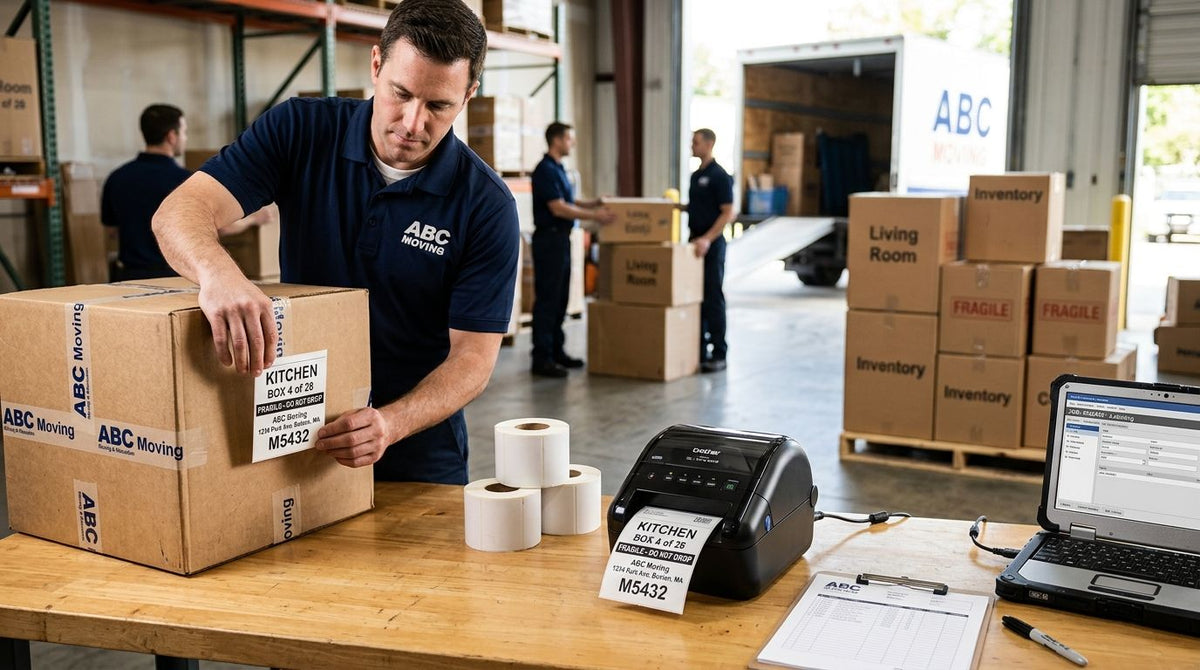
The best label printer for moving companies in 2026 is the GoDEX ZX430i+ Thermal Printer, which wins for high-volume barcode inventory labels across job sites and storage warehouses. Best for small crews and local movers: the GoDEX RT700i+ Thermal Printer. Best budget option for straightforward box labels: the GoDEX RT200i Thermal Printer. Best for durable asset tags on trucks, dollies, and reusable equipment: the GoDEX GE330 Thermal Transfer Printer.
- The GoDEX ZX430i+ is the best label printer for moving companies printing high-volume barcode inventory labels in 2026.
- The GoDEX RT700i+ fits small crews and local movers that want a color display without paying for 300 DPI.
- The GoDEX RT200i is the budget pick for straightforward box labels at 203 DPI.
- The GoDEX GE330 uses thermal transfer ribbon to print asset tags that survive years on trucks and equipment.
Why this matters
Moving companies print more labels per job than almost any other service business — box counts, room destinations, fragile warnings, inventory sheets, and crew work orders, all generated on the same day a job starts. A desktop printer bought for a home office chokes on that volume by the second month.
Barcode labels also do double duty in this industry. They track boxes through a residential move or a long-term storage job, and they tag reusable gear — dollies, moving blankets, crate bins, hand trucks — that has to survive years of loading docks and truck beds. The printer you buy has to handle both jobs, or the company ends up buying two.
“If a barcode doesn't scan through packing tape and warehouse grime, the printer's resolution didn't matter.”
McAuley Labels sells the GoDEX printer lineup that covers both ends of that range in 2026, from desktop 203 DPI units to thermal transfer models built for outdoor-durable tags.
How moving companies actually use a label printer
A crew scans or reads a barcode on each box as it leaves the truck and again when it lands in the right room — that's the inventory-control half of the job. The same printer usually handles fragile stickers, room-destination color codes, and a work order sheet for the lead on each job.
The other half is equipment tracking. Dollies, straps, moving blankets, and storage crates get reused for years, and a barcode asset tag is how a company knows which truck a piece of gear last rode in. That second use case is where direct thermal box labels and thermal transfer equipment tags start to pull in different directions — one printer rarely does both jobs equally well.
Direct thermal vs. thermal transfer for movers
Direct thermal printing uses heat-sensitive label stock and no ribbon — cheaper to run, but the print fades and darkens over time when it's exposed to heat or direct sunlight. That's fine for a box label that gets thrown out at the end of a job.
Thermal transfer printing burns ink from a ribbon onto the label, which costs more per label but holds up for years outdoors. A dolly or a truck-mounted asset tag printed with thermal transfer survives a summer in a hot cargo bay; a direct thermal tag in the same spot fades within a season. That distinction drives most of the ranking below.
What makes the best label printer for moving companies
- Print resolution (DPI): 203 DPI covers most box and inventory labels; 300 DPI holds up better on small barcodes and dense text.
- Direct thermal vs. thermal transfer: direct thermal needs no ribbon but fades with heat and UV exposure; thermal transfer uses ribbon and lasts years outdoors.
- Connectivity: USB alone works for a single desk; USB/Serial/Ethernet supports networked printing across a dispatch office or warehouse.
- Control panel: a color display lets crews switch label templates without touching a computer between jobs.
- Duty cycle: desktop models handle a few jobs a week; models built for continuous runs handle daily high-volume printing without falling behind.
Label printers for moving companies at a glance
| Printer | Best for | Standout feature | Key limitation |
|---|---|---|---|
| GoDEX ZX430i+ Thermal Printer | High-volume barcode inventory labels | 300 DPI with color display and Ethernet | Costs more to run than 203 DPI models |
| GoDEX RT700i+ Thermal Printer | Small crews and local movers | Color display at 203 DPI | Barcode density limited compared to 300 DPI |
| GoDEX RT200i Thermal Printer | Straightforward box labels on a budget | 203 DPI without the display premium | No color display for on-the-fly template switching |
| GoDEX GE330 Thermal Transfer Printer | Durable asset tags for trucks and equipment | Thermal transfer output resists fading | Requires ribbon as an ongoing consumable |
1. GoDEX ZX430i+ Thermal Printer: best label printer for moving companies with high box volume
The GoDEX ZX430i+ is a 4-inch dual thermal printer running at 300 DPI, built to print both direct thermal and thermal transfer labels from the same unit. It connects over USB, Serial, or Ethernet, and the color display lets a dispatcher switch between box labels, inventory tags, and work orders without opening a laptop.
GoDEX ZX430i+ pros:
- 300 DPI keeps barcodes scannable even after packing tape and warehouse dust build up
- Ethernet support means one printer can serve a shared dispatch station
- Handles direct thermal box labels and thermal transfer asset tags on the same hardware
- Color display speeds label template changes between jobs
GoDEX ZX430i+ cons:
- 300 DPI print heads cost more to replace than 203 DPI equivalents
- Thermal transfer mode requires keeping ribbon stocked as a separate consumable
Best for: moving and storage companies running high-volume barcode inventory labels across multiple jobs a week. Verdict: Buy.
2. GoDEX RT700i+ Thermal Printer: best label printer for small moving crews
The GoDEX RT700i+ is a 4-inch dual thermal printer at 203 DPI with a color display and the same USB/Serial/Ethernet connectivity as the ZX430i+, at a lower resolution tier and a lower cost of entry.
GoDEX RT700i+ pros:
- Color display without paying for 300 DPI resolution
- 203 DPI is sharp enough for job numbers, box counts, and destination room labels
- Same connectivity options as the higher-resolution model
GoDEX RT700i+ cons:
- 203 DPI barcodes get harder to scan reliably below about half an inch wide
- Not built for the ribbon-heavy thermal transfer runs that outdoor asset tags need
Best for: local and regional moving companies labeling boxes and inventory sheets on a handful of jobs a week. Verdict: Buy.
3. GoDEX RT200i Thermal Printer: best budget label printer for basic box labels
The GoDEX RT200i runs at 203 DPI without the color display of the RT700i+, aimed at companies that just need clean box and inventory labels without extra hardware or a bigger footprint on the dispatch desk.
GoDEX RT200i pros:
- 203 DPI matches the RT700i+ for standard label runs
- Simpler control panel means less to configure for a crew that only prints one label type
GoDEX RT200i cons:
- No color display, so template switching happens through connected software only
- Not the right printer if the company also tags trucks or reusable equipment with heavy-duty labels
Best for: moving companies that only need basic box and inventory labels, not equipment tagging. Verdict: Buy if the job is box labels only.
4. GoDEX GE330 Thermal Transfer Printer: best label printer for durable equipment tags
The GoDEX GE330 is a 4-inch thermal transfer printer at 203 DPI, built to run ribbon full-time rather than switch between direct thermal and thermal transfer like the ZX430i+.
GoDEX GE330 pros:
- Thermal transfer output resists fading from sun exposure on truck cabs and trailer walls
- Pairs with heavy-duty barcode label stock for tagging dollies, straps, and storage bins
- 203 DPI is enough resolution for asset ID barcodes at typical tag sizes
GoDEX GE330 cons:
- Requires ribbon as an ongoing consumable, unlike direct thermal-only printing
- Overkill for a company that only prints disposable box labels
Best for: moving and storage companies tagging reusable equipment that has to survive years outdoors. Verdict: Buy for equipment tracking; skip if boxes are the only labeling need.


How we ranked
The ranking weighs five factors: print resolution, direct thermal versus thermal transfer durability, connectivity, control panel, and duty cycle — the same criteria listed above. The GoDEX ZX430i+ wins overall because it's the only model in this group that handles both high-volume box labels and thermal transfer asset tags on one machine.
The RT700i+ and RT200i split the desktop tier by feature set — display versus no display, same 203 DPI. The GE330 wins the equipment-tagging use case because it's the only ribbon-only, thermal transfer printer in this comparison built for labels that live outdoors past one moving season.
Which label printer should you choose?
Printing box labels for two or three trucks a week and nothing else: buy the GoDEX RT200i. Running a dispatch office that prints inventory tags, work orders, and barcode labels across a warehouse or storage facility: the GoDEX ZX430i+ is the label printer for moving companies operating at that volume in 2026.
Need color-display convenience without paying for the 300 DPI step up: the GoDEX RT700i+ covers that middle ground. Tagging trucks, dollies, and rental gear that has to survive outdoors for years: the GoDEX GE330 is the only printer on this list built for that job.
Most moving companies outgrow a basic box-label printer within a year of adding warehouse or storage services. Buying the ZX430i+ from the start avoids a second purchase in 2027.
FAQ
What's the best label printer for moving companies in 2026?
The GoDEX ZX430i+ Thermal Printer is the best overall pick in 2026 for moving companies printing high-volume barcode inventory labels, running at 300 DPI with Ethernet support for networked dispatch printing.
Is 203 DPI or 300 DPI better for moving company box labels?
203 DPI is enough for standard box counts and job numbers; 300 DPI matters more once barcodes get small or dense, which is common on inventory sheets used across multiple storage jobs.
Do moving companies need thermal transfer or direct thermal printers?
Direct thermal works fine for disposable box labels that get thrown out after a job. Thermal transfer is the better choice for asset tags on trucks, dollies, and equipment that has to survive outdoor exposure for years.
How do moving companies use barcode labels for inventory tracking?
A barcode gets printed and applied to each box, then scanned when it leaves the truck and again when it arrives in the right room, giving the crew a running count against the inventory sheet.
Can one printer handle both box labels and equipment asset tags?
The GoDEX ZX430i+ can, since it prints both direct thermal and thermal transfer labels from the same unit. Single-mode printers like the GE330 handle only thermal transfer.
What's the difference between the GoDEX RT700i+ and RT200i?
Both run at 203 DPI, but the RT700i+ adds a color display for switching label templates without a computer, while the RT200i is the simpler, lower-cost configuration.
Do label printers need ribbon for moving company labels?
Only in thermal transfer mode. Direct thermal printers, and dual thermal printers running in direct thermal mode, need no ribbon at all — just heat-sensitive label stock.
How durable do labels need to be for moving trucks and storage?
Box labels only need to survive one job, so direct thermal is fine. Tags on trucks, dollies, or long-term storage racks need thermal transfer printing to resist fading from heat and sunlight.
One last thing
Direct thermal printing — no ribbon, just heat-sensitive paper — fades and darkens with heat and UV exposure over time. That's a property of the print technology, not a printer defect, which is why a box label taped to cardboard in a hot truck cab looks fine after a week but a direct thermal tag left on equipment stored outdoors for a season doesn't.
If a label has to survive on a truck, a dolly, or a storage rack past one moving season, print it on the GoDEX GE330 with thermal transfer ribbon instead of a direct thermal model.