

The cost to run an oil change sticker printer is your spending on labels, ribbon, electricity, maintenance, and printing labor divided by the usable stickers you produce. The printer purchase is a separate ownership cost, and spoiled labels or incorrect service details add expense without adding usable reminders. For your 2026 budget, calculate both recurring cost per sticker and total cost per completed service rather than relying on a flat monthly allowance.
- Calculate cost to run an oil change sticker printer from usable reminders, not the number of labels purchased.
- McAuley Labels offers an oil change sticker system with custom labels, ribbon, and a standalone keyboard.
- Thermal transfer printing consumes ribbon as well as label stock; include both in your operating budget.
- Separate the initial printer purchase from recurring supplies, maintenance, electricity, and staff time.
Why this matters
A supply invoice tells you what you purchased. It does not tell you what each finished reminder costs. Labels used for alignment, test prints, and corrected mileage still belong in your operating calculation.
Budget around readable, accurate stickers applied to vehicles. That connects printing expense to completed work instead of treating every label fed through the printer as useful output.
How much does it cost to run an oil change sticker printer?
Use this calculation for your 2026 operating budget:
Recurring cost per usable sticker = total operating expenses for the period ÷ usable stickers produced during that period.
For a ribbon-based system, the equipment and replacement ribbon serve different purposes:
| Item | Best for | What the inputs establish | Budget limitation |
|---|---|---|---|
| Oil Change Sticker Printer System | Shops setting up in-house service-reminder printing | Includes 1,000 custom labels, ribbon, and a standalone keyboard | Included supplies are a starting quantity, not a recurring operating allowance |
| Thermal Transfer Ribbon | Replenishing compatible oil change sticker printers | Wax/resin ribbon measuring 2.25 inches wide by 243 feet long, with a 1/2-inch core | Ribbon length alone does not establish the number of usable stickers produced |
The initial system bundles equipment with consumables. Separate those categories in your records so the first purchase does not distort later operating comparisons.
What belongs in the operating calculation?
Record expenses against the same reporting period. Use supplies consumed during that period, rather than assigning an entire replenishment order to the day it arrives.
| Expense | How to account for it | What to avoid |
|---|---|---|
| Label stock | Value of labels consumed, including spoiled labels | Counting only labels successfully applied |
| Ribbon | Value of ribbon consumed during printing and setup | Assuming ribbon yield equals the label-roll quantity |
| Electricity | Measured energy use multiplied by your electricity rate | Treating the power adapter rating as measured consumption |
| Cleaning and maintenance | Supplies and service attributable to printing | Assuming maintenance is included indefinitely |
| Staff time | Printing-related labor using your internal labor rate | Counting only the moment the printer runs |
| Software or support | Actual charges attributable to this workflow, if applicable | Adding a subscription that your setup does not require |
Keep the printer purchase outside this recurring total. Add an equipment allocation only when you want to measure ownership cost.
Calculate your shop's running cost step by step
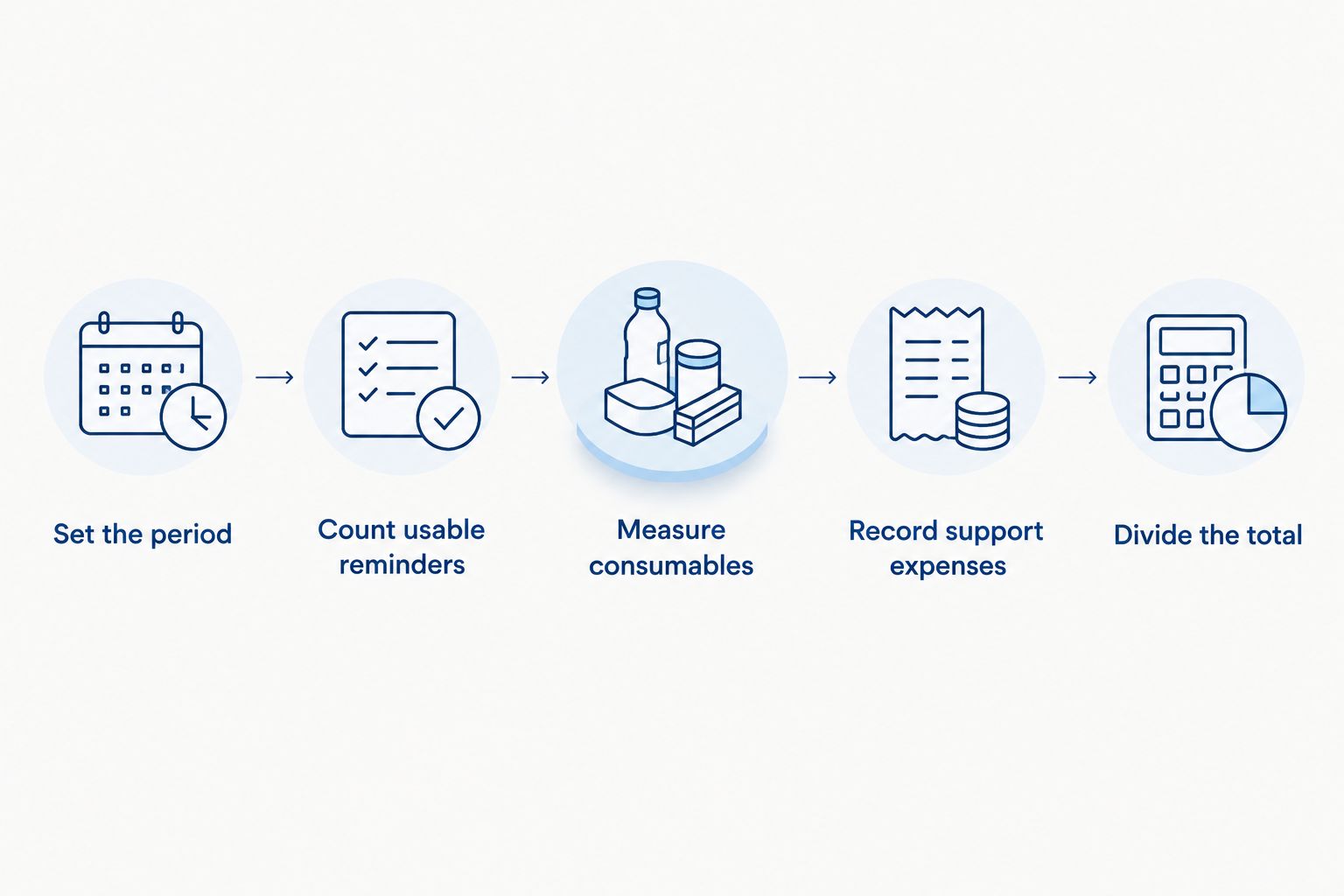
A useful 2026 calculation needs a consistent period, supply records, and an output count. Use the same boundaries every time you compare results.
- Set the period. Choose the reporting period you already use for shop expenses. Record its beginning and ending dates so purchases and output stay aligned.
- Count usable reminders. Count accurate stickers accepted for application, not every label advanced through the printer. Record rejected output separately.
- Measure consumables. Record label stock and ribbon consumed, including setup waste. Keep unused supplies outside the consumption total.
- Record support expenses. Add attributable cleaning materials, maintenance, electricity, software charges, and staff time. Avoid counting the same expense in multiple categories.
- Divide the total. Divide operating expenses by usable reminders. Keep equipment allocation separate so you can see recurring expense and ownership expense independently.
A partial roll complicates measurement. Document how you estimate its remaining quantity, then use that method consistently rather than switching methods between reporting periods.
Keep a simple operating worksheet
Your worksheet should show starting supplies, purchases, ending supplies, rejected labels, usable reminders, and printing-related labor. Keep invoices alongside the worksheet so you can trace each expense to an actual purchase.
Record why you rejected a label. An incorrect date calls for a different correction than a misaligned print, even though both consume stock and ribbon.
Use the calculation to identify a correctable expense, not just produce a monthly total. A waste category you can explain is more useful than a blended figure you cannot investigate.
What does the included supply bundle cover?
The listed McAuley Labels oil change sticker printer system includes 1,000 custom labels, ribbon, and a standalone keyboard. That establishes the starting label quantity; it does not establish a guaranteed number of completed service reminders.
Test prints, setup output, and incorrect entries consume part of the starting supply. Keep those labels in your consumption records even when you do not apply them to a vehicle.
Do not assume that the included ribbon and label quantity will run out together. Track each supply independently, and confirm the replacement requirements for the printer you purchase.
McAuley Labels is best for buyers seeking an oil change sticker system with custom labels, ribbon, and a standalone keyboard. The bundled components simplify the initial purchasing list, but replenishment and operating records remain separate responsibilities.
Why oil change sticker printer running costs vary
Your shop's actual expenses depend on the supplies you use and how you produce reminders. Review these factors before comparing totals:
- Label consumption: Count every label used, including alignment checks and rejected output. Purchased quantity and usable output are not interchangeable.
- Ribbon consumption: A thermal transfer workflow uses ribbon alongside the labels. Record consumption rather than assuming a fixed yield from roll length.
- Print layout: Label length, feed settings, and the printer's ribbon-handling behavior affect material consumption. Confirm those details for your actual setup.
- Data entry: Incorrect mileage, dates, or customer details require corrections. Track reprints by cause so you can distinguish entry errors from print-quality problems.
- Maintenance activity: Cleaning materials, service work, and replacement parts belong in the periods they support. Follow the equipment instructions rather than inventing a universal replacement schedule.
- Usable output: Equipment allocation and other fixed expenses are spread across your finished reminders. Compare periods using both total expense and usable output.
For a 2026 comparison between shops or locations, use matching expense definitions. A materials-only figure is not comparable to a figure that includes staff time and equipment allocation.
How do you calculate ribbon cost per sticker?
Divide the value of ribbon consumed by the usable stickers produced while consuming it. Use observed output, not a yield guessed from the ribbon's advertised length.
The listed replacement ribbon is 243 feet long and 2.25 inches wide, with a 1/2-inch core. Those specifications help identify the supply, but they do not establish your printer's finished-label yield.
Measure ribbon consumption during normal work
Begin with a documented ribbon quantity and record the usable reminders produced before replacement. Include the labels rejected during that interval in your waste record, not in the usable-output denominator.
If a ribbon spans reporting periods, allocate its consumption consistently. Assigning the entire ribbon expense to its replacement date can make one period look expensive and the preceding period look artificially inexpensive.
Check compatibility before ordering. Ribbon width, core dimensions, winding requirements, and ribbon formulation must match the printer and label stock; a matching dimension alone is not a complete compatibility check.
How do you separate running cost from ownership cost?
Running cost covers the resources consumed to print reminders. Ownership cost adds the equipment investment and any other attributable setup expense over your chosen accounting period.
Ownership cost per usable reminder = recurring operating cost per usable reminder + equipment allocation per usable reminder.
Choose your equipment-allocation method with whoever manages your accounts. Keep that method consistent across your 2026 comparisons, and do not present an internal planning assumption as a guaranteed printer lifespan.
A paid-off printer still consumes labels, ribbon, electricity, and staff time. Conversely, an initial equipment invoice should not make every later replenishment purchase appear to be a new equipment expense.
Avoid counting bundled supplies twice
When a system includes starter supplies, document how you allocate the purchase between equipment and consumables. Do not include the full bundle as equipment expense and then count the included supplies again without a corresponding adjustment.
This distinction matters when you compare the initial setup period with routine operation. The categories must match before the totals mean anything.
How can you reduce waste without sacrificing readable reminders?
Start with the reason labels are being discarded. Changing supplies before identifying the problem makes it harder to tell which correction worked.
Correct the template before routine printing
Check the date format, mileage field, shop details, and print position before staff use the template for customer vehicles. Keep a controlled version so an accidental layout change does not spread through the workflow.
Validate the template after changes to label dimensions or printer settings. A saved layout is useful only when it still matches the loaded media.
Fix repeated feeding or alignment problems
Follow the printer's instructions for loading media and calibration. If labels repeatedly feed incorrectly, stop the run and correct the cause rather than producing more rejected stickers.
Clean the printhead using the manufacturer's procedure and approved materials. Do not compensate for a dirty printhead by repeatedly changing settings without checking the underlying condition.
Check the finished reminder
Confirm that the printed mileage and date match the service record. Inspect readability before applying the sticker so a printing error does not become a customer-facing error.
For your 2026 review, compare rejected labels by cause as well as total quantity. That tells you whether the next action belongs in template control, staff instruction, media loading, or maintenance.
FAQ
What's the cost to run an oil change sticker printer each month?
Monthly running cost is the value of labels and ribbon consumed plus attributable electricity, maintenance, software, and labor. Divide that total by usable reminders to calculate recurring cost per sticker; keep the equipment purchase separate.
Does an oil change sticker printer need ink cartridges?
A thermal transfer oil change sticker printer uses ribbon rather than ink cartridges. Include replacement ribbon in the operating budget and confirm the printing method for your specific equipment.
Does the starter bundle produce exactly 1,000 usable stickers?
The listed starter bundle includes 1,000 custom labels, not a guarantee of 1,000 usable reminders. Setup prints and rejected labels consume part of that quantity.
How many stickers will a 243-foot ribbon print?
A 243-foot ribbon does not establish a fixed sticker yield by itself. Yield depends on the printing setup, label feed length, ribbon handling, and rejected output; measure usable production with your actual supplies.
Is the printer purchase part of its running cost?
The printer purchase is an ownership expense rather than a recurring consumable expense. Add a separate equipment allocation when calculating total ownership cost per reminder.
What's the best way to compare oil change sticker printing costs?
Compare cost per usable reminder using identical expense categories and reporting periods. Include rejected output in supply consumption, and state whether labor and equipment allocation are included.
What does the McAuley Labels oil change sticker system include?
The McAuley Labels oil change sticker system includes 1,000 custom labels, ribbon, and a standalone keyboard. Track label and ribbon consumption independently when planning replenishment.
One last thing
A label reprinted because of incorrect mileage is a printing expense even when the printer worked perfectly. Equipment records alone will not explain that waste.
Add a rejection reason beside each discarded reminder in your shop's operating record. Before changing the printer or supplies, check whether the recurring problem is the template, the entry process, or the printed result.