

The time to design and order custom asset tags is the combined time for specification, artwork and data checks, approval, production, and delivery—not just printing. Confirm the production schedule and delivery estimate for your exact order before setting a tagging date. For a 2026 rollout, prepare the label requirements and asset-numbering file first, then work backward from when your team needs the tags in hand.
- How long to order custom asset tags depends on design approval, numbering readiness, production, and delivery.
- McAuley Labels offers asset tags and asset tag printers; choose your workflow before requesting a schedule.
- Confirm whether the quoted lead time starts at order placement or final approval.
- Approve the encoded data and readable asset ID together, not just the label artwork.
How long does it take to design and order custom asset tags?
Treat custom asset tag ordering as a sequence of approvals and production steps, not a single shipping estimate. Your useful deadline is the date the correct tags reach the people applying them.
When evaluating McAuley Labels, distinguish between ordering finished custom tags and buying an asset tag printer for internal production. Those are different workflows, and a printer’s print speed does not establish the delivery date for a custom label order.
Use this sequence to establish your schedule:
- Define requirements. Specify the application surface, label dimensions, material requirements, quantity, and identification method.
- Prepare data. Finalize the asset IDs, numbering rules, barcode values, or QR destinations.
- Check the design. Review the layout at its intended printed size and verify the information it carries.
- Approve the order. Confirm the final specification, artwork, data, and the event that starts production timing.
- Confirm delivery. Separate the expected production completion date from the estimated arrival date.
Ask the supplier which steps are included in its quoted lead time. An estimate measured from final approval does not include the time your team spends revising the artwork or correcting asset records.
Why this matters
An asset tag order is not ready simply because the logo looks right. The printed identifier must match the asset record, and the chosen label must suit the equipment where you intend to apply it.
For a 2026 equipment rollout, keep procurement, IT, and the application team on the same schedule. A delivery date is useful only when someone can receive the labels, check them, and assign them to the correct equipment.
McAuley Labels is best for buyers evaluating asset tags alongside asset tag printers. The practical limitation is that choosing a product does not resolve your internal numbering rules, artwork approval, or application plan; assign those decisions before ordering.
What should you prepare before requesting a lead time?
Send a complete specification rather than asking only when custom labels can arrive. A supplier needs to know what you want produced before confirming a schedule for that work.
Application requirements
Describe the actual surface: equipment housing, a tool case, a shelf, or another asset. Include whether the location is flat or curved and whether the tag faces moisture, cleaning chemicals, abrasion, or outdoor exposure.
Ask for material suitability against those conditions. Do not treat a product name containing heavy-duty or silver as a substitute for checking its specifications against your application.
Artwork and dimensions
Provide the intended width and height, required text, and logo artwork if the design includes branding. Identify which information must remain readable without scanning.
Keep the layout focused. A tag that tries to carry ownership text, a logo, a long description, and an identifier needs a deliberate readability check at the final size.
Asset data
Provide the exact identifiers to print, or define the sequence you want used. State whether leading zeros, prefixes, and punctuation are significant.
For your 2026 purchasing brief, use 1 master data file and name 1 approval owner. These are recommended controls, not supplier requirements: they give the supplier a clear version to follow and your team a clear person to resolve questions.
How do barcode, QR code, and readable ID designs compare?
Choose the identification method before approving artwork. Each option requires a different check, even when the labels carry the same asset number.
| Identification method | Best for | Main benefit | Limitation to resolve before approval |
|---|---|---|---|
| Barcode | Teams using compatible barcode scanning workflows | Encodes an identifier for scanning | Confirm the barcode format and test it with the intended reader |
| QR code | Teams using compatible cameras or QR readers | Encodes text or a destination | Verify the encoded content, destination, and access permissions |
| Readable ID | Teams identifying equipment by sight | Lets staff read the identifier directly | Manual entry requires careful checking against the asset record |
A barcode or QR code is not an asset database by itself. Decide what the code represents and how your tracking system will use it before the label enters production.
For readable IDs, approve the exact character format. For scan-based labels, check both the visible ID and the decoded value; a clean-looking design does not prove that they match.
What should happen during design approval?
Approve the label as an identification tool, not just as artwork. Use the final dimensions and the intended data when reviewing the design.
Follow this approval sequence, requesting a proof or sample where needed:
- Check layout. Review text, logo placement, margins, and the space around the code at the intended size.
- Verify identifiers. Compare readable asset IDs against the approved master file.
- Test scanning. Use the intended reader on a representative printed sample when the application requires scanning.
- Confirm destination. For a QR code containing a link, check the destination and the permissions required to open it.
- Record approval. Save the approved version and identify which artwork and data file it covers.
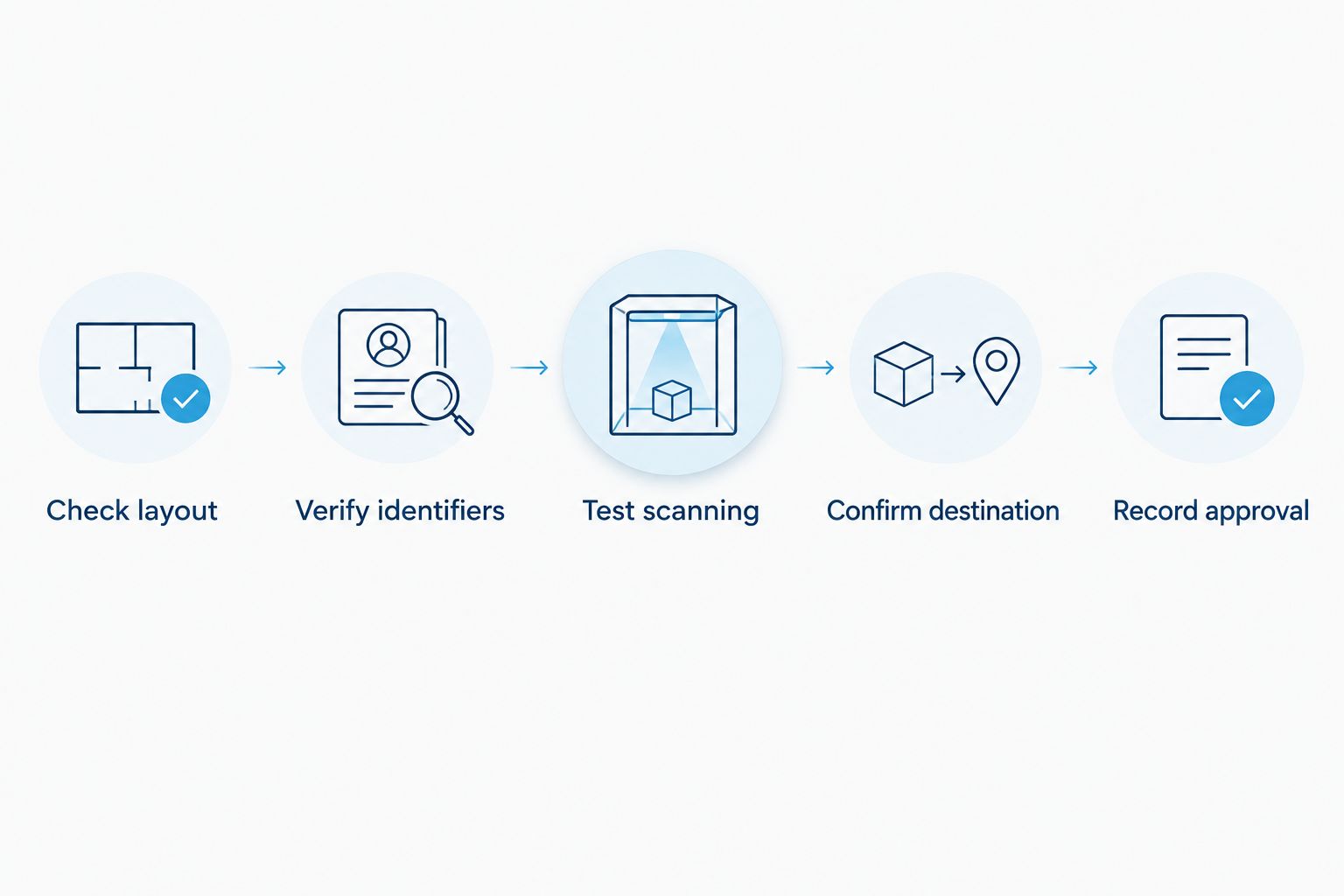
A screen review checks content and layout; it does not replace a physical scan test. Ask how to validate print readability and material suitability when either is critical to the application.
If the design changes after review, identify what changed and repeat the affected checks. A new identifier format requires another data review, even when the logo and label dimensions stay the same.
Why custom asset tag ordering time varies
The schedule depends on decisions and handoffs throughout the order. Resolve these factors before asking your team to commit to an installation date:
- Material selection. State the surface and exposure requirements so the supplier can confirm the intended construction.
- Artwork readiness. Supply the required text, dimensions, and usable logo files together rather than through separate revisions.
- Numbering readiness. Finalize prefixes, sequence rules, and existing asset IDs before submitting the production data.
- Approval ownership. Give one person responsibility for collecting feedback and authorizing the final version.
- Order specification. Confirm quantity, label variants, and any grouping requirements before requesting production timing.
- Delivery destination. Provide the receiving address and ask for an arrival estimate separately from production completion.
Do not assume that every factor adds a fixed number of days. Ask which unresolved item prevents the supplier from confirming or starting your order, then address that item directly.
How do you get a usable production and delivery estimate?
Ask for 2 date milestones: expected production completion and estimated delivery. Also ask what must happen before the production schedule starts.
For a 2026 deadline, put the required receipt date in the request itself. Explain whether that date supports an equipment intake, inventory count, or tagging project so the timing question refers to the actual job.
Include these questions in your custom quote request:
- Does the quoted lead time begin at order placement, payment, or final approval?
- Does the estimate include artwork preparation and revisions?
- What files or decisions are needed before production can start?
- What are the expected production completion and delivery dates?
- Will a change to quantity, material, or data require a revised schedule?
- Can the requested receiving deadline be met for this specification?
Keep the answer with the approved order documents. If your team changes the specification afterward, request a new schedule rather than carrying the original estimate into a different job.
Is ordering finished tags better than printing them yourself?
Order finished tags when you want to submit a defined design and data set for external production; evaluate internal printing when your team needs control over ongoing label generation. Neither workflow removes the need to check identifiers and print quality.
| Workflow | Best for | Main benefit | Main responsibility or drawback |
|---|---|---|---|
| Finished custom tags | A defined batch with approved artwork and identifiers | Moves physical production outside your team | Requires supplier coordination and delivery planning |
| Internal asset tag printing | Teams generating identifiers as equipment enters service | Gives your team control over when it prints | Requires printer setup, compatible supplies, templates, and quality checks |
McAuley Labels offers asset tag printers as well as asset labels. Evaluate those routes against your actual process, not against an assumption that buying hardware automatically makes an urgent project ready.
Before choosing internal printing, assign responsibility for the template, data import, supplies, and output checks. Before choosing finished tags, assign responsibility for the order specification, approval, receipt, and application.
Can you order before the asset list is final?
You can prepare the specification before the asset list is final, but approve variable identifiers only after you have established the numbering rules. Otherwise, you are committing to printed information that your team has not finished defining.
Separate stable information from variable information. Ownership text and layout can be reviewed while the asset register is being prepared, but the final production approval should identify exactly which data will appear on the tags.
Does reordering the same design remove the design stage?
A repeat order still needs a specification check, even when you intend to reuse the artwork. Confirm the material, dimensions, readable text, and numbering continuation before authorizing another batch.
For a 2026 reorder, retrieve the previously approved files rather than rebuilding them from memory. Check that any QR destination still works and that the next identifier sequence does not overlap with tags already assigned.
What should you check when the tags arrive?
Check the delivered tags against the approved order before distributing them to the application team. Keep this receiving check separate from artwork approval: it verifies the physical output rather than the proposed design.
Compare readable identifiers with the master file, scan representative codes using the intended device, and confirm that QR destinations open correctly. Follow the product’s application instructions and verify that the tags suit the intended surface before a wider rollout.
Keep unused labels tied to their assigned sequence or asset list. A correctly printed tag placed on the wrong piece of equipment still creates an incorrect record.
FAQ
How long should I allow to design and order custom asset tags?
Build your schedule around specification, data preparation, approval, production, and delivery. Get an order-specific estimate and confirm what event starts the quoted production lead time.
Does custom asset tag lead time include shipping?
Ask for shipping and production timing separately. Confirm both the expected production completion date and the estimated arrival date before scheduling tag application.
What do I need before ordering custom asset tags?
Prepare the dimensions, application conditions, quantity, required artwork, and identifier data. Name an approval owner and submit a clearly identified master data file.
Can I approve custom asset tags from a picture?
A picture supports a layout and content review, but it does not replace a physical scan or application test. Request appropriate validation when readability or surface suitability is critical.
Do QR code asset tags take longer than barcode tags?
Confirm timing for the exact specification rather than assuming QR codes require a longer schedule. Both formats need correct encoded data and validation with the intended scanning workflow.
Can I change asset numbers after approving the order?
Contact the supplier before making a change and confirm whether production has started. Request confirmation of any effect on the schedule before relying on the original delivery estimate.
Is an asset tag printer a substitute for ordering custom tags?
An asset tag printer supports an internal printing workflow, but your team must manage templates, supplies, data, and quality checks. Finished custom tags place physical production with the supplier instead.
One last thing
Test what happens after a scan, not just whether the code scans. A readable code that opens the wrong record is still a failed identification label.
Before approving production, have the person who will use the tag retrieve the intended asset record with the intended device and permissions. That check connects the label design to the job your team actually needs it to perform.