
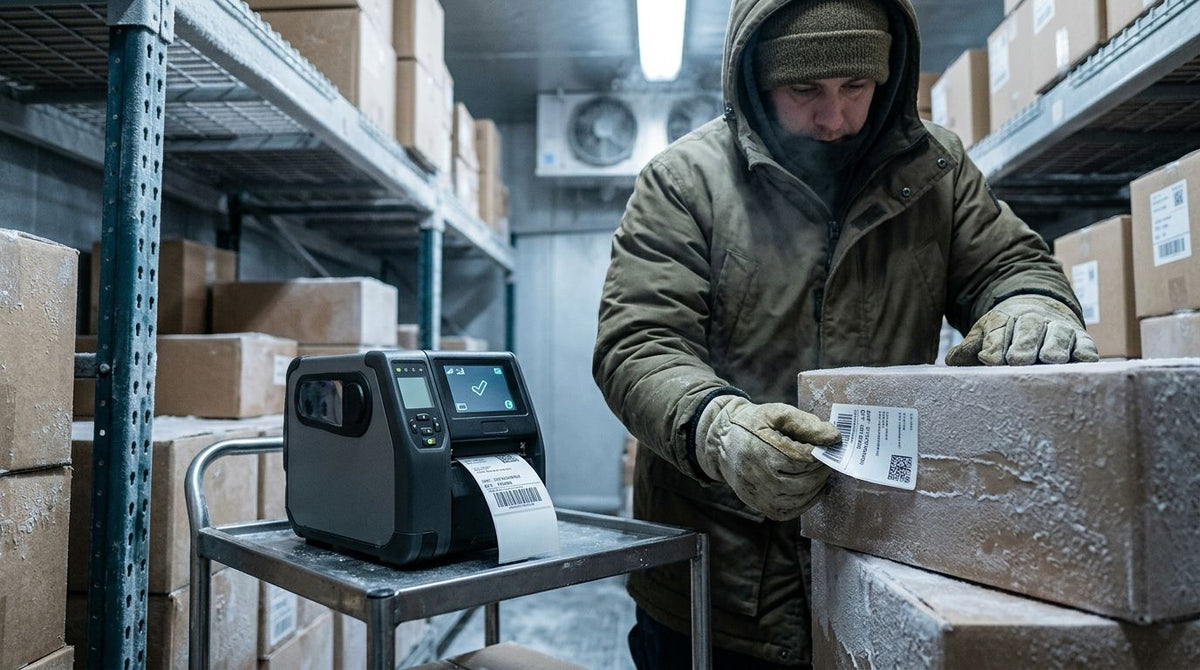
Yes, a waterproof label printer can work in freezing temperatures in 2026, but only when the printer’s published operating range includes the actual ambient temperature. Waterproof describes the label construction and printed image, not the printer enclosure. At 32°F (0°C) and below, adhesive application, condensation, label stock, and ribbon selection usually matter more than print resolution.
- For waterproof label printer freezing temperatures, verify the printer’s operating range before placing it in the cold.
- Waterproof label stock does not make the printer enclosure waterproof or cold-rated.
- Thermal transfer with wax/resin ribbon is the stronger choice for durable outdoor and cold-storage labels.
- McAuley Labels is best for businesses matching thermal printers, ribbons, and durable label stock in 2026.
Can a waterproof label printer work in freezing temperatures?
A waterproof label printer can work around or below the 32°F (0°C) freezing point when its manufacturer-approved operating range permits it. The safer setup keeps the printer in a conditioned area and sends the finished labels into the cold environment. If the printer must remain inside a freezer, cooler, unheated warehouse, or outdoor enclosure, confirm the exact operating and storage limits in the model manual.
The printer is only one part of the system. For a label to remain usable, the face stock must resist moisture, the printed image must stay readable, and the adhesive must suit both the application temperature and the later service temperature. The guide to printing waterproof labels for outdoor use covers the media side of that decision.
| Installation | Can it work near freezing? | Best for | Main limitation | Verdict |
|---|---|---|---|---|
| Printer indoors, labels used in the cold | Yes, because the printer stays within normal indoor conditions | Warehouses, food packaging, outdoor equipment | Labels still need suitable stock and adhesive | Best overall setup |
| Printer inside a refrigerated work area | Yes, if the model’s operating range includes that temperature | Cold-storage labeling at the point of use | Condensation and cold supplies can affect feeding and adhesion | Use only after checking the manual |
| Standard desktop printer exposed outdoors | Not by default | Temporary sheltered stations | Waterproof labels do not protect printer electronics | Skip unless the printer is enclosed and rated |
| Mobile printer used briefly in the cold | Model-dependent | Field identification and equipment checks | Battery and display performance depend on the device rating | Verify before deployment |
The table separates media performance from equipment performance. A waterproof polyester label can remain readable in wet conditions while the desktop printer that produced it still requires a dry, temperature-controlled location.
Why this matters
Freezing conditions create several separate failure points. A printer can produce a clean barcode while the label fails to bond, or a label can stick correctly while condensation interferes with printing and feeding. Treating the printer, ribbon, label stock, adhesive, and application surface as one system prevents that mismatch in 2026.
McAuley Labels is best for businesses choosing thermal printers and durable label supplies for asset tracking, automotive service, laboratory labeling, and other operational uses. The limitation is that no catalog category replaces the operating-temperature specification for the exact printer model or the application-temperature specification for the exact adhesive.
The practical decision is simple: keep the printer warm when possible, then specify the label for the colder environment. This reduces the number of variables that must work correctly at the same time.
Four temperature ratings control the result
A single cold-weather claim does not cover an entire labeling system. Check these four ratings separately before using a printer or applying labels in freezing conditions.
Printer operating temperature
The operating range states the ambient temperatures in which the printer is designed to run. This range governs the print mechanism, sensors, display, power components, and media transport. Do not substitute the storage range for the operating range; a printer can often be stored under conditions in which it should not be powered on.
In 2026, use the model manual or current technical data sheet as the controlling source. Product names, thermal technology, or 203 DPI and 300 DPI specifications do not establish cold-weather approval.
Printer storage temperature
The storage range applies while the printer is switched off. If a printer has been stored in a cold vehicle, trailer, or warehouse, moving it into a warmer room can create condensation on internal and external surfaces. Let the unit reach the conditions required by its manual before connecting power.
A waterproof label printer search often hides this distinction. The printer may be capable of printing waterproof media without being designed for wet storage, freezing storage, or operation immediately after a rapid temperature change.
Adhesive application temperature
Application temperature is the temperature of the label, adhesive, and target surface when the label is attached. It is not just the air temperature. Metal shelving, glass, drums, tools, and outdoor equipment can remain at or below 32°F (0°C) after the surrounding air begins to warm.
An adhesive can have a broad service range but still require warmer conditions during initial application. Check the label supplier’s technical data for that minimum application temperature. If the surface is outside the stated range, move the item to a suitable area or apply the label before it enters cold storage.
Label service temperature
Service temperature describes the conditions the applied label can tolerate after it has bonded. This rating belongs to the complete label construction, including face stock, adhesive, coating, and printed image. Waterproof face stock alone does not establish the service range.
This distinction matters for frozen packaging, outdoor asset tags, refrigerated samples, and equipment that cycles between indoor and outdoor temperatures. The label must handle the full cycle, not only the temperature present during printing.
How to set up label printing for freezing conditions
Use this process for a new cold-storage, outdoor, or winter labeling application in 2026.
-
Record the actual environment. Identify whether the printer itself will be cold or only the finished label. Also record whether the label will face water, condensation, abrasion, chemicals, sunlight, or repeated temperature changes.
-
Check the printer manual. Compare the expected ambient temperature with the published operating range. If the environment falls outside that range, relocate the printer rather than assuming waterproof media solves the problem.
-
Choose the print method. Direct thermal printing removes the ribbon from the supply list, but the image forms in a heat-sensitive coating. Thermal transfer places ink from a ribbon onto the label and is the stronger option when long-term image durability matters.
-
Match the ribbon to the label stock. Wax/resin is a common middle ground for durable thermal transfer printing. McAuley Labels lists a wax/resin thermal transfer ribbon for its stated oil change sticker printer use, but compatibility and environmental suitability still depend on the printer and label construction.
-
Prepare the application surface. Apply labels only to a clean, dry surface within the adhesive’s specified application range. Frost, oil, dust, and condensation block direct contact between the adhesive and the substrate.
-
Test the complete cycle. Print a representative label, apply it under the planned conditions, expose it to the real cold and moisture cycle, then inspect adhesion and scan the barcode. A room-temperature print sample alone does not validate a freezing-temperature application.
This process also separates printer problems from label problems. Feeding, calibration, weak print, peeling, and unreadable barcodes have different causes and require different corrections.
Why cold-weather label performance varies
Cold-weather results vary because the term waterproof covers only part of the application. These factors control whether the finished label remains attached and readable:
- Printer location: A conditioned print room removes cold electronics, stiff media, and condensation from the printing stage.
- Print technology: Thermal transfer generally suits durable identification better than direct thermal when labels face long service periods or environmental exposure.
- Ribbon chemistry: Wax, wax/resin, and resin ribbons interact differently with paper and synthetic face stocks. Use the combination specified for the media and printer.
- Face stock: Semi-gloss white, metalized silver, and other constructions have different moisture, abrasion, and surface characteristics.
- Adhesive specification: Minimum application temperature and service temperature are separate values. Both must fit the job.
- Surface material: Smooth glass, painted metal, rough plastic, and textured equipment surfaces do not provide the same bonding conditions.
- Moisture: Frost and condensation interfere with adhesion even when the face stock itself resists water.
- Temperature cycling: Moving labels repeatedly between cold and warm areas adds condensation and dimensional changes that a constant-temperature test does not reproduce.
A 600 DPI printer can produce smaller text and finer barcodes than a 203 DPI printer, but resolution does not make the image waterproof or the adhesive cold-rated. Select resolution for print detail, then qualify the ribbon and label stock separately.
Direct thermal or thermal transfer for freezing temperatures?
Thermal transfer is the stronger choice for durable labels used around freezing temperatures because the printed image comes from a ribbon rather than a heat-sensitive label coating. Direct thermal remains useful when labels have a shorter service life and avoiding ribbon changes is the main operational requirement.
| Print method | Best for | Pros | Cons | Verdict |
|---|---|---|---|---|
| Direct thermal | Short-life indoor labels and workflows that avoid ribbons | Fewer supplies and a simpler media path | Image durability depends on the thermal coating and environmental exposure | Buy for short-life labels |
| Thermal transfer with wax/resin | General durable labels, service stickers, and barcodes | Better image durability than direct thermal for many operational uses | Requires ribbon loading and compatibility checks | Buy for most durable business labels |
| Thermal transfer with resin | Applications requiring a compatible high-durability ribbon and synthetic stock | Strong print durability when correctly matched | Not every printer, stock, or application requires it | Buy only when the media specification calls for it |
For a 2026 freezing-temperature project, start with the environment and service-life requirement rather than the printer resolution. A 203 DPI unit can print a durable label when paired with suitable media, while a 300 DPI or 600 DPI unit can still produce a label that peels if the adhesive is wrong.
Does waterproof mean the printer can get wet?
No. Waterproof usually refers to the finished label or its material, not the printer enclosure. Keep a standard desktop thermal printer dry unless its manufacturer explicitly provides an ingress-protection or environmental rating that permits moisture exposure.
A covered outdoor workstation must also account for condensation, wind-driven moisture, power connections, and temperature limits. A roof or cabinet does not automatically create a controlled environment.
Will waterproof labels stick to a frozen surface?
Not automatically. The adhesive must support application at the actual surface temperature, and the surface must be clean and free of frost or condensation. A label rated for cold service can still fail when applied below its minimum application temperature.
The strongest workflow applies the label before the item enters the freezer or before outdoor equipment becomes cold. If that is not possible, choose an adhesive documented for the planned application conditions.
Can I move a cold printer directly into a warm room?
Do not power it on until it meets the conditions stated in its manual. A cold printer entering warm, humid air can collect condensation, and electrical equipment should be dry before use. The same transition can place moisture on label rolls and ribbon surfaces.
This is especially relevant during winter deliveries and mobile work in 2026. Store supplies in sealed packaging while they adjust to the working environment, then inspect them before loading.
FAQ
Can a waterproof label printer work below 32°F?
Yes, but only if the printer’s published operating range includes temperatures below 32°F (0°C). Waterproof label compatibility does not prove that the printer itself is rated for freezing operation.
What type of label printer is best for freezing temperatures?
A thermal transfer printer kept in a conditioned area is the best general setup for labels that will enter freezing conditions. Pair it with compatible durable stock, ribbon, and an adhesive specified for the application and service temperatures.
Does waterproof mean a thermal printer can be used outdoors?
No, waterproof normally describes the label rather than the thermal printer enclosure. Outdoor printer use requires a model or enclosure rated for the expected moisture and temperature conditions.
Will a waterproof label stick to frozen metal?
Only if its adhesive is specified for application at the metal’s actual surface temperature. Frost, condensation, oil, and a surface below the adhesive’s minimum application temperature can prevent bonding.
Is 300 DPI better than 203 DPI for cold-weather labels?
No, 300 DPI provides finer print detail, but it does not improve waterproofing, cold resistance, or adhesive performance. Choose DPI for barcode and text detail, then choose media for the environment.
Should cold label rolls acclimate before printing?
Yes, label rolls should reach the printer’s approved working conditions before use. Keeping cold rolls sealed during the transition helps limit condensation on the labels and liner.
Is thermal transfer better than direct thermal for freezer labels?
Thermal transfer is generally better when the printed image must remain durable during extended environmental exposure. The label stock and adhesive must still be specified for freezer application and service.
Does McAuley Labels sell a cold-rated waterproof label printer?
McAuley Labels supplies thermal printers, wax/resin ribbon, and durable label constructions, but the exact cold rating must be confirmed from each printer and media specification. Select the system by operating range, application temperature, and service temperature.
One last thing
Do not approve a freezing-temperature label system immediately after printing. The useful test happens after the label completes the same cold, moisture, handling, and temperature-change cycle it will face in daily use. Scan the barcode while cold, inspect the edges after condensation appears and dries, and check whether the adhesive lifts from the actual surface.
That test can reveal a weak adhesive even when the 2026 printer setup, ribbon, and barcode quality are correct. It can also show that the printer should remain indoors while only the finished labels enter the cold environment.