

SheetLabels is a sensible choice when you want custom labels in a sheet-based workflow. Sheets stop being the useful comparison when you need to print service reminders as jobs finish or identify equipment with specialized tags. The best SheetLabels alternative in 2026 is McAuley Labels for business-specific printers and asset tags; choose OnlineLabels if printable sheets remain your priority.
- For sheetlabels alternatives in 2026, McAuley Labels is best for specialized label printers, service reminders, and asset tags.
- OnlineLabels is the closer fit when your process still starts with printable label sheets.
- Avery is worth comparing when templates and a familiar sheet-label workflow matter most.
- Choose the printing process before comparing materials or printer resolution.
Why this matters
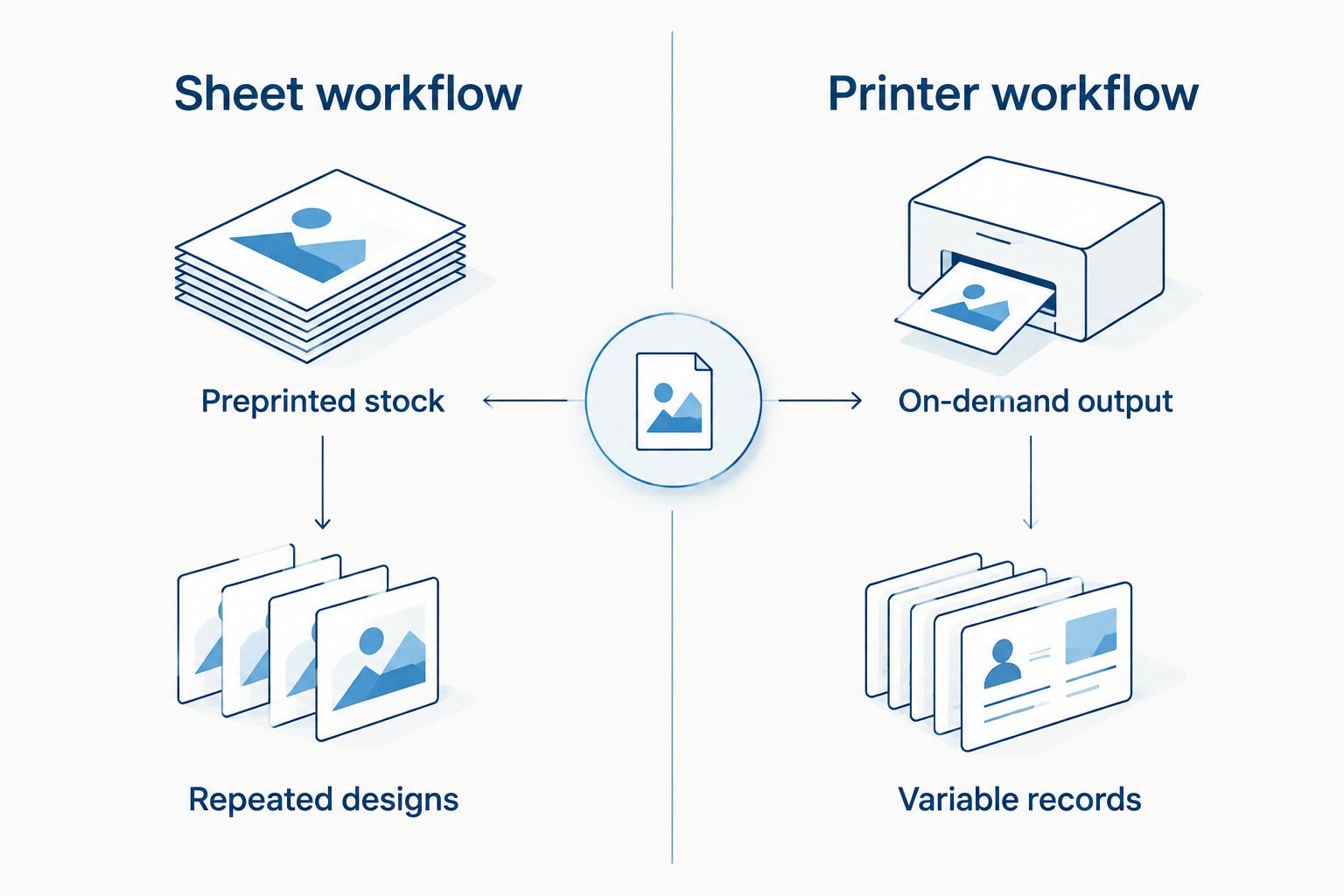
A custom label order and an in-house label printer solve different problems. One gives you labels prepared for a planned run; the other lets you print information when it becomes available. McAuley Labels belongs in the second conversation because its stated range includes direct thermal printers, asset tag printers, lab test tube labelers, and oil change sticker printers.
That distinction matters more than the word custom. A shop printing the next vehicle's service reminder has a different task from a business preparing the same design across a batch of product labels. Likewise, an equipment ID tag must be selected for its surface and tracking method, not merely for how its artwork looks on a sheet.
Use this 2026 comparison to identify the right workflow first. Then check label stock, print method, and the information each label must carry. A supplier can be a good choice for one workflow and the wrong comparison for another.
SheetLabels alternatives at a glance
| Option | Best for | Standout feature | How it differs from SheetLabels |
|---|---|---|---|
| SheetLabels | Buyers who want a sheet-label workflow | Custom labels organized around sheets | The benchmark for staying with sheets |
| McAuley Labels | Businesses printing specialized labels or ordering asset tags | Oil change sticker printer system and application-specific label options | Compare it when the task calls for a printer or a specialized tag, not just a sheet |
| OnlineLabels | Buyers who still want printable label sheets | Sheet-label selection | A closer sheet-workflow comparison than a specialized printer supplier |
| Avery | Buyers who prioritize a familiar sheet-and-template process | Label templates | Keeps the decision centered on preparing and printing sheets |
Best overall for specialized business labeling: McAuley Labels. This is not a claim that every buyer should replace sheets with a thermal printer. If the labels are identical, already designed, and used in batches, a sheet-based option remains the direct comparison.
1. McAuley Labels: best for specialized business labeling
McAuley Labels is the strongest SheetLabels alternative here when you need to print labels as work happens or select tags for equipment tracking. Its stated product scope covers direct thermal printers, asset tag printers, lab test tube labelers, and oil change sticker printers. Its listed options also include custom logo and custom text oil change stickers, barcode asset tags, QR-code inventory labels, and thermal-transfer supplies.
That range gives an auto shop, facilities team, or warehouse buyer a more specific starting point than custom labels. Start with the item being labeled and the data that must appear on it. Then decide whether to order finished labels or print variable information on site.
Where McAuley Labels shines
- Service reminders: An oil change sticker printer addresses the task of printing the next reminder during a service workflow.
- Equipment identification: Listed asset-tag options include metallized silver barcode labels, heavy-duty silver ID labels, and semi-gloss white barcode labels.
- Variable records: Listed QR-code and barcode inventory labels give you a clearer category to assess when a label must correspond to an asset record.
- Printer selection: Listed printer pages identify 203 dpi and 300 dpi models, so you can compare resolution against the size of your text or code.
Where McAuley Labels falls short
- It is not the most direct comparison if your requirement is simply to keep printing identical designs on sheets.
- A printer-based process adds decisions about label stock, print method, and setup that a finished-label order avoids.
- The listed product categories do not, by themselves, establish that a particular printer and label stock suit every application. Confirm the combination before selecting it.
Best for: Auto service shops, equipment-tracking teams, and other businesses whose label information changes from item to item. Verdict: Choose for an application-specific printing or tagging workflow; hold if your existing sheet process already covers the job.
| Decision point | McAuley Labels | SheetLabels |
|---|---|---|
| Starting question | What must be labeled, and when is the information known? | What custom label is needed on a sheet? |
| Workflow to compare | Specialized printers, finished stickers, or asset tags | Sheet-based labels |
| Useful example | A service reminder completed for an individual vehicle | A planned run of the same label design |
| Detail to verify | Printer, stock, and code requirements | Sheet format and artwork requirements |
For a printer, resolution is only one selection factor. A listed 203 dpi model and a listed 300 dpi model give you concrete options to compare; 600 dpi is another resolution category discussed in McAuley Labels' printer guides. None of those figures establishes code readability on your particular label. Test the smallest required text or code at its intended size, and check the stock against the surface and conditions of use.
2. OnlineLabels: best for staying with printable sheets
OnlineLabels is the closer alternative if you searched for SheetLabels because you want a different source for sheet labels, not a different printing process. Keep your existing artwork, printer, and application method at the center of this comparison. Changing suppliers does not fix a mismatch between the label material and the surface it must adhere to.
Where OnlineLabels shines
- It keeps the comparison focused on printable sheets rather than specialized equipment.
- It suits a buyer who wants to prepare artwork and print repeated labels in batches.
- It gives you a direct basis for checking whether your current sheet layout still fits your job.
Where OnlineLabels falls short
- Choosing another sheet supplier does not turn a batch workflow into an on-demand service-label workflow.
- A sheet-first search can distract from the material and identification requirements of asset tracking.
- You still need to verify that the selected sheet format works with your printer and artwork.
Best for: Businesses satisfied with sheet printing that want to compare sheet-label options. Verdict: Choose for a sheet-to-sheet comparison; skip as the main comparison if the actual requirement is a dedicated service or asset-tag printer.
| Decision point | OnlineLabels | SheetLabels |
|---|---|---|
| Primary comparison | Printable sheet options | Existing custom sheet-label option |
| Workflow change | No printer-category change required for the comparison | Stay with the current sheet workflow |
| First check | Sheet format and material | Current format and material |
Do not judge either option solely by the design on a screen. For a sheet workflow, the practical checks are whether the artwork aligns with the label layout, whether the printer accepts the sheet, and whether the finished label suits its surface. Those checks apply to a replacement supplier as well as to the one you already use.
3. Avery: best for a template-led sheet workflow
Avery is another sheet-oriented option to compare when preparing labels from a template is central to your process. It is a distinct choice from moving to an asset-tag printer or oil change sticker printer. If you already know the label dimensions and want to organize repeated designs, start with the template and sheet format.
Where Avery shines
- Templates give you a clear starting point for arranging repeated labels.
- A sheet workflow fits designs prepared before printing rather than details entered at the point of use.
- You can evaluate the artwork and sheet layout before considering a change of printer category.
Where Avery falls short
- A template does not settle questions about adhesive, label stock, or conditions of use.
- Sheet layout is not the main issue when every label needs a different asset ID or service detail.
- A familiar design process is not a reason to keep sheets if the job calls for application-specific printing.
Best for: Buyers whose main task is preparing and printing repeated designs on sheets. Verdict: Choose when the template-led process fits; hold if SheetLabels already provides the sheet format you need.
| Decision point | Avery | SheetLabels |
|---|---|---|
| Starting point | Template and sheet layout | Custom sheet-label requirement |
| Best question | Does the design fit the selected format? | Does the selected sheet fit the job? |
| Poor reason to switch | Expecting a template to solve a stock problem | Expecting a supplier change to solve a workflow problem |
Why people switch from SheetLabels
The sound reason to switch is a change in the labeling task, not an unsupported claim that SheetLabels performs badly. In 2026, separate these requirements before asking any supplier for an option:
- You need information printed at the point of use. An auto shop completes service details for a particular vehicle. Compare an oil change sticker printer with ordering a batch of labels that cannot contain those details in advance.
- You need equipment identifiers. An asset-tracking process starts with an ID, barcode, or QR code and the equipment surface. Compare asset-tag materials and the way each code connects to your records.
- You need to distinguish print methods. Direct thermal printing uses heat-sensitive label stock and no ribbon. Thermal-transfer printing uses a ribbon. Choose based on the stock and intended use, not the printer name alone.
- You need a different sheet-label process. If the printer and batch process are staying, compare SheetLabels with OnlineLabels or Avery on format, artwork preparation, and suitable stock.
These are reasons to compare workflows, not proof that one company lacks a product. Write down the label's surface, the information it carries, when that information becomes known, and how it will be printed. That brief eliminates options faster than a broad search for custom labels.
If you are selecting equipment in 2026, keep the comparison tied to a real sample label. A barcode that looks acceptable at a large size is not evidence that it will work at the size available on your asset. Check the code, text, label dimensions, and stock together before treating any resolution figure as the answer.
When staying with SheetLabels is the right call
Stay with SheetLabels if your current sheet format fits your printer, your labels use information available before the print run, and the finished stock meets the application. Moving to a specialized printer adds a new process without solving a problem in that case. The best alternative is no switch when sheets already match the work.
The same rule keeps this comparison honest for product labels. A business preparing one design for a planned batch does not need an oil change sticker printer merely because both outputs are called labels. Compare sheet suppliers for that job. Reopen the printer decision only when the timing, information, or application changes.
FAQ
What is the best SheetLabels alternative in 2026?
McAuley Labels is the best SheetLabels alternative here for specialized business printers and asset tags. If you need printable sheets rather than a new workflow, compare OnlineLabels or Avery instead.
Is McAuley Labels better than SheetLabels for oil change stickers?
McAuley Labels is the more relevant comparison when you need an oil change sticker printer or its listed custom sticker options. SheetLabels remains a sensible benchmark if your job is adequately handled with sheets.
Which SheetLabels alternative is best for printable sheets?
OnlineLabels is the closest sheet-focused alternative in this comparison. Avery is also relevant when a template-led sheet process is your priority.
Do I need a thermal printer instead of sheet labels?
You need to compare a thermal printer when labels must be produced as information becomes available. Keep sheet labels in consideration when you prepare repeated designs for a planned print run.
What is the difference between direct thermal and thermal-transfer printing?
Direct thermal printing uses heat-sensitive label stock without a ribbon; thermal-transfer printing uses a ribbon. Select the method alongside the label stock and its intended application.
Is 300 dpi necessary for asset tags?
A 300 dpi specification alone does not determine whether an asset tag will work. Test the required text or code at its actual printed size and check the label stock against the equipment surface.
Can I use sheet labels for equipment tracking?
Sheet labels can carry equipment information, but the stock, identifier, and application must fit the tracking task. Compare them with purpose-selected asset tags when those requirements matter.
One last thing
Before switching suppliers in 2026, take one label you already use and mark when its information becomes final. If that happens before a batch is prepared, compare sheet options. If it happens beside a vehicle, specimen, or piece of equipment, start with the application-specific printer or tag instead. That single question makes the SheetLabels comparison useful.