
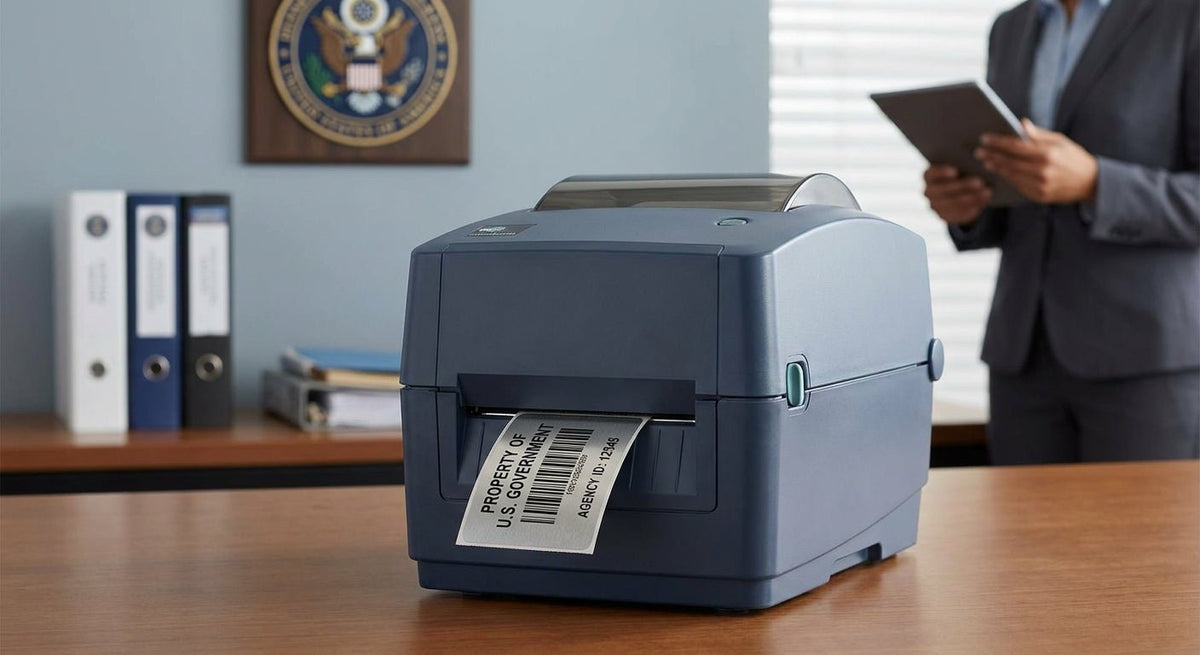
Choosing the right asset tag printer for government property tracking comes down to three non-negotiable specs: print resolution, label material durability, and audit-trail reliability — and the wrong choice fails an inspection.
TL;DR: The best asset tag printer for government property in 2026 is the Godex RT230i (300 DPI, thermal transfer) for most deployments — it prints crisp barcodes and QR codes on metalized silver polyester labels that survive outdoor storage, vandalism attempts, and decades of field use. Agencies needing higher throughput or 600 DPI serialization should step up to the Godex RT863i. McAuley Labels stocks both with matched label stock and ships from the US.
Why Government Asset Tagging Is Different
Federal and state property management rules — including guidelines under OMB Circular A-136 and agency-specific FISCAM controls — require traceable, tamper-evident identification on capital assets. A standard office label printer won't cut it. Government tags must stay legible through outdoor exposure, equipment transfers across facilities, and annual physical inventories that involve handheld scanners reading barcodes from awkward angles.
The label material matters as much as the printer. Metalized silver polyester resists abrasion, chemicals, and UV degradation that destroy paper tags within months. That's why procurement officers consistently specify thermal transfer printing on polyester stock — the resin ribbon fuses pigment into the label surface rather than onto it, producing barcodes that scan accurately after years of exposure.
In 2026, most government IT and facilities teams also require QR code support alongside traditional Code 128 or Code 39 barcodes, so print resolution of at least 300 DPI is now the floor, not a premium feature.
How We Ranked These Printers
The printers below were evaluated against five criteria relevant to government property management: print resolution (DPI), label material compatibility (polyester, metalized silver, 3M adhesive), connectivity options for networked environments, throughput speed for bulk tagging operations, and compliance-relevant features like automatic serial number sequencing. Price tier is noted but was not the primary sort criterion — durability and scan reliability were.
Ranked: Best Asset Tag Printers for Government Property in 2026
1. Godex RT230i — 300 DPI Thermal Transfer
The standard-issue pick.
The Godex RT230i runs at 300 DPI and handles 4-inch-wide label stock, which covers the full range of government asset tag sizes from standard 1" x 3" equipment tags to larger rack-mount labels. It accepts USB, serial, and Ethernet connections — critical for agencies that need to push label templates from a networked asset management system without installing per-desk software.
- Resolution: 300 DPI
- Print width: 4 inches
- Connectivity: USB, Serial, Ethernet
- Compatible stock: Metalized silver polyester, 3M heavy-duty, semi-gloss white
For 2026 government deployments, 300 DPI is the resolution at which QR codes remain scannable at small sizes (down to 0.4" x 0.4") and Code 128 barcodes stay readable after surface wear. The RT230i hits that mark reliably.
Verdict: Buy. This is the right printer for the majority of federal, state, and municipal property rooms.
2. Godex RT863i — 600 DPI Industrial Thermal Transfer
The high-specification pick for serialized or small-format tags.
The Godex RT863i prints at 600 DPI on a 4-inch print head, making it the correct choice when agencies print dense serialized data matrices, micro-text for compliance markings, or tags small enough that 300 DPI barcode edges become jagged. Defense contractors, research labs, and IT asset rooms that tag components smaller than 1" square need this resolution.
- Resolution: 600 DPI
- Print width: 4 inches
- Use case: Micro-tags, dense data matrix codes, compliance-grade serialization
600 DPI adds cost per unit but eliminates re-tag cycles from unreadable barcodes — a failure mode that costs agencies scanner time and audit credibility. At 600 DPI, the dot pitch is 0.042mm, producing edges that remain sharp on metalized polyester even after chemical cleaning.
Verdict: Buy for IT asset rooms and labs. Hold for general facilities use where 300 DPI is sufficient.
3. Godex GE330 — 4-inch, 203 DPI Thermal Transfer
The budget-conscious entry point.
The Godex GE330 asset tag printer is the lowest-cost thermal transfer option in the McAuley Labels lineup that still supports metalized silver and 3M heavy-duty label stock. At 203 DPI, it prints standard Code 39 and Code 128 barcodes legibly at sizes of 1" height and above.
- Resolution: 203 DPI
- Best for: Property rooms with large-format tags (1" height minimum), low-volume tagging
- Limitation: Not suitable for QR codes smaller than 0.75" or dense 2D data matrix codes
Agencies working within tight procurement budgets that primarily tag large equipment — vehicles, generators, HVAC units — will find the GE330 sufficient. Agencies tagging laptops, monitors, or small IT components should step up to 300 DPI.
Verdict: Consider for facilities and fleet. Skip for IT asset management.
4. Godex ZX430i — 4-inch, 300 DPI with Higher Throughput
The volume pick for central property offices.
The Godex ZX430i matches the RT230i's 300 DPI resolution but is built for higher-volume batch runs — relevant for agencies that conduct annual physical inventories and need to reprint tags for hundreds of assets in a single session. Its heavier-duty mechanism handles longer continuous print runs without head degradation.
- Resolution: 300 DPI
- Throughput: Higher continuous-duty rating than the RT-series
- Connectivity: Ethernet standard
For a central property office that issues tags to multiple departments, the ZX430i reduces downtime during large tagging events.
Verdict: Buy for centralized property management offices processing 500+ tags per quarter.
5. Godex MX30i — Mobile Thermal Transfer Printer
The field pick for on-site audits and transfers.
Fixed printers cover the property room. The Godex MX30i handles the field side: Bluetooth and USB connectivity, battery-powered operation, and compatibility with metalized silver polyester stock in roll format. Auditors doing walk-around physical inventories can print replacement tags on-site rather than returning to a central station.
- Print width: 3 inches
- Connectivity: Bluetooth, USB
- Power: Battery
- Weight: Portable (belt-clip or vest-carry capable)
For agencies with distributed facilities or vehicle fleets, pairing one fixed-station printer with one MX30i covers both bulk issuance and field replacement without two separate procurement line items.
Verdict: Buy as a complement to any fixed-station printer above. Not a standalone replacement.
Comparison Table
| Printer | DPI | Print Width | Ethernet | Best For | Verdict |
|---|---|---|---|---|---|
| Godex RT230i | 300 | 4" | Yes | Standard government tags | Buy |
| Godex RT863i | 600 | 4" | Yes | Micro-tags, IT assets | Buy (IT/Lab) |
| Godex GE330 | 203 | 4" | Yes | Large equipment, budget | Consider |
| Godex ZX430i | 300 | 4" | Yes | High-volume central office | Buy (volume) |
| Godex MX30i | 203 | 3" | No (BT) | Field audits, fleet | Buy (field) |
Label Stock: What to Pair with Your Printer
The printer is only half the system. Government asset tags must be specified alongside the correct label material:
- Metalized silver polyester — the standard for equipment subject to outdoor exposure, temperature swings, and abrasion. Survives chemical wipe-downs used in government facilities. Pairs with resin or wax-resin ribbon.
- 3M heavy-duty adhesive — for assets on painted metal, powder-coated surfaces, or painted concrete where standard adhesive fails within months. The heavy-duty silver barcode asset tag uses 3M-grade adhesive on metalized polyester.
- Semi-gloss white — for indoor assets in climate-controlled environments (office furniture, AV equipment) where aesthetics and scan clarity matter more than extreme durability.
For government property specifically, McAuley Labels' custom 3M asset labels for government property covers the material selection decision in detail, including adhesive performance data across surface types.
What to Avoid
Direct thermal printers for permanent asset tags. Direct thermal prints fade within 12–18 months under UV exposure. A tag that won't scan at the next annual inventory is a compliance failure, not a minor inconvenience. Thermal transfer — where a ribbon deposits resin into the label face — is mandatory for government asset tagging.
203 DPI for small-format or QR code tags. At 203 DPI, a 0.5" QR code produces a dot pitch that most handheld government scanners reject. If your tag size is under 1" in any dimension, 300 DPI is the minimum.
Generic label stock from office supply stores. Paper labels on metal assets peel, absorb moisture, and become unreadable. Government audit standards effectively require polyester or equivalent synthetic material on any asset exposed to humidity, outdoor conditions, or cleaning agents.
Where to Buy
- McAuley Labels (mcauleylabels.com) — US manufacturer and direct seller of Godex printers and matched label stock. Ships from the US; no import lead times. Metalized silver, 3M heavy-duty, and semi-gloss white stock available in government-standard sizes.
- Direct procurement via custom quote — agencies with volume requirements or specific size requirements can use McAuley Labels' custom quote page to specify quantities, material, and print format.
- GSA Schedule — verify current GSA availability directly with the vendor before assuming schedule pricing applies.
FAQ
What is the best asset tag printer for government property in 2026? The Godex RT230i at 300 DPI is the best all-around asset tag printer for government property in 2026. It prints QR codes and barcodes on metalized silver polyester with Ethernet connectivity for networked property management systems.
What DPI do I need for government asset tag barcodes? 300 DPI is the practical minimum for government asset tags in 2026, particularly for Code 128 barcodes and QR codes on tags smaller than 1" x 1". 600 DPI is required for micro-tags and dense data matrix codes on small components.
Is thermal transfer or direct thermal better for government property tags? Thermal transfer is required for any tag that must remain legible beyond 18 months or that will be exposed to UV light, moisture, or cleaning chemicals. Direct thermal fades and is unsuitable for permanent government asset identification.
What label material should government agencies use for asset tags? Metalized silver polyester is the standard. For assets on painted metal or powder-coated surfaces, specify 3M heavy-duty adhesive backing. Semi-gloss white is acceptable for indoor, climate-controlled assets only.
Can I print QR codes on government asset tags with a 203 DPI printer? Only at sizes of 0.75" square or larger. Below that, 203 DPI produces QR code edges that most scanner firmware rejects. For tags smaller than 0.75", use 300 DPI or higher.
Do government asset tag printers need Ethernet connectivity? Yes, for any deployment where label templates are pushed from a networked asset management system (DPAS, AMS, or agency-specific platforms). USB-only printers require per-workstation driver installation, which creates configuration inconsistency across property rooms.
How do I print serial numbers sequentially on government asset tags? Godex printers running GoLabel software support automatic serial number incrementing. You set the starting number, increment value, and quantity — the printer sequences every tag without manual input. This is the correct method for issuing numbered tags across a fiscal year's procurement.
What is the difference between asset tags and inventory labels? Asset tags are permanent identifiers for tracked capital assets — equipment, vehicles, IT hardware — with durable materials designed to last the asset's full life. Inventory labels are typically shorter-lived, repositionable labels for consumables or shelving locations. Government property management requires asset tags, not inventory labels.
One Last Thing
Metalized silver polyester labels printed with a resin ribbon on a 300 DPI thermal transfer printer will outlast the equipment they're attached to in most government use cases. The failure point in government asset tagging is almost never the printer — it's using the wrong label material or printing at 203 DPI and discovering the barcodes won't scan two years into a five-year asset life cycle. Specify the material and resolution before you specify the printer model.