
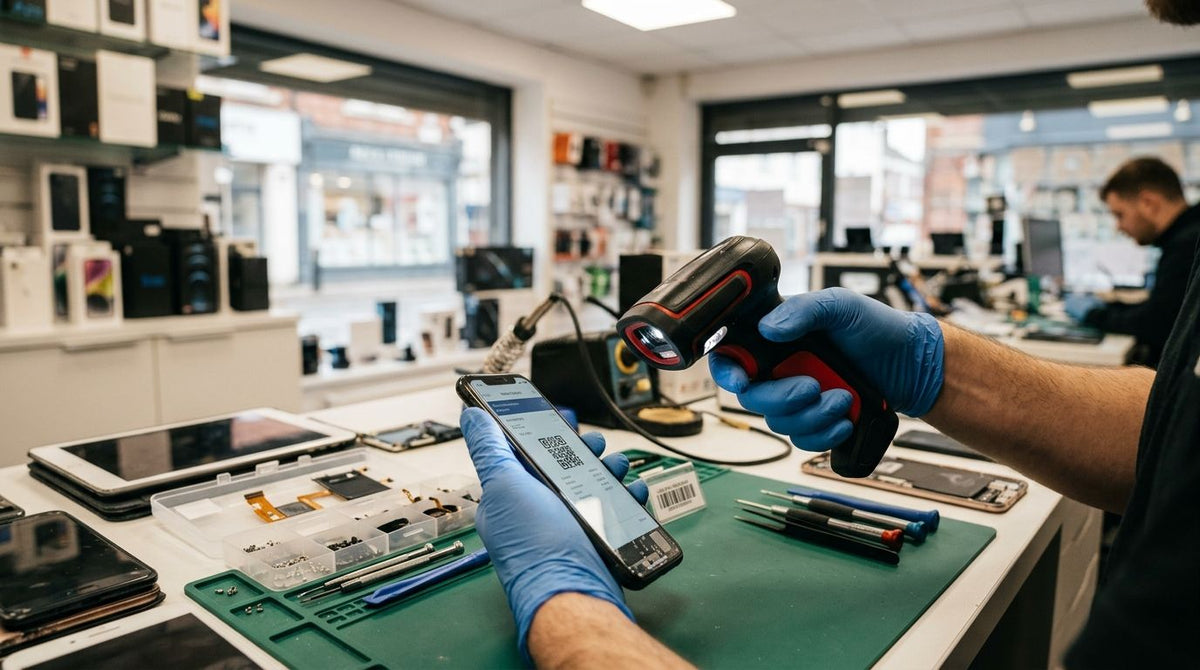
Best overall: GoDEX GS220 USB Barcode Scanner. Best for damaged or curved part labels: a 2D imager scanner. Best for techs who move between the bench and the counter: a wireless Bluetooth scanner. Best budget backup: a smartphone barcode scanning app. Here's how each stacks up for a phone and electronics repair shop tracking screens, batteries, and connectors in 2026.
- GoDEX GS220 USB Barcode Scanner is the pick for most repair counters: 1D, plug-and-play, no drivers to install.
- 2D imager scanners read QR codes and barcodes wrapped around curved cases or scuffed screen protectors that 1D scanners miss.
- Wireless Bluetooth scanners cut the tether between the repair bench and the front counter.
- A barcode scanner for phone repair shop counters rarely needs warehouse-grade range — decoding at arm's length matters more.
- Pairing a scanner with metalized silver asset tags keeps small parts trackable through 2026 without labels curling off.
Why this matters
A phone repair shop juggles hundreds of small SKUs — screens by model, batteries by capacity, connectors by pin count. Type each part number by hand at check-in and you'll eventually swap a screen meant for one ticket onto another.
A barcode scanner turns that into a half-second decode instead of a keystroke error. McAuley Labels builds the label side of that workflow — thermal-printed asset tags and inventory labels — and the scanner side is the part most shops get wrong by buying whatever's cheapest on a marketplace listing without checking what it actually decodes.
The real decision isn't "which brand" — it's 1D versus 2D, wired versus wireless, and whether the scanner tolerates a label that's been peeled off a curved battery pack twice already.
What makes the best barcode scanner for a phone repair shop
- Scan engine type — 1D linear scanners decode standard barcodes; 2D imagers add QR codes and read at odd angles.
- Connection — USB plug-and-play versus Bluetooth wireless changes how far a tech can roam from the register.
- Angle tolerance — labels wrapped around curved cases or battery packs need omnidirectional reads, not a straight-line laser.
- Software fit — most repair-ticket and POS systems expect keyboard-emulation (HID) input with zero driver install.
- Bench durability — counters see drops, dust, and the occasional isopropyl alcohol spill.
Barcode scanners for phone repair shops at a glance
| Option | Best for | Standout feature | Key limitation |
|---|---|---|---|
| GoDEX GS220 USB Barcode Scanner | Everyday counter check-in/checkout | Plug-and-play USB, no driver install | Reads 1D barcodes only |
| 2D imager scanner | Curved or damaged part labels | Omnidirectional reads, decodes QR codes | Adds a second device type to manage |
| Wireless Bluetooth scanner | Bench-to-counter mobility | Untethered scanning away from the register | Needs charging and pairing upkeep |
| Smartphone scanning app | Backup or very low-volume shops | Uses hardware you already own | Slower and less reliable on small labels |
1. GoDEX GS220 USB Barcode Scanner: best barcode scanner for phone repair shop counters
The GoDEX GS220 USB Barcode Scanner is a 1D scanner that plugs into a USB port and types decoded barcodes directly into whatever field your cursor sits in — no software install, no configuration screen. That's the entire appeal for a repair counter running a POS or ticketing system: point, click, done.
It handles standard linear barcodes on parts bins, work orders, and printed asset tags without issue. It comes with a 3-year warranty, which matters on a device that gets picked up and set down dozens of times a shift.
GoDEX GS220 pros:
- Plug-and-play USB, works with any HID-compatible POS or ticketing software
- No driver install or setup screen
- 3-year warranty
- Reads standard barcodes on bins, tickets, and printed asset tags reliably
GoDEX GS220 cons:
- 1D linear only — it won't decode QR codes
- Wired, so the scanner stays at the counter
- Not built for heavily bent or highly reflective labels
Best for: shops that check parts in and out at a single fixed register. Verdict: Buy.
2. 2D imager scanner: best for QR codes and curved or damaged labels
A 2D imager decodes everything a 1D scanner does plus QR codes and 2D matrix codes, and it reads omnidirectionally — tilt the label, wrap it around a curved case, scuff half the barcode, and it still usually catches the readable half.
That matters if you print QR-coded service tags for tracking a repair through diagnosis, ordering, and pickup, or if vendor parts arrive with codes on curved battery-pack sleeves.
2D imager pros:
- Reads QR codes plus every standard 1D format
- Omnidirectional — no need to line the label up straight
- More tolerant of scuffed or partially torn labels
2D imager cons:
- Costs more than a comparable 1D unit
- Overkill if your parts only carry basic UPC labels
Best for: shops using QR-coded service tags or stocking parts that arrive in awkward, curved packaging. Verdict: Buy if you're already printing QR codes.
3. Wireless Bluetooth scanner: best for bench-to-counter workflow
A Bluetooth scanner decodes the same barcodes as its wired counterpart but pairs to a register, tablet, or laptop without a cable. A tech can scan a part at the repair bench, then walk it to the counter to close out the ticket.
That's a real advantage in a one- or two-tech shop where the bench and the register aren't next to each other. It's less useful in a shop with a fixed check-in station where nobody needs to move.
Wireless scanner pros:
- No cable tying the scanner to one spot
- Works well for solo techs handling both repair and walk-up sales
- Can pair to more than one device
Wireless scanner cons:
- Battery needs charging management
- Bluetooth pairing can drop and need reconnecting
- Generally priced above an equivalent wired model
Best for: solo techs or small shops where the bench and counter sit apart. Verdict: Hold — only worth it if your layout actually needs the mobility.
4. Smartphone barcode scanning app: best budget backup option
A scanning app uses a phone's camera to decode a barcode instead of dedicated hardware. It costs nothing extra if the phone is already sitting on the counter.
It's fine for the occasional stock check but not built for high-volume counter work — it's slower per scan and struggles with small, glossy labels on phone parts.
Scanning app pros:
- Zero extra hardware to buy
- Works instantly on a phone you already own
- Fine for occasional inventory spot-checks
Scanning app cons:
- Noticeably slower than dedicated hardware
- Struggles with small or reflective part labels
- Ties up the phone while scanning
Best for: very low-volume shops or a backup when the primary scanner is down. Verdict: Wait — only lean on this until volume justifies real hardware.


How we ranked these
Each pick maps to one of the criteria above: the GoDEX GS220 wins on plug-and-play software fit and counter durability, the 2D imager wins on angle tolerance and QR support, the wireless scanner wins on connection flexibility, and the app is ranked last because it fails the durability and speed tests that matter most on a busy bench.
The ranking isn't a popularity contest — it's a decision tree. Pick the row that matches your shop's actual layout and label types, not the scanner with the most features you'll never touch.
“The ranking isn't a popularity contest — it's a decision tree: pick the row that matches your shop's layout, not the scanner with the most features you'll never touch.”
Which barcode scanner should you choose?
If you run one counter and print standard barcodes on bins and work orders, the GoDEX GS220 USB Barcode Scanner is the default — it's plug-and-play, carries a 3-year warranty, and needs zero setup time in 2026 or any year after.
Switch to a 2D imager the moment you start printing QR-coded service tags or your parts arrive on curved packaging that a 1D scanner keeps missing. Add a wireless scanner only if your bench and counter are physically separate — otherwise it's an extra charging cable for no real gain.
Once a part scans clean at checkout, that same barcode data usually flows straight onto the invoice you hand the customer. Shops that already standardize their repair tickets follow the same structure as a payment receipt template, matching each scanned part number to a line item the customer can verify before they pay.
One last thing
A scanner is only as good as the label it's reading. Standard paper labels curl and fade fast on a bench that sees isopropyl alcohol, heat guns, and soldering irons — pair whichever scanner you pick with a metalized or polyester label stock so the barcode stays scannable after the tenth wipe-down, not just the first.
FAQ
What's the best barcode scanner for a phone repair shop?
For most counters, a plug-and-play 1D USB scanner like the GoDEX GS220 is the best fit in 2026 because it works with any POS or ticketing software without a driver install. Shops printing QR-coded service tags should step up to a 2D imager instead.
Is a 1D or 2D barcode scanner better for phone repair inventory?
A 1D scanner covers standard barcodes on bins and tickets and costs less to run. A 2D imager is better if you use QR codes or handle parts with curved, damaged, or scuffed labels that a straight-line scanner struggles to read.
Can I use a smartphone camera instead of a dedicated scanner?
Yes, but only as a backup or for very low scan volumes. A phone-based scanning app is slower per scan and less reliable on small, glossy phone-part labels than dedicated hardware.
Does a barcode scanner work with any repair shop software?
Most USB and Bluetooth barcode scanners use HID keyboard emulation, meaning they type the decoded barcode into whatever field is selected. That makes them compatible with nearly any POS or repair-ticket system without special drivers.
How do I label small phone parts for scanning?
Print barcodes on durable label stock sized for small bins or trays, since standard paper labels wear out fast around solvents and heat. Metalized or polyester stock holds up better on a repair bench through repeated handling.
What's the difference between wired and wireless barcode scanners?
A wired USB scanner stays tethered to one register and needs no charging. A wireless Bluetooth scanner roams between the bench and counter but needs battery management and occasional re-pairing.
Do barcode scanners read QR codes on phone boxes or service tags?
Only 2D imager scanners read QR codes; standard 1D scanners can't decode them. If your shop prints QR-coded service tags, a 2D scanner is the right pick, not a 1D unit.