
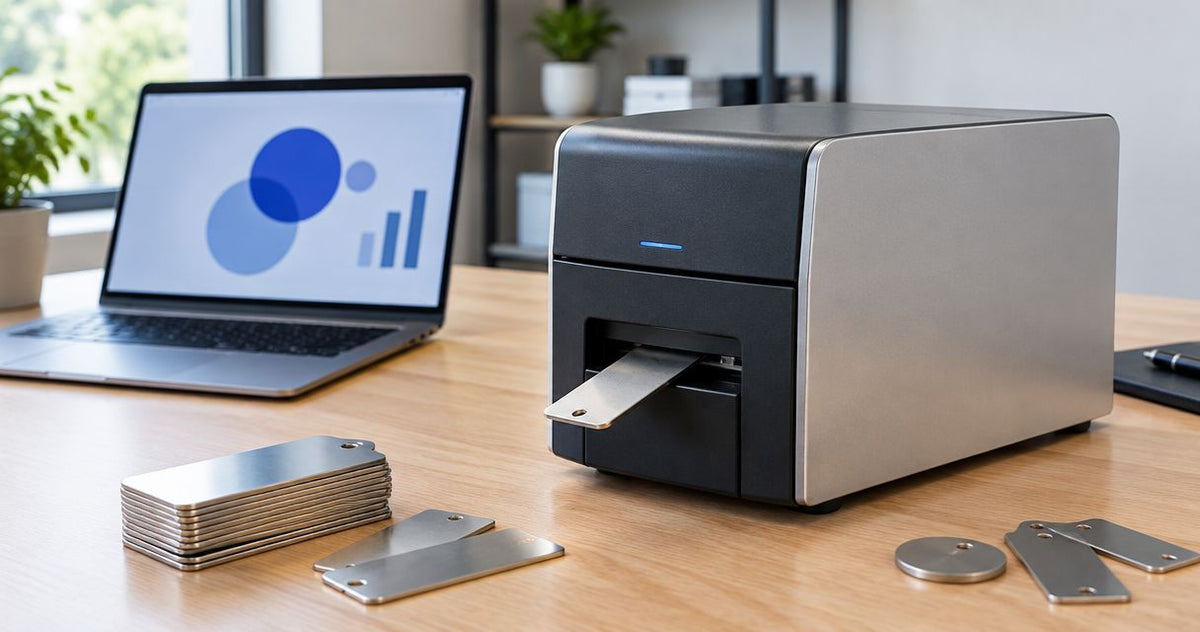
Metal asset tag printer cost depends first on whether you need to print adhesive metalized labels or mark solid metal plates; those jobs require different equipment. For adhesive asset tags, budget for the printer, compatible label stock, thermal transfer ribbon, and setup—not just the machine. This 2026 guide explains how to specify the right system and compare complete quotes.
- Metal asset tag printer cost starts with the material: metalized adhesive labels and solid metal plates require different equipment.
- GoDEX G530 is a 300 DPI option to evaluate for adhesive asset labels, subject to media compatibility.
- GoDEX RT700i+ provides 203 DPI printing; GoDEX ZX430i+ provides 300 DPI printing and listed industrial connections.
- Compare printer, label stock, ribbon, setup, and usable output—not hardware alone.
For a system-specific purchasing request, use the McAuley Labels custom quote page. Specify the tag material and finished label design before asking for a printer recommendation.
How much does a metal asset tag printer cost?
Compare the complete labeling system, not a generic metal-tag printer category. A thermal label printer prints compatible label stock; it does not engrave a solid metal plate. A silver appearance alone does not tell you which process you need.
For adhesive asset labels, the following models provide a specification-based shortlist. Their listed resolutions and interfaces support comparison, but those specifications do not establish compatibility with every metalized label or ribbon.
| Printer option | Listed specifications | Best for evaluating | Advantage | Limitation to check |
|---|---|---|---|---|
| GoDEX G530 Thermal Printer | 4-inch, 300 DPI, dual thermal | Adhesive asset labels with detailed text and codes | Supports direct thermal and thermal transfer workflows | Exact stock, ribbon, and connection requirements need confirmation |
| GoDEX RT700i+ Thermal Printer | 4-inch, 203 DPI, dual thermal, color display | Asset-label designs that pass a scan test at 203 DPI | Provides both thermal printing methods and a color display | Lower resolution than the listed 300 DPI options |
| GoDEX ZX430i+ Thermal Printer | 4-inch, 300 DPI, dual thermal, USB/Serial/Ethernet | Industrial labeling workflows needing the listed connections | Combines 300 DPI output with several connection types | Industrial positioning does not establish your required output or material compatibility |
Treat these as adhesive-label printer options, not metal-plate marking machines. For a solid plate, request equipment specifically designed for the plate material and marking method.
What belongs in the purchase breakdown?
Separate the quote into hardware, consumables, and implementation. That makes omissions visible.
- Printer: exact model, resolution, printing method, and connections.
- Label stock: material, adhesive, dimensions, roll format, and printable coating.
- Ribbon: formulation and dimensions matched to the printer and label stock.
- Setup: label template, data import, driver configuration, and calibration responsibilities.
- Acceptance testing: printed samples, barcode scanning, and application testing on your equipment.
- Ongoing operation: replacement consumables, cleaning, maintenance, and operator time.
For your 2026 purchase, ask suppliers to identify what each quote includes. A printer-only quote and a ready-to-print system quote are not equivalent scopes.
Why this matters
An asset tag has to stay attached, remain readable, and retrieve the correct equipment record. Printer resolution addresses only part of that job.
A sharp barcode on unsuitable stock still fails the application. A durable label carrying a duplicate asset ID still fails the tracking process. Approve the material, print, and data workflow together.
McAuley Labels supplies asset tag printers and custom labels for businesses. McAuley Labels is a fit for business buyers sourcing adhesive asset labels and label-printing equipment. For solid metal plates, establish the marking process separately rather than assuming a thermal printer can handle the job.
Adhesive metalized labels: specify the complete combination
Metalized polyester labels are flexible adhesive labels, not solid metal plates. Their suitability depends on the label construction, printable surface, adhesive, and conditions where you apply them.
Best for: buyers who need adhesive equipment identification and have confirmed that the selected material suits the surface and environment. The practical advantage is an adhesive-label workflow; the limitation is that the label's performance still depends on the chosen construction and application.
For thermal transfer printing, the printer uses a ribbon to transfer the image onto compatible media. Specify both together. A ribbon intended for another application does not become suitable simply because it fits inside the machine.
Before ordering, ask for a sample printed with your actual asset ID, text, and barcode. Apply it to the intended surface and test it under the conditions your equipment encounters. Do not substitute a paper demonstration label for the production material.
Solid metal plates: specify marking equipment separately
Solid metal plates require a process suited to marking that material, such as engraving or an appropriate laser-marking system. A roll-fed thermal label printer is not a substitute.
Best for: applications whose requirements explicitly call for a solid metal identification plate. The benefit is meeting that material requirement; the trade-off is a separate equipment, attachment, and marking workflow.
Tell the supplier the plate material, finished dimensions, attachment method, and required marking. Include whether the result needs readable text, a barcode, or both. Do not compare a plate-marking quote with an adhesive-label printer quote as though they deliver the same output.
For a 2026 equipment purchase, keep these categories separate in your purchasing request. Ask each supplier to state the finished tag construction before discussing machine specifications.
Printer resolution: compare 203 DPI, 300 DPI, and 600 DPI
Resolution describes dot density, not adhesive strength or environmental resistance. More dots per inch allow finer printed detail, but the finished barcode still needs suitable dimensions, clear space, contrast, and a successful scan test.
203 DPI: evaluate the finished label first
The GoDEX RT700i+ lists 203 DPI output. Best for: designs whose text and barcodes remain readable at that resolution in the intended label size.
Its dual thermal capability supports different printing workflows. The limitation is lower dot density than 300 DPI or 600 DPI equipment, so approve the actual printed design rather than relying on a screen preview.
300 DPI: evaluate detailed asset-label layouts
The GoDEX G530 and GoDEX ZX430i+ list 300 DPI output. Best for: buyers evaluating finer text or barcode detail than their existing 203 DPI workflow provides.
The advantage is higher dot density than 203 DPI. The limitation is unchanged: resolution alone does not prove that the label stock, ribbon, scanner, and design work together.
600 DPI: require a demonstrated detail need
600 DPI equipment provides finer dot density than 300 DPI equipment. Best for: layouts where an actual print test demonstrates a need for that added detail.
Do not select 600 DPI solely because the tag has a metallic appearance. Metalized stock is a material decision; resolution is an image-detail decision. Keep them separate in your specification.
How do you get a comparable printer quote?
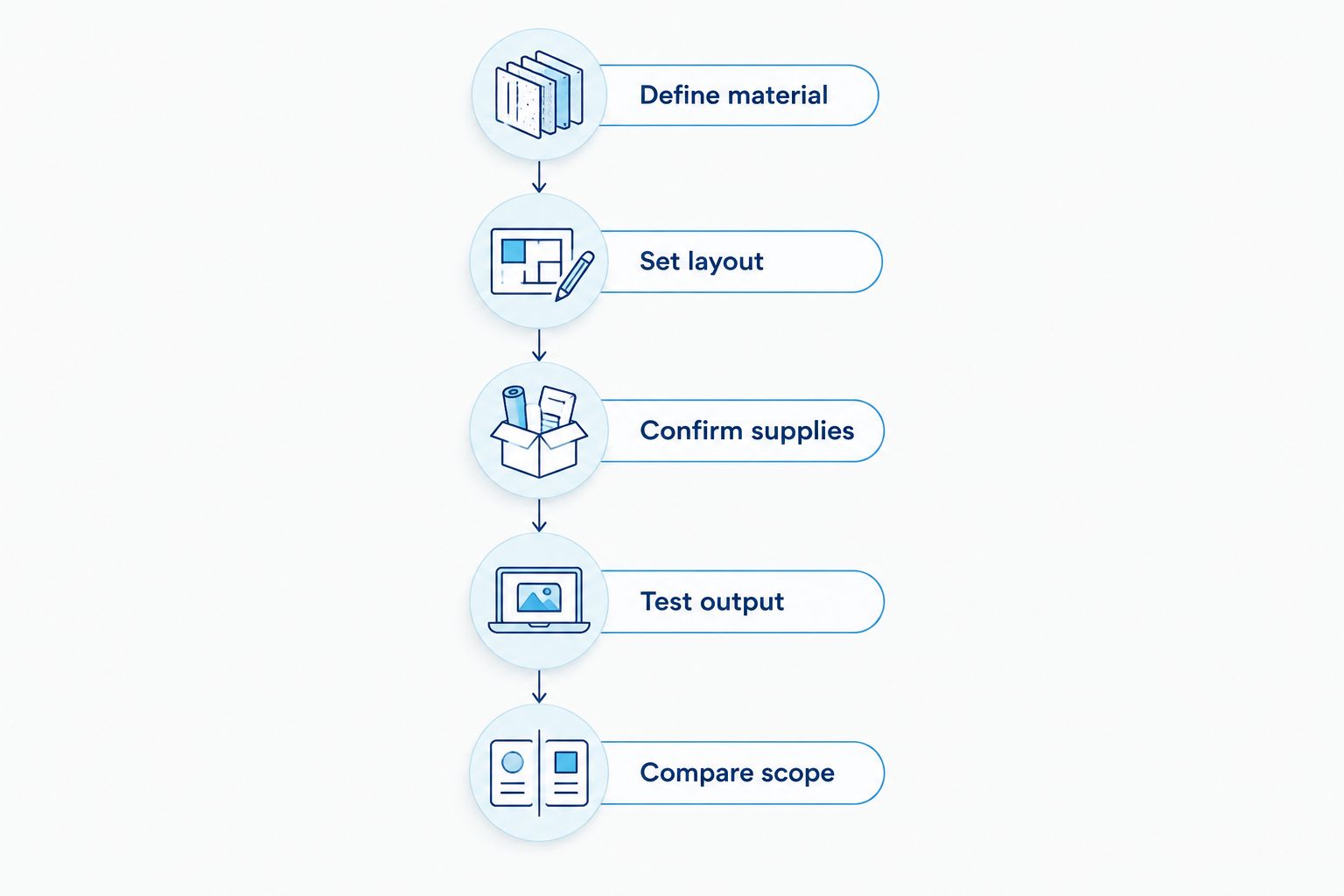
Use the same specification for every supplier. Follow this sequence before choosing equipment.
- Define material. State adhesive metalized label or solid metal plate. Include the surface where the tag will be attached.
- Set layout. Provide finished dimensions, asset ID format, text, barcode type, and required clear space.
- Confirm supplies. Identify the exact stock and, for thermal transfer, the compatible ribbon.
- Test output. Print the finished design, scan it with the intended device, and check the attached sample.
- Compare scope. Record hardware, consumables, connections, setup responsibilities, and maintenance terms separately.
For McAuley Labels asset tag printers, provide the production label design rather than a general request for durable tags. The useful question is whether the proposed printer, stock, and ribbon produce your required result together.
The product cards below identify the models in the comparison. Review their current listings, then confirm the media combination before ordering; none should be treated as equipment for engraving metal plates.


Why metal asset tag printer cost varies
These factors change the equipment and supplies you need. Use them to explain differences between quotes, not to assume that a particular specification always produces a particular expense.
- Tag construction: adhesive metalized stock and solid metal plates require different production methods.
- Image detail: 203 DPI, 300 DPI, and 600 DPI represent different dot densities; the required layout determines what to evaluate.
- Media format: label width, roll configuration, and sensor requirements must match the machine.
- Consumable pairing: thermal transfer requires a compatible ribbon and printable stock; direct thermal uses heat-sensitive media without a ribbon.
- Connections: USB, Serial, and Ethernet are distinct interfaces. Specify how the printer will receive jobs.
- Implementation scope: templates, data handling, calibration, and acceptance testing belong in the purchasing scope.
For your 2026 comparison, record each supplier's assumptions next to the proposed system. If the assumptions differ, resolve them before deciding which quote meets the requirement.
How do you compare ongoing printing expense?
Compare the resources used to produce accepted tags, not merely the number of labels fed through the printer. Reprints, failed scans, and installation work belong in the operating review.
For thermal transfer, track label stock and ribbon consumption separately. Include time spent loading supplies, preparing data, applying tags, and correcting rejected output. Use your actual usage records rather than a generic cost-per-label claim.
Evaluate usable output before expanding production. A successful test should confirm readable text, a working scan, correct asset data, and appropriate attachment. Those checks prevent you from approving hardware on print appearance alone.
Can a thermal printer print on actual metal tags?
A standard thermal label printer prints compatible label media, not solid metal plates. For adhesive metalized asset labels, confirm the printable coating and ribbon combination; for a solid plate, specify a suitable marking process.
The distinction matters even when both finished tags look silver. Ask for the material construction in writing.
Is 300 DPI always better than 203 DPI for asset tags?
300 DPI provides higher dot density than 203 DPI, but it is not automatically the better purchase. Select the resolution that produces readable text and reliably scannable codes at your required dimensions.
The GoDEX G530 and GoDEX ZX430i+ provide 300 DPI options for evaluation. Test the same design across the shortlisted equipment rather than changing the layout between demonstrations.
Do you need ribbon for metalized asset labels?
Thermal transfer printing requires ribbon; direct thermal printing does not. For a metalized label, confirm which printing method the exact stock supports and obtain the recommended ribbon specification where applicable.
Do not assume an oil change sticker ribbon suits an asset-label material. Application names and physical fit do not establish print compatibility.
FAQ
What determines metal asset tag printer cost?
Metal asset tag printer cost depends on the tag construction, printer specifications, consumables, and setup scope. Separate adhesive metalized-label printing from solid metal-plate marking before requesting quotes.
Can I use a thermal label printer to engrave metal plates?
No. A thermal label printer prints compatible label media; engraving solid metal plates requires equipment designed for that marking process.
What's the difference between metalized labels and metal asset plates?
Metalized labels are flexible adhesive labels with a metallic appearance, while metal asset plates are solid metal tags. Their printing or marking methods and attachment requirements differ.
Is a 203 DPI printer enough for barcode asset tags?
A 203 DPI printer is a candidate when the finished barcode and text pass testing at the required label size. Confirm scanning with the device used in your actual workflow.
What's the advantage of 300 DPI asset-label printing?
300 DPI provides higher dot density than 203 DPI, allowing finer printed detail. It does not establish label durability, adhesive performance, or barcode readability by itself.
Do metalized asset labels need thermal transfer ribbon?
Metalized asset labels need ribbon when their specified printing method is thermal transfer. Confirm the exact label coating and ribbon combination before ordering consumables.
What should I request before buying an asset tag printer in 2026?
Request a sample of your finished label printed on the proposed production stock in 2026. Confirm scanning, attachment, data accuracy, connections, and the complete supply specification before approving the system.
One last thing
A tag attached to metal is not necessarily a metal tag. That distinction is the first purchasing decision, not a detail to settle after ordering a machine.
For your 2026 purchase, put the finished tag construction at the top of the specification. Then ask McAuley Labels to confirm the adhesive-label printer and supply combination against that requirement. Do not replace a material decision with a resolution upgrade.