
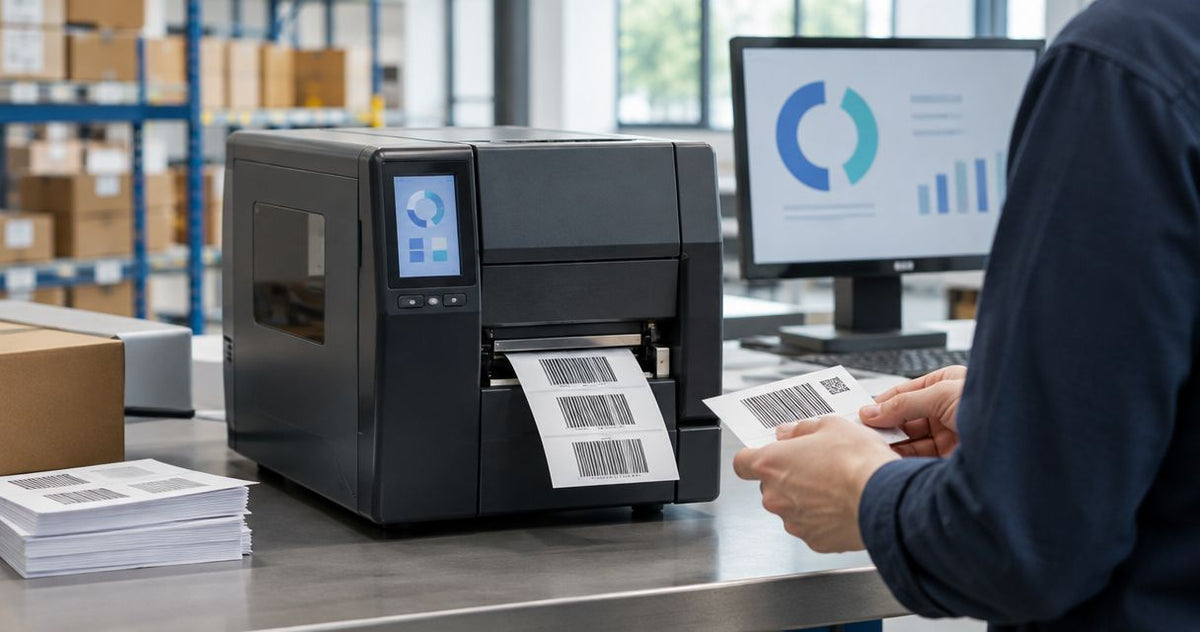
An industrial barcode label printer cost estimate in 2026 should cover the printer, compatible labels, ribbon where required, and the setup needed to produce usable barcodes. Compare the current printer figures in the product cards below, then budget separately for consumables, maintenance, and any label-handling equipment your workflow needs.
- Compare industrial barcode label printer cost by complete configuration, not printer hardware alone.
- GoDEX ZX430i+ offers 300 DPI printing; confirm your label layout before selecting higher resolution.
- GoDEX GX4200i specifies up to 16 IPS; test usable output with your actual barcode template.
- McAuley Labels supplies specialized label printers; match thermal transfer printing and label stock to the application.
Why this matters
A printer purchase only works if the finished label scans, stays attached, and remains readable for its intended use. Buying hardware before specifying the label leaves those requirements unresolved.
The GoDEX ZX430i+ thermal printer provides a concrete starting configuration: 4-inch industrial dual thermal printing, 300 DPI resolution, and USB, serial, and Ethernet connections. Those specifications describe a printer—not a complete labeling workflow.
McAuley Labels is best for businesses seeking specialized label printers for asset tags, laboratory labels, and automotive service stickers. For an industrial barcode project, confirm the exact model, media, and connection requirements rather than treating that broader product range as proof that every printer fits every job.
How much does an industrial barcode label printer cost?
Use current product-card figures as hardware references for your 2026 budget. Keep the printer configuration and the operating requirements separate when comparing quotes; a bare printer and a system with supplies or accessories are different purchases.
The comparison below uses the supplied specifications for three industrial GoDEX printers. It does not assume that resolution alone determines the right machine.
| Industrial printer | Stated specifications | Best for | Functional advantage | Limitation to check |
|---|---|---|---|---|
| GoDEX ZX430i+ | 4-inch dual thermal; 300 DPI; color display; USB/serial/Ethernet | Buyers evaluating detailed barcode layouts | Combines industrial printing with 300 DPI resolution | Test the required batch; no print-speed figure is stated here |
| GoDEX GX4200i | 4-inch dual thermal; 203 DPI; up to 16 IPS; 5-inch touchscreen; USB/serial/Ethernet | Buyers evaluating speed-focused labeling | Provides a stated maximum print-speed specification | Validate dense codes and small text at 203 DPI |
| GoDEX GX4300i | 4-inch industrial dual thermal; 300 DPI; USB/serial/Ethernet | Buyers comparing another industrial 300 DPI configuration | Provides higher dot density than a 203 DPI configuration | Confirm throughput and accessory requirements before choosing |
These are configuration comparisons, not a durability ranking. An industrial designation does not establish a particular drop rating, dust rating, or continuous-duty capacity.
What belongs in the complete budget?
Separate the purchase into identifiable components. That makes it easier to compare offers without mistaking an omitted item for a saving.
| Budget component | What to specify | What to check |
|---|---|---|
| Printer hardware | Exact model, resolution, and connection method | Whether the quoted configuration matches the required workflow |
| Label stock | Material, adhesive, dimensions, and roll configuration | Compatibility with the printer and application surface |
| Ribbon | Ribbon type and dimensions for thermal transfer printing | Compatibility with both the printer and label material |
| Setup | Driver, template, data source, and calibration | Who completes and validates each task |
| Maintenance | Cleaning requirements and replacement components | Manufacturer instructions and service arrangements |
| Label handling | Rewinding, cutting, or other finishing needs | Whether accessories are necessary and compatible |
Compare complete configurations, not model names alone. Require each quote to identify what is included, what needs separate ordering, and what needs confirmation before installation.
GoDEX ZX430i+: 300 DPI industrial label printing
The GoDEX ZX430i+ is a 4-inch dual thermal industrial label printer with 300 DPI resolution, a color display, and USB, serial, and Ethernet connections. Its supplied description also states a 3-year warranty.
Best for: buyers evaluating detailed barcode layouts on an industrial printer. The 300 DPI specification gives you more dots per inch than a 203 DPI printhead, but the barcode layout still needs testing at its intended dimensions.
The advantage is a clearly specified resolution and connection set. The limitation is that those specifications do not establish output speed for your job, compatibility with your business software, or resistance to a particular environment.
For a 2026 purchase, send the actual label template and media requirements with your inquiry. Ask for confirmation against the required print width, roll configuration, and barcode format before selecting the machine.
GoDEX GX4200i: 203 DPI and up to 16 IPS
The GoDEX GX4200i is a 4-inch dual thermal industrial printer with 203 DPI resolution. Its supplied title specifies up to 16 inches per second, a 5-inch touchscreen, and USB, serial, and Ethernet connections; its description states a 3-year warranty.
Best for: buyers evaluating speed-focused industrial labeling. The stated maximum speed is useful for shortlisting, but it is not a guarantee of end-to-end output from your data source to an applied label.
The advantage is the explicit speed specification. The trade-off to evaluate is lower dot density than the 300 DPI models in this comparison, particularly when your layout contains small text or tightly packed barcode elements.
Run the intended template on the intended stock. Check scan results and printed text before treating maximum print speed as the deciding factor in your 2026 hardware selection.
GoDEX GX4300i: 300 DPI industrial dual thermal printing
The GoDEX GX4300i is a 4-inch industrial dual thermal printer with 300 DPI resolution and USB, serial, and Ethernet connections. The supplied product description states a 3-year warranty.
Best for: buyers comparing industrial 300 DPI configurations. Its resolution puts it in the same dot-density category as the GoDEX ZX430i+, so resolution alone does not distinguish the two.
The advantage is a stated industrial dual thermal configuration with 300 DPI printing. The limitation is that the supplied specifications do not settle the throughput or accessory comparison.
Ask for the exact configuration needed for your installation. Compare media handling, supported connections, and demonstrated label output rather than assuming that a different model name means a better fit.
Why industrial barcode label printer cost varies
The useful question is which requirements change the system you need. For a 2026 comparison, keep these factors attached to the quote:
- Print resolution: The compared industrial models include 203 DPI and 300 DPI configurations. Select resolution against barcode dimensions and text requirements.
- Print process: Direct thermal printing does not require ribbon; thermal transfer printing uses ribbon. That changes the consumables you must specify.
- Label material: Paper and polyester are separate media choices. Match the material and adhesive to the surface and exposure conditions.
- Connections: The compared printers list USB, serial, and Ethernet. Confirm the connection your workstation or network actually uses.
- Output handling: A rewinder or other finishing accessory belongs in the configuration only when the workflow requires it.
- Setup and upkeep: Template preparation, calibration, cleaning, and replacement components belong in the operating plan, even when they are not included with hardware.
Do not assign a budget advantage to a feature you will not use. Equally, do not remove a required component just to make the initial hardware comparison look simpler.
How do I compare printer quotes without buying the wrong setup?
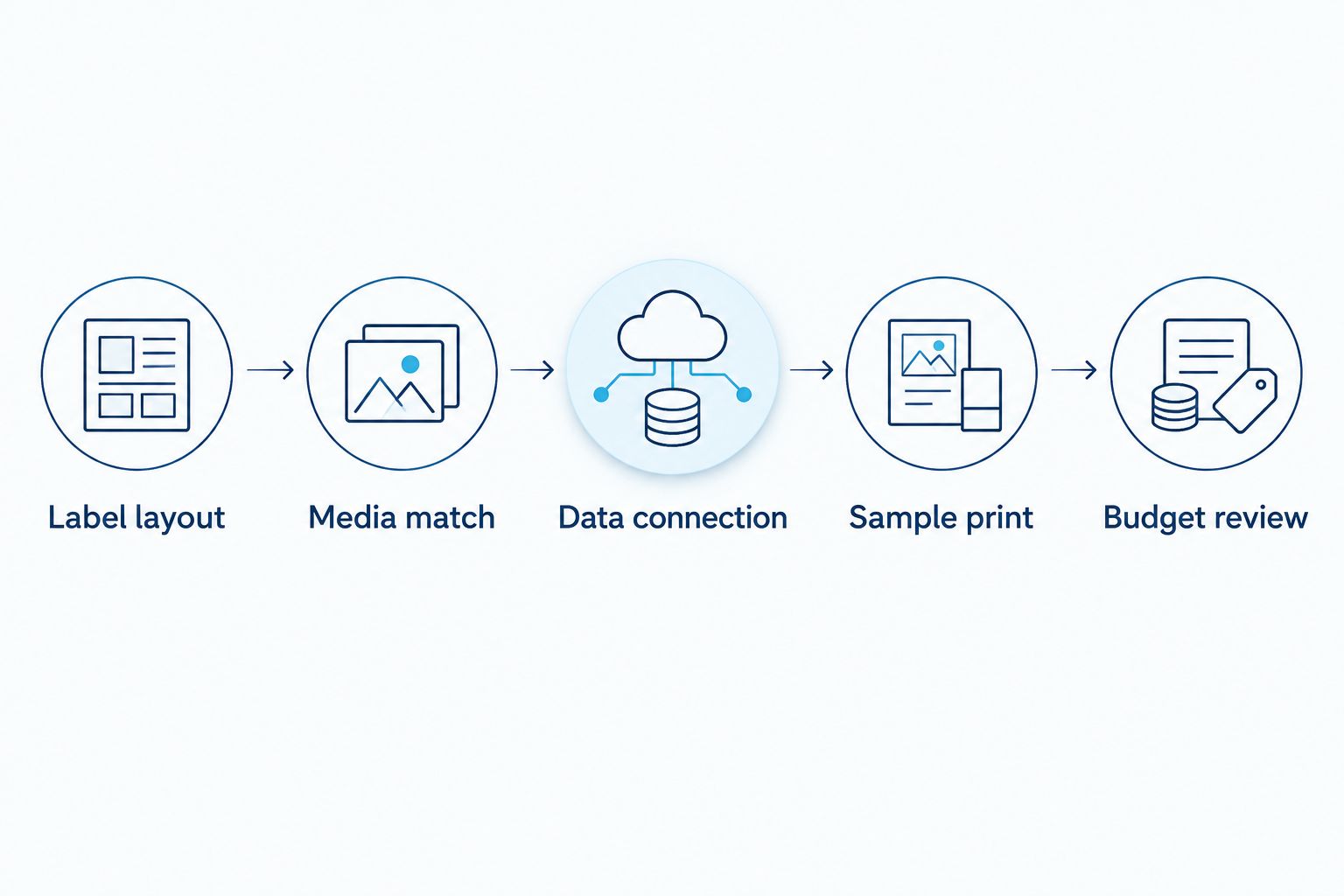
Define the finished label first, then work backward to the printer. This sequence gives each supplier the same requirements and gives your team a clear acceptance test.
- Label layout: Provide the actual barcode, text, and required label dimensions. Include the longest data values the template must accommodate.
- Media match: Specify the application surface and expected exposure. Confirm printer, label, adhesive, and ribbon compatibility together.
- Data connection: Identify the workstation or system supplying the print data. Confirm the driver, interface, and template workflow.
- Sample print: Print the intended layout on the intended stock. Check alignment, text readability, and barcode scanning with your working equipment.
- Budget review: Compare the complete configuration, including required supplies and accessories. Record the acceptance criteria before ordering.
McAuley Labels supplies industrial thermal printers alongside label products. Evaluate that combination as a sourcing option, but confirm the exact media configuration rather than assuming every label roll fits every printer.
The following cards show the listed hardware figures for the industrial models compared above. Read them alongside the specifications and testing steps, not as complete operating budgets.


Do I need 300 DPI for industrial barcode labels?
300 DPI is a configuration to evaluate when your layout requires finer printed detail than a 203 DPI configuration can reproduce acceptably. It is not an automatic requirement for every industrial barcode label.
Test the complete label at its final size. Barcode dimensions, data length, blank space around the code, media, and print settings all matter; resolution does not replace layout validation.
Use a scanner to check readability and a barcode verifier when formal print-quality verification is required. A successful scan is useful evidence, but it does not establish compliance with every customer's barcode specification.
Is direct thermal cheaper to operate than thermal transfer?
Direct thermal removes ribbon from the consumables list. That is a specific operational difference, not proof that it produces the lowest total operating expense for every application.
Thermal transfer adds ribbon selection and replacement to the workflow. Its benefit is the ability to pair compatible ribbons and media for the required application, while direct thermal depends on heat-sensitive label stock.
Choose the print process against label life and exposure, then compare operating requirements. A label that needs replacement before its task is finished is not a successful result, regardless of how simple the initial supplies list looked.
What should I check before approving an industrial printer purchase?
Check the finished label, the data workflow, and the complete configuration before approving a 2026 purchase. Get those checks recorded against the exact model being ordered.
Does the label work on the application surface?
Print quality and adhesion are separate requirements. Test the selected stock on the actual surface, following its application instructions, and evaluate it under the intended conditions.
Do not describe a printer itself as waterproof simply because it prints on a water-resistant material. Printer protection, label material, adhesive performance, and printed-image resistance are different properties.
Does the data reach the printer correctly?
A listed connection does not establish software compatibility. Confirm that your system can send the required template and variable data through the selected driver and interface.
Check leading zeros, long identifiers, and changing fields in the sample output. The barcode must encode the intended data—not merely resemble the approved design.
Can operators repeat the result?
Keep the approved template, media identification, and settings accessible to the people printing labels. Include loading, calibration, and cleaning instructions from the manufacturer.
Repeat the test after a media change or a template revision. A working sample should become a repeatable process, not an isolated demonstration that only the installer can reproduce.
FAQ
How much does an industrial barcode label printer cost in 2026?
Compare the current hardware figures in the industrial printer cards, then budget separately for required supplies and setup. A complete comparison needs the same resolution, print process, connections, and accessories on each quote.
What extra expenses should I budget for with a barcode printer?
Budget for compatible labels, thermal transfer ribbon where required, setup, maintenance, and any necessary label-handling accessories. Ask which items are included with the exact printer configuration.
Is a 300 DPI barcode printer better than a 203 DPI printer?
A 300 DPI printer provides more dots per inch than a 203 DPI printer, but that alone does not make it the better choice. Test your actual barcode and text layout at the intended label size.
Does a thermal barcode printer need ink?
Thermal barcode printing does not use conventional ink cartridges. Direct thermal printing uses heat-sensitive media, while thermal transfer printing uses ribbon.
Can I use direct thermal labels for permanent asset identification?
Do not assume direct thermal labels suit permanent asset identification. Evaluate the required label life and exposure, then confirm the selected media and printing process meet those conditions.
Does a successful barcode scan prove the label meets a customer specification?
A successful scan does not prove that a label meets every customer print-quality specification. Use barcode verification when the application requires formal quality assessment.
Which industrial printers does McAuley Labels list in this comparison?
This comparison includes the GoDEX ZX430i+, GoDEX GX4200i, and GoDEX GX4300i industrial thermal printers. Compare their stated specifications and confirm the configuration against your label workflow.
One last thing
A printer can produce a sharp barcode that contains the wrong identifier. Visual quality and data accuracy are separate acceptance checks.
Before approving a McAuley Labels industrial barcode printer configuration, print a label from your real data source and scan it into the system that will use it. Confirm the decoded value, not just the scan beep. That test checks the connection between the printed label and the record your team needs to retrieve.