

Choose McAuley Labels if you need specialized label printers for asset identification, laboratory tubes, or oil-change reminders; choose SheetLabels if you need blank label sheets for an existing office printer or custom-printed labels with fixed artwork. This 2026 comparison separates buying a printing workflow from buying labels for a defined job.
- McAuley Labels vs SheetLabels turns on workflow: specialized label printers versus blank sheets and custom-printed labels.
- Choose McAuley Labels label printers when asset tags or service reminders need changing information.
- Choose SheetLabels for blank label sheets that match an existing inkjet or laser printer.
- For fixed artwork, compare the finished label specification rather than declaring a universal winner.
Why this matters
A service reminder and a packaging sticker solve different problems. The reminder needs information from the current job; the packaging sticker often repeats approved artwork. Buying both as though they were the same print task creates unnecessary work.
The Oil Change Sticker Printer System illustrates the specialized approach: its listed configuration includes 1,000 custom labels, a ribbon, and a standalone keyboard. Those are concrete components for an in-house labeling station, not simply a supply of finished stickers.
For your 2026 purchasing decision, start with the information that changes. Then decide who prints it, where printing happens, and what surface receives the label. Those answers matter more than a broad claim that one supplier has better labels.
At a glance
| Dimension | McAuley Labels | SheetLabels |
|---|---|---|
| Best for | Specialized business labeling and in-house thermal printing | Blank label sheets and custom-printed label orders |
| Standout offering | Oil-change printer system with labels, ribbon, and standalone keyboard | Blank sheets for inkjet or laser workflows |
| Changing information | Printer-led approach for operational labels | Blank sheets suit changing information printed on compatible office equipment |
| Existing office printer | Evaluate the label format separately from the thermal-printer catalog | Better fit when the job specifically requires inkjet or laser label sheets |
| Fixed artwork | Custom logo stickers and other custom labels | Custom-printed labels for approved artwork |
| Identification materials | Custom QR Code Inventory Labels in metalized silver polyester; other listed identification stocks include semi-gloss white and 3M heavy-duty | |
| Identification materials, continued | Select by application and surface | Select a label material and adhesive for the same application |
| Resolution | Listed printer options include 203 dpi and 300 dpi | For blank sheets, resolution comes from your existing printer |
| Application testing | Test the selected label, print method, and surface together | Test the selected label, print method, and surface together |
| Purchasing model | Equipment and replenishment supplies, or custom-label orders | Blank-label purchases or custom-print orders |
Specialized printers win for point-of-work labeling
McAuley Labels label printers are best for businesses that need specialized in-house labeling workflows. The stated range covers direct thermal printers, asset-tag printers, laboratory test-tube labelers, and oil-change sticker printers. That makes the printer part of the buying decision rather than an afterthought.
Consider an automotive service desk. Your logo stays the same, but the next service information changes with the vehicle. A dedicated labeling station lets you organize the task around that changing information instead of around an office document.
The oil-change system's standalone keyboard is a relevant distinction for this scenario. It is an explicitly listed component; it does not establish compatibility with every shop-management application or describe every field the system supports. Check the exact input process against your service routine before choosing it.
The tradeoff is ownership of the printing task. Your team must load supplies, maintain the printer, and keep the template correct. Specialized equipment is the better workflow when that responsibility belongs at the workstation; it is unnecessary when you only need finished stickers with unchanged artwork.
In-house printing wins when the label data changes
Changing information favors a process that keeps printing close to the person creating the record. Asset IDs, inventory identifiers, and service details are operational data, not merely design elements. Decide how those records reach the label before you compare materials.
A dedicated thermal printer is one route. Blank sheets in a compatible office printer are another. Neither route automatically creates an asset database, validates a record, or maintains a service history. Your data process must do that work.
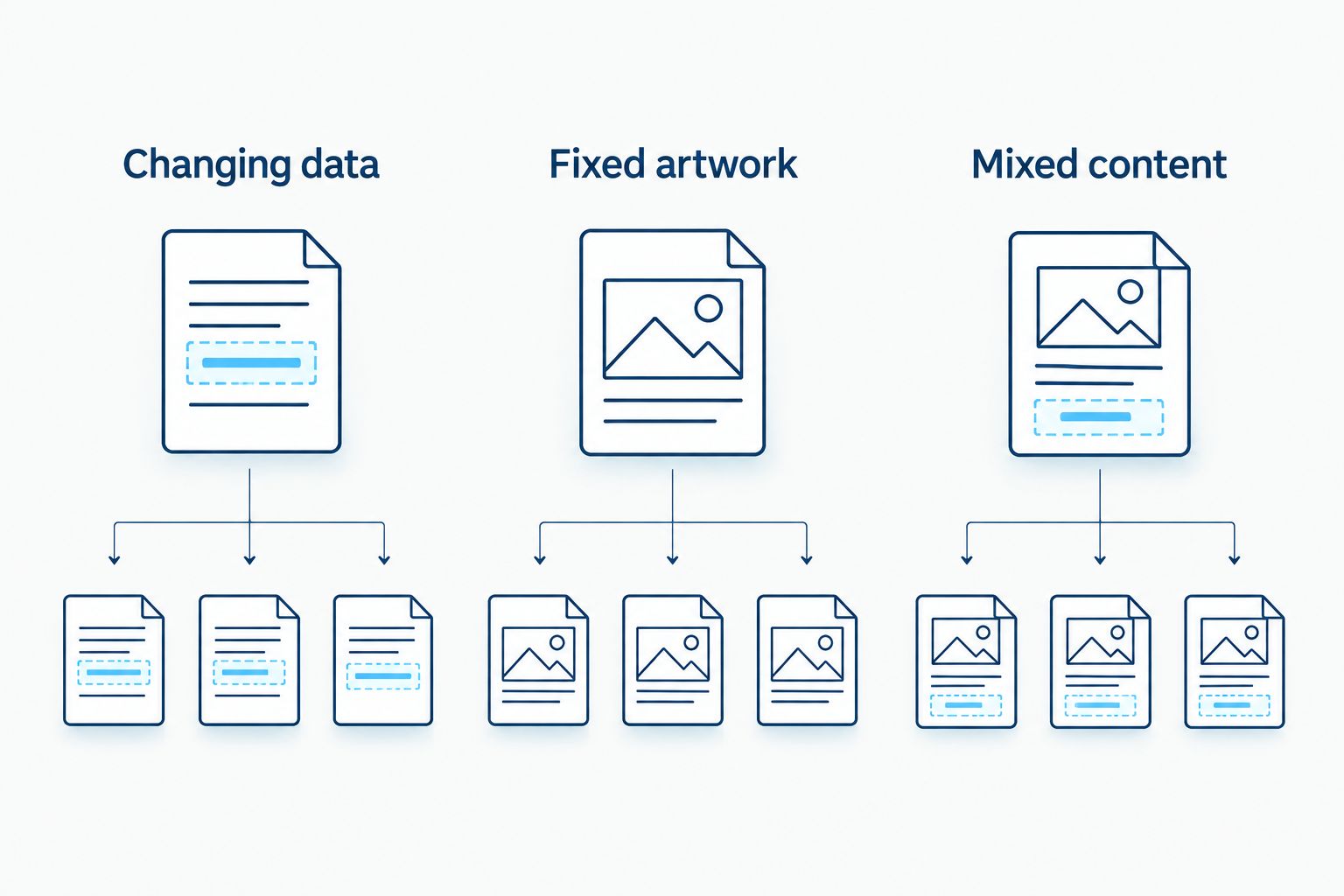
For your 2026 workflow, distinguish these label tasks:
- Changing data: An identifier or service field changes between labels.
- Fixed artwork: The same approved design repeats across the order.
- Mixed content: A permanent logo accompanies information printed later.
Changing data favors in-house control. Fixed artwork favors a repeatable print order or a stable office-printer template. Mixed content requires you to confirm that the later printing method works with the preprinted stock.
SheetLabels wins when you already use inkjet or laser sheets
SheetLabels is the better fit when your requirement is specifically blank label sheets for an existing inkjet or laser printer. You are choosing stock for equipment you already use, rather than establishing a thermal-label station.
That is a genuine advantage for an office handling address labels, filing labels, or repeated sheet-based jobs. The relevant purchasing questions are sheet layout, printer compatibility, label dimensions, and material. A specialized printer is not a requirement just because the output happens to be a label.
The limitation is sheet handling. Your document must match the label layout, and printer scaling or alignment errors can shift the output away from the die-cut labels. Test a plain-paper print against the layout before committing label stock.
Do not treat blank sheets as thermal-printer media. Inkjet, laser, direct thermal, and thermal transfer describe different printing methods with different stock requirements. The better supplier is the one offering the format your actual printer accepts.
Both suppliers belong on the shortlist for fixed artwork
For fixed logo stickers or packaging artwork, compare the finished label specification rather than awarding a brand-wide winner. Both suppliers offer custom-printed labels; the decision changes once variable information and printer ownership leave the brief.
The client's catalog includes custom business-logo stickers. SheetLabels also serves custom-print buyers. Those facts establish an overlap, not equal performance on every material, finish, or application.
Send the same specification to each supplier:
- Finished label dimensions and shape.
- Artwork and intended print appearance.
- Container or equipment surface.
- Moisture, handling, cleaning, and heat exposure.
- Whether the label stays permanently or must remove cleanly.
The advantage of a custom-print order is that your team does not need to reproduce the artwork on-site. The drawback is that a design change affects future orders and any unused labels carrying the old design. Neither supplier wins that tradeoff universally.
Identification stock favors a purpose-specific brief
The identification catalog provides concrete starting points: metalized silver polyester QR labels, semi-gloss white barcode labels, and 3M heavy-duty inventory-label options. That is useful evidence of application-focused selection, not proof that every stock withstands every environment.
Start with the object you are labeling. A warehouse bin, laptop case, tool housing, and laboratory tube present different surfaces and handling conditions. A familiar material name does not resolve those differences.
For asset tracking, also separate the visible code from the record it identifies. A printed barcode or QR code carries information; your chosen system determines what happens after someone scans it. Buying the sticker does not by itself establish equipment ownership, maintenance history, or inventory accuracy.
SheetLabels remains a candidate when you can specify a suitable printed label for the same task. The specialized catalog earns a place on the shortlist because it names identification uses directly. The final material decision still requires the same surface and exposure checks for either supplier.
Resolution belongs to the print method, not the supplier name
For 2026 printer selection, 203 dpi, 300 dpi, and 600 dpi describe print resolution—not label durability or adhesive strength. The supplied printer catalog explicitly includes 203 dpi and 300 dpi models. A higher resolution allows finer printed detail, but it does not repair an unsuitable label layout.
Small text and dense codes require attention to the physical space available. Enlarging a code, simplifying its content, or removing unnecessary text can matter more than choosing a higher-resolution printer. Test the actual output with the scanner your team uses.
For blank sheets, the office printer determines resolution and printing behavior. For outsourced custom labels, judge the finished proof and its intended use rather than comparing it directly with a thermal printer's dpi specification.
This is not a fair supplier-wide contest. One purchase includes printing hardware; another supplies media or finished labels. Compare resolution only after you have selected the production method.
Both require application testing before a material decision
Neither supplier name replaces a test on the intended surface. Label performance comes from the combination of face material, adhesive, printing method, application conditions, and exposure after application.
For thermal printing, distinguish the methods clearly. Direct thermal media forms an image through heat without a ribbon. Thermal transfer printing uses a ribbon to transfer the image onto compatible label stock. These are established printing processes, not interchangeable product descriptions.
A useful acceptance test includes:
- Applying the label to the real surface after the required preparation.
- Checking that text and codes remain readable under normal handling.
- Scanning the code with the intended device.
- Exposing the label to the cleaning or storage conditions of the job.
- Checking removal behavior if the application requires it.
For a laboratory application, specify the actual storage and handling conditions. Do not infer freezer, cryogenic, chemical, or regulatory suitability from the word laboratory alone. A suitable printer and a suitable adhesive are separate requirements.
Purchasing model: production control versus ordering labels
The 2026 purchasing distinction is equipment plus replenishment supplies versus buying blank or finished labels for a defined order. It is not a supported claim that either supplier is always cheaper.
With an in-house printer, your purchasing plan includes the machine, compatible stock, and a ribbon when the printing method requires one. Your team also owns setup, template control, loading, cleaning, and print checks. In return, the printing task remains inside your operation.
With blank sheets, you retain the office printer and purchase compatible label media. That avoids introducing a separate printer solely for a sheet-based task, but your team still controls layout, printing, and application.
With custom-printed labels, your specification and artwork drive the order. You move printing outside the workstation, but you must plan for design changes and replenishment.
Compare these models using your actual usage and workflow. Ask whether the label data changes during the job, who approves artwork, and who owns replenishment. A predictable routine is more useful than a purchase justified by an unsupported savings claim.
Final verdict: buy for the person producing the label
Choose McAuley Labels if you manage operational labeling
Best for: an automotive service manager, asset coordinator, or laboratory buyer selecting specialized label-printing equipment. Choose this route when the label belongs to an in-house task and the equipment must match that task.
Before purchasing, confirm the complete chain: input method, template, printer, stock, and application surface. A printer that produces a clear label still needs the correct information and material to make that label useful.
Choose SheetLabels if you buy sheets or finished artwork
Best for: an office administrator using inkjet or laser label sheets, or a packaging buyer ordering labels with approved artwork. Choose this route when your main requirement is compatible sheets or a finished print order rather than a specialized operational printer.
For your 2026 decision, keep the specification narrow. Sheet-based office printing and custom packaging labels are legitimate reasons to choose SheetLabels; they are not reasons to assume the same purchase will solve every equipment-tagging or laboratory-labeling task.
| Dimension | Winner |
|---|---|
| Specialized printer selection | McAuley Labels |
| Changing information at the workstation | In-house printing; select the printer format for the task |
| Existing inkjet or laser sheet workflow | SheetLabels |
| Fixed artwork | Tie: compare the finished specification |
| Identification-stock selection | Purpose-specific catalog for shortlisting; application test for approval |
| Resolution | No supplier-wide winner |
| Application testing | Tie: required for either route |
| Purchasing model | Printer ownership for control; label orders for defined output |
FAQ
Which is better, McAuley Labels or SheetLabels?
McAuley Labels is the better fit for specialized label-printing workflows; SheetLabels is the better fit for blank inkjet or laser sheets and custom-print orders. Choose according to who prints the label and whether its information changes.
Is SheetLabels better if I already have a laser printer?
SheetLabels is the more direct fit when your job requires blank laser-compatible label sheets. Match the sheet layout and material to the printer, then check alignment before printing on label stock.
Should an auto shop buy an oil-change sticker printer?
An oil-change sticker printer fits a shop that wants to produce changing service information in-house. Confirm the input process, sticker stock, and workstation routine before selecting a system.
Do QR code inventory labels include an asset-tracking system?
A QR code label does not by itself create an asset-tracking system. Define the destination or encoded identifier and connect it to the records your team maintains.
Do I need 300 dpi instead of 203 dpi for barcode labels?
Choose resolution from the barcode dimensions, text size, and required readability—not from a blanket preference for 300 dpi. Test the final label with the intended scanner and simplify the layout when necessary.
Are direct thermal labels the same as thermal transfer labels?
Direct thermal and thermal transfer labels use different printing processes. Direct thermal printing does not need a ribbon; thermal transfer printing requires a compatible ribbon and label stock.
How should I compare the purchasing models?
Compare equipment and replenishment supplies with blank-label or finished-label orders. Include the work your team performs: setup, printing, artwork approval, application, and replenishment.
One last thing
Approve the scan result, not just the printed appearance. A barcode can look clean while identifying the wrong record, and a QR code can scan correctly while opening the wrong destination. Verify both the physical label and the information it returns before applying labels across your operation.