
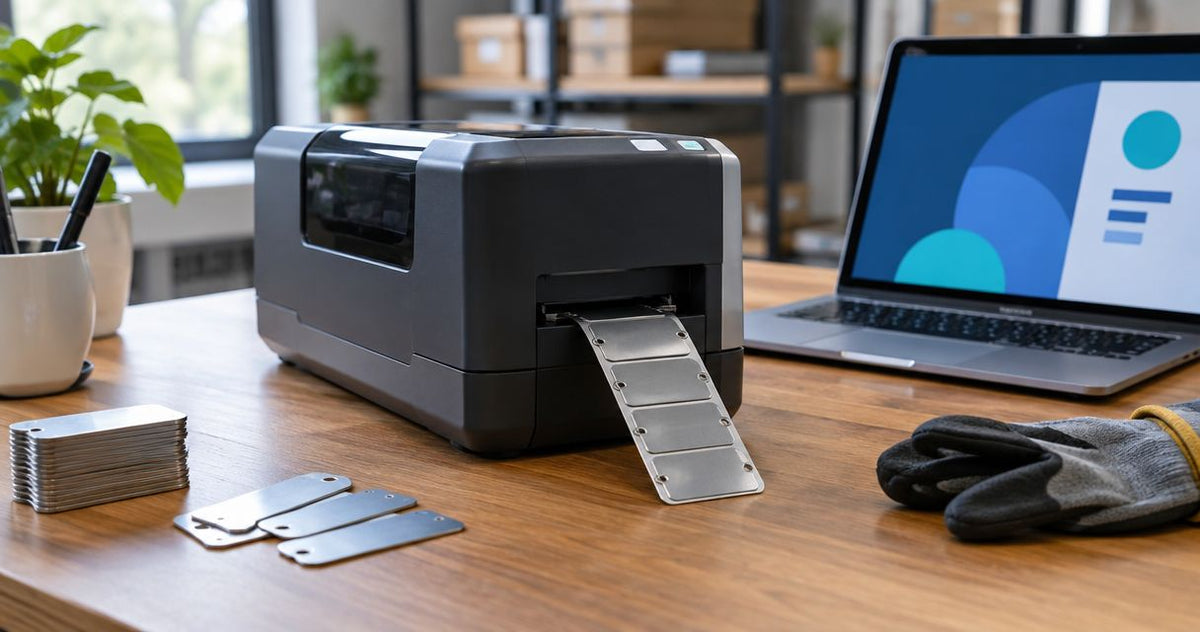
A metal asset tag printer is worth it in 2026 when you need recurring, on-demand equipment identification and the machine supports the exact tag material your application requires. It is not worth buying a metal-marking system merely to produce silver adhesive labels. Include consumables, setup, application, and recordkeeping in the decision—not just the printer.
- Is a metal asset tag printer worth it? Yes for recurring asset tagging, after confirming material compatibility.
- Metalized polyester asset labels are not solid metal plates; choose the material before the printer.
- McAuley Labels suits businesses evaluating thermal asset label printing, not an assumed metal-engraving workflow.
- Test adhesion, barcode scanning, and asset-record accuracy before committing to in-house production.
Is a metal asset tag printer worth it in 2026?
Buy an asset tag printer for a repeatable labeling job, not for a metallic appearance. The deciding question is whether you need adhesive labels or actual metal plates. Those requirements lead to different equipment.
Start with the substrate. The guide to silver polyester asset tags for metal surfaces addresses the adhesive-label side of that decision. A label applied to a metal cabinet is not necessarily a metal tag.
| Tagging approach | Best for | Main advantage | Main limitation |
|---|---|---|---|
| In-house thermal-transfer adhesive labels | Recurring asset intake with changing IDs | You control when individual labels are produced | Printer, label stock, and ribbon require a compatible combination |
| Ordered custom adhesive asset labels | Planned batches with settled artwork and numbering | You avoid operating a printer for that batch | Changes require another production decision |
| Solid metal plates with a compatible marking process | Applications that explicitly require metal plates | The substrate matches a true metal-tag requirement | A conventional thermal label printer is not a metal engraving machine |
These are workflow choices, not a durability ranking. A successful tag needs readable information, suitable attachment, and a correct asset record. None of those follows automatically from the word metal.
Why this matters
An equipment label has to identify the asset where employees actually use it. A clear barcode on the wrong material fails that job just as surely as a durable label carrying the wrong ID. Start with the asset and its working conditions.
For a 2026 purchasing decision, separate appearance from function. Silver polyester describes a label material; solid metal describes a different substrate. Thermal printing, engraving, and other marking processes are not interchangeable simply because their finished tags look metallic.
Write the requirement in plain language: adhesive label or plate, application surface, printed information, scanning device, and exposure conditions. That short specification gives you a useful basis for comparing equipment. A search for a metal asset tag printer alone does not.
Thermal-transfer asset labels: worth it for recurring identification
Best for: businesses that assign equipment IDs as assets arrive. In-house thermal-transfer printing lets you produce variable information on compatible label stock using a ribbon. The value is control over the labeling workflow, not a guaranteed saving.
Choose this route when employees regularly need new asset IDs, replacement labels, or different layouts. Keep the permanent identifier stable while recording ownership, location, and maintenance changes in the asset system. That avoids redesigning a tag whenever operational details change.
The drawback is responsibility. Your team must maintain templates, load suitable consumables, calibrate the printer, and check output. Buying the machine transfers those tasks in-house; it does not remove them.
Confirm compatibility for the exact label and ribbon combination. Do not treat a silver finish, a polyester description, or a heavy-duty name as proof that a particular printer will handle the stock. Ask for the material specification and test a printed sample.
Ordered custom asset labels: worth it for settled batches
Best for: projects with known quantities, fixed artwork, and an approved numbering list. Ordering custom labels separates label production from your internal tagging work. Your team still needs to check the delivered IDs and apply each label to the correct asset.
This approach is useful when the job is a planned equipment rollout rather than an ongoing stream of new records. Supply an approved data file and retain the numbering list. Treat the labels and the asset register as parts of the same project.
The trade-off is less immediate control over production changes. A revised logo, numbering scheme, or label layout requires another order decision. Avoid printing changing details directly on a permanent tag unless you have a replacement process.
Do not buy a printer solely because you expect occasional corrections. First determine why corrections occur. Duplicate IDs or inaccurate source records need a data fix, not additional hardware.
Solid metal tags: worth it only for a metal-plate requirement
Best for: applications whose specification explicitly calls for a solid metal tag. Select a marking process that supports the specified metal, tag dimensions, and required information. Conventional thermal label printing does not establish metal-plate capability.
A solid plate also needs an attachment plan. Decide whether the equipment permits the intended fastening method and whether the tag remains accessible for inspection. Do not drill, rivet, or otherwise modify equipment without approval.
The limitation is a different production workflow. Plate handling, marking, attachment, and inspection belong in the evaluation. A machine designed for roll-fed adhesive labels is not a substitute simply because both outputs identify equipment.
Do not purchase a metal-marking system until the tag specification requires one. If an adhesive label meets the application requirement, evaluate that workflow on its own merits.
Why the value of an asset tag printer varies
A useful 2026 assessment connects the purchase to actual work. Evaluate these factors before comparing models:
- Tag material: Separate solid metal plates from metalized polyester and other adhesive label stocks. Match the equipment to the substrate.
- Data changes: Identify which fields stay permanent and which belong in the asset record. Frequent record changes do not necessarily require frequent tag replacement.
- Print detail: Use the real barcode, QR code, and text layout to assess resolution. Small features need a readable finished result.
- Application surface: Test the intended equipment surface, including its finish and curvature. A successful test on a loose sample sheet does not establish adhesion on an asset.
- Exposure conditions: List cleaning agents, abrasion, moisture, sunlight, and heat that the installed tag encounters. Request evidence for the selected material rather than assuming resistance.
- Internal ownership: Assign responsibility for numbering, printing, applying, and checking labels. Include that work when judging whether in-house production is worthwhile.
Which thermal printer specifications should you compare?
Resolution is a practical comparison point, but it is not a durability rating. The supplied McAuley Labels catalog includes thermal printers at 203 DPI, 300 DPI, and 600 DPI. Those specifications describe printing resolution, not the service life of an installed tag.
The following models are thermal-label candidates, not evidence of solid-metal marking capability. Confirm media compatibility before selecting any of them for an asset-label job.
| Thermal printer | Stated specification | Best for evaluation | Advantage to assess | Limitation to check |
|---|---|---|---|---|
| GoDEX RT700i+ | 4-inch format, 203 DPI, color display | Layouts that remain readable at 203 DPI | A stated resolution to test against your normal asset layout | Fine details still require a sample print |
| GoDEX G530 | 4-inch format, 300 DPI, dual thermal | Asset layouts needing closer examination of small print | Higher stated resolution than the 203 DPI candidate | Resolution does not prove label or ribbon compatibility |
| GoDEX RT863i+ | 4-inch format, 600 DPI, dual thermal | Compact layouts with fine printed features | The highest stated resolution in this comparison | Extra resolution does not establish outdoor resistance |
Choose the resolution that produces a readable, scannable version of your actual label. Do not select 600 DPI solely because the number is larger. Likewise, do not approve 203 DPI without checking the smallest required information.
Print the same design when comparing candidates. Keep the label dimensions, encoded content, and scanning conditions consistent so that a layout change does not get mistaken for a printer improvement.
These product cards provide the catalog specifications for the models above. They are starting points for a media-and-layout test, not a claim that every asset-label material works with every model.


How do you test whether in-house asset printing is worthwhile?
Use the complete tagging workflow for your 2026 evaluation. A printer demonstration proves little if the label never reaches the equipment or the scanned value points to the wrong record. Test the job from source data to installed identification.
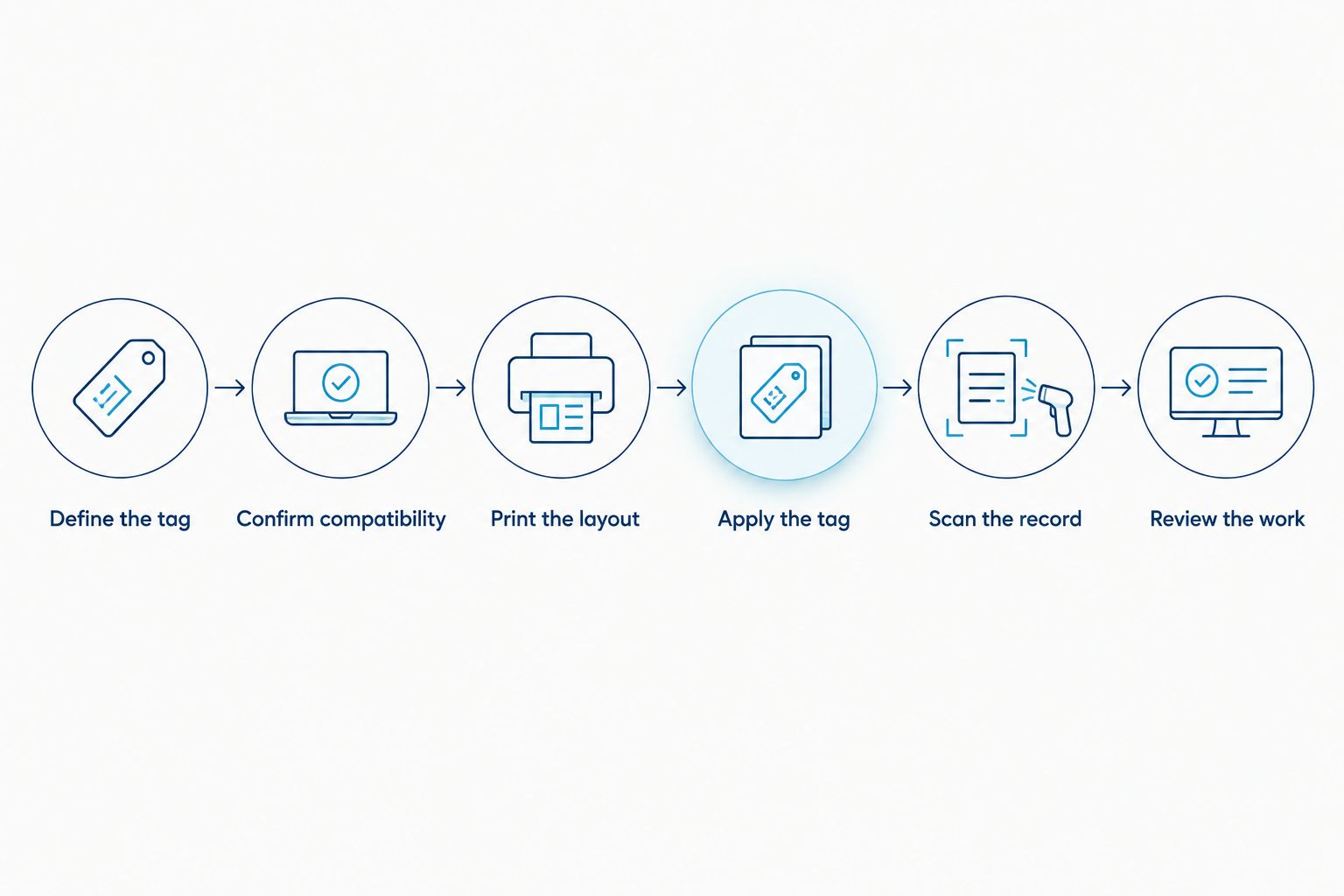
- Define the tag. Specify the substrate, attachment method, dimensions, and information. Resolve the adhesive-label versus solid-plate question here.
- Confirm compatibility. Obtain confirmation for the exact printer, stock, and ribbon combination. For solid plates, confirm the marking process instead.
- Print the layout. Use the intended asset ID and the smallest required text or code. Check alignment and information completeness.
- Apply the tag. Follow the material supplier's preparation and application instructions on representative equipment. Keep the tag clear of controls and required equipment markings.
- Scan the record. Use the device employees will carry. Confirm that the result identifies the correct asset rather than merely showing a readable code.
- Review the work. Record consumables used, rejected labels, operator time, application time, and corrections. Use those observations to compare production approaches.
The test should end with an installed label and a verified record. Keep failed samples too. They show whether the problem is material selection, printing, application, scanning, or data handling.
What should your business case include?
Compare the work you perform today with the proposed process. Include equipment, consumables, maintenance, template preparation, data checks, printing, application, and replacements. Use your own measured activity rather than a generic monthly tag threshold.
Keep production and asset management separate in the calculation. A printer creates identification; your records connect that identification to equipment. Do not count improvements from a cleaned-up register as automatic printer savings.
McAuley Labels is best suited to businesses evaluating thermal asset label printing, rather than assuming a thermal printer marks solid metal plates. Its catalog provides thermal printer candidates, but the purchasing decision still depends on your selected media and completed workflow test.
For the McAuley Labels asset label printing route, the practical advantage is the ability to evaluate different stated resolutions. The limitation is equally specific: resolution and product names alone do not establish adhesion, exposure resistance, or solid-metal marking capability.
Can a thermal label printer print on actual metal tags?
A conventional thermal label printer does not engrave solid metal plates. Thermal-transfer printing uses a ribbon and compatible media; confirm any claimed metal-tag capability against the manufacturer's exact specification.
If your requirement is a silver adhesive asset label, ask about printable metalized stock instead. That is a different question from marking a metal plate.
Do you need 600 DPI for asset tags?
600 DPI is not a universal requirement for asset tags. Evaluate resolution using the finished label's smallest text and code features, then test scanning with your actual device.
Do not infer durability from resolution. Adhesion and exposure resistance require their own material checks.
Should you print location and employee names on permanent tags?
Keep changing location and employee information in the asset record when the tag's purpose is permanent identification. Print a stable identifier that connects the equipment to that record.
This separates a personnel or location update from a physical relabeling job. Use a written rule so employees know which information belongs on the tag.
FAQ
Is a metal asset tag printer worth it for a small business?
A metal asset tag printer is worth evaluating when your business has recurring tagging work and a defined material requirement. For a settled batch, compare ordered labels before taking on printer operation.
Are metalized asset labels the same as solid metal tags?
Metalized asset labels are not the same as solid metal plates. Confirm the substrate and attachment method before choosing production equipment.
Is thermal transfer better than direct thermal for permanent asset labels?
Thermal transfer is the relevant starting point when your selected asset label stock requires ribbon printing. Direct thermal uses heat-sensitive media without a ribbon; verify suitability for the intended exposure and identification period.
Does a higher DPI make an asset tag last longer?
A higher DPI does not establish a longer asset tag life. Resolution concerns printed detail, while material, adhesive, ribbon, and exposure determine application suitability.
Can I print QR codes on silver asset labels?
You can print QR codes on silver label stock when the stock and printing process are compatible. Test the finished code at its intended size with the actual scanning device.
What should I ask McAuley Labels before choosing an asset label printer?
Ask McAuley Labels to confirm the exact printer, asset label stock, and ribbon combination for your layout. Include the application surface, exposure conditions, and required code dimensions in the request.
Should I buy an asset printer before creating my asset register?
Create the asset numbering rules and source records before buying a printer. Hardware cannot prevent duplicate identifiers or correct inaccurate asset data.
One last thing
Keep the asset ID permanent; let the record carry the changes. A department move, employee change, or maintenance update does not require a new tag when the existing identifier still connects to the correct equipment record.
Before approving a printer purchase in 2026, ask an employee to identify an asset using the proposed tag and retrieve its record. If that fails, fix the identification workflow first. A clearer printed label is only useful when it leads to the right information.