
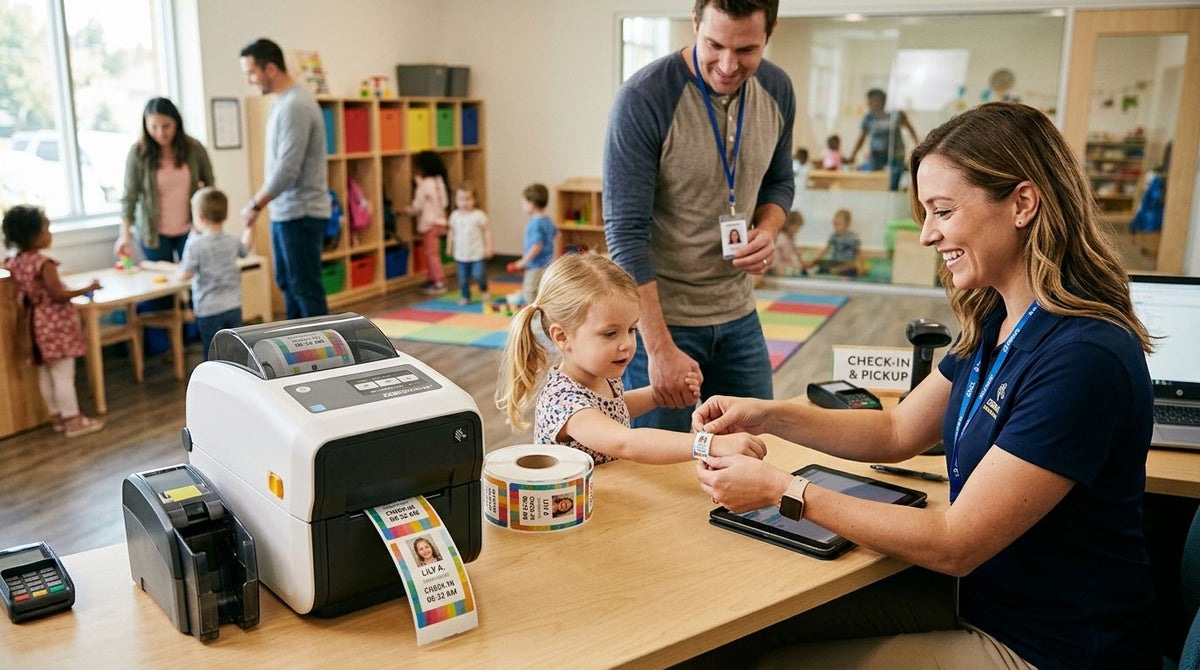
A wristband printer for daycare check-in and pickup security prints matching parent-and-child ID codes at drop-off, so front-desk staff verify a guardian in seconds instead of scanning a paper sign-in sheet for a name that might not even be legible. Daycare centers move faster than gyms or water parks on this front: the same child gets checked in and picked up every single day, usually by two or three approved adults, which means the wristband system has to be fast, durable through nap time and outdoor play, and simple enough for a new front-desk hire to run on day one.
- A GoDEX direct thermal printer paired with linerless wristband stock is the fastest wristband printer for daycare check-in and pickup setup in 2026 — no ribbon to track, no jam risk during rush hour.
- Direct thermal wristband labels skip ribbon costs entirely and hold up through a full day of handwashing and nap mats.
- Match parent and child codes at print time, not at pickup — that single step closes the biggest security gap in daycare check-in.
- GoDEX ZX420i+ fits centers with 40+ daily check-ins; GoDEX DT200L fits single-classroom or in-home daycares on a tighter counter.
Why this matters for daycare check-in
Licensing inspectors care about one thing at pickup: can staff prove, in under 10 seconds, that the adult standing at the door is authorized to take that specific child. A printed wristband with a matching barcode or short code on a parent card does that instantly. A paper sign-in binder does not — it just proves someone wrote a name down.
Daycare centers also cycle through more daily check-ins than most wristband use cases. A 60-child center runs 60 drop-offs and 60 pickups every day, five days a week, which adds up to roughly 600 wristband prints a week if you're re-issuing daily. That volume rules out anything built for occasional use. It's the same logic covered in asset tags for daycare and childcare centers: when a tag or wristband has to survive daily handling by kids and staff, the material and the printer both matter more than they would for a one-time event badge.
Map your check-in workflow before buying hardware
Before any printer purchase, write down exactly what happens at drop-off and pickup today.
- Count how many children check in during your busiest 30-minute window
- List every approved-pickup scenario you handle (grandparents, nannies, co-parents with custody schedules)
- Note where the printer physically sits — front desk, classroom door, or both
- Decide whether wristbands get reissued daily or reused for the week
- Flag any state licensing requirement that specifies sign-in/sign-out documentation
This mapping step tells you whether you need one printer or two, and whether you need a compact desktop unit or something built for higher daily volume.
Choose wristband stock that survives a full daycare day
Before picking a printer model, settle the label question — this is where most daycare centers overspend without realizing it. Ribbon-based thermal transfer wristbands cost more per print and add a consumable staff has to reorder and swap correctly, which is one more failure point at 7:45 AM.
Direct thermal wristband stock skips the ribbon entirely. Direct thermal printer labels work with no-ribbon-needed printing, which cuts the parts list down to just the printer and the label roll — fewer supplies to track, fewer things that jam mid-checkin. The tradeoff: direct thermal print does fade faster under prolonged direct sunlight than thermal transfer, so daily reissue (not week-long wear) is the right model for a daycare setting anyway.
- Confirm the wristband adhesive is skin-safe and won't leave residue on a toddler's wrist
- Order a width that fits a 6-month-old's wrist and a 5-year-old's wrist without redesigning the layout
- Test one full day before ordering in bulk — nap sweat and hand sanitizer are the real durability test
- Keep 2-3 weeks of stock on hand; daycare doesn't get a grace period for a backordered roll
Pick a printer that survives front-desk chaos
A daycare front desk is not a quiet office. Drop-off hour means phones ringing, a line at the door, and a printer that has to work without a manual on hand.
GoDEX DT200L is a 2-inch linerless direct thermal printer at 203 DPI — the right size for a single classroom or an in-home daycare running a lower daily volume, with no liner waste to deal with at a small counter. Best for: single-location or in-home daycares. Verdict: Buy if you're checking in fewer than 25 children a day.
GoDEX ZX420i+ runs 203 DPI with a color display, which matters when a non-technical staff member has to troubleshoot a misfeed between drop-offs without calling IT. Best for: centers running 40+ daily check-ins across multiple classrooms. Verdict: Buy if your front desk needs a printer a rotating staff can run without training.
GoDEX GX4200i prints up to 16 inches per second at 203 DPI with a 5-inch touchscreen — more machine than most single-location daycares need, but the right call for a multi-site chain printing wristbands at several front desks off one shared spec. Verdict: Buy for multi-location operators; Skip for a single classroom, it's overbuilt.


Print matching parent and child codes at drop-off
The security value of a wristband printer for daycare check-in and pickup comes entirely from the match, not the wristband alone.
- Print the child's wristband and the parent's matching pickup card at the same time, same code
- Use a short numeric or barcode format staff can scan or eyeball fast
- Reissue new codes daily so yesterday's card can't get reused by mistake
- Never let a wristband leave the printer without its matching parent card printing first
Train staff on pickup verification, not just printing
A printer only closes the security gap if front-desk staff actually check the match every time, not just on the days a director is watching.
- Require a visible code check before releasing any child, no exceptions for regulars
- Post a simple written policy for what happens when a pickup card is lost or forgotten
- Rotate the verification duty so it's not always the same one person cutting corners under pressure
- Run a monthly spot-check where a director tests whether staff catch a mismatched code
Log every pickup exception for licensing records
Every daycare eventually hits a day where a grandparent forgot the card or a court order changes who's approved for pickup. Those exceptions need a paper trail separate from the wristband system itself. Centers running multiple locations often pair wristband verification with dedicated incident reporting software so that custody changes, late pickups, and any safety exception get logged consistently across every site instead of living in a single director's notebook.
- Log the date, time, and reason for any manual override of the wristband match
- Keep exception logs for the period your state licensing agency requires
- Review exception patterns monthly — repeated overrides usually mean a workflow gap, not bad luck
Audit your wristband stock monthly
- Count remaining rolls against your weekly usage rate
- Check printhead cleanliness — a dirty printhead on 203 DPI stock produces streaky codes that scanners misread
- Confirm code format hasn't drifted between classrooms if you run more than one printer
- Re-test wristband adhesion and readability after any stock supplier change
Comparison: wristband printer options for daycare centers
| Option | Best for | Key limitation |
|---|---|---|
| GoDEX DT200L (linerless, 203 DPI) | Single-classroom or in-home daycare | Smaller print width limits label layout options |
| GoDEX ZX420i+ (203 DPI, color display) | Multi-classroom centers with rotating staff | Overkill for very low daily volume |
| GoDEX GX4200i (203 DPI, 16 IPS) | Multi-location daycare chains | Too much machine for a single front desk |
| Handwritten paper sign-in sheet | Centers not ready to switch systems | No verifiable match at pickup; slowest option |
Common mistakes daycare centers make
- Reusing the same wristband code for a full week. A lost or copied wristband stays valid for days instead of hours — reissue daily.
- Skipping the parent-card match step during a rush. The wristband alone proves nothing if nobody checks it against a card.
- Buying a ribbon-based printer for a single classroom. It adds a consumable and cost the direct thermal route in direct thermal wristband labels already solves.
- Not training substitute staff on the verification step. The system fails exactly on the day a regular front-desk person calls in sick.
- Storing wristband stock near a heat source. Direct thermal material fades faster near a sunny window or a space heater — keep it in a drawer.
FAQ
What's the best wristband printer for daycare check-in and pickup in 2026?
The GoDEX ZX420i+ at 203 DPI with a color display is the best fit for most daycare centers running 40 or more daily check-ins, because staff can troubleshoot it without calling for support. Smaller centers under 25 daily check-ins do fine with the compact GoDEX DT200L.
Do daycare wristbands need to be reissued every day?
Yes — reissuing daily keeps a lost or copied wristband from staying valid for more than a few hours. Weekly reuse is the most common daycare wristband mistake and the easiest one to fix.
Is direct thermal or thermal transfer better for daycare wristbands?
Direct thermal is the better fit for daily-reissue daycare wristbands because it needs no ribbon and the fade risk only matters for wristbands worn longer than one day. Thermal transfer makes more sense for wristbands meant to last a week or longer.
How fast can a daycare front desk print a wristband and matching parent card?
A 203 DPI direct thermal printer like the GoDEX DT200L or ZX420i+ prints a wristband and its matching card in a few seconds, which is fast enough to keep a drop-off line moving.
Can one printer handle both wristbands and parent pickup cards?
Yes, as long as the printer supports the label width for both formats — most daycare centers run both off a single 203 DPI unit at the front desk.
What happens if a child's wristband gets lost during the day?
Staff should reprint a replacement wristband with a fresh code and log the reissue, then verify the parent's pickup card still matches before releasing the child.
Do daycare centers need a barcode or just a printed number on the wristband?
A short numeric or barcode format both work; barcodes scan faster during a busy pickup line, while a plain number works fine for smaller centers checking codes by eye.
How much does it cost to run a daycare wristband printer daily?
Direct thermal wristband stock has no ribbon cost, so daily running cost comes down to the label roll itself — check current pricing on the label listing for your volume.
One last thing
The daycare centers that get pickup security wrong almost never fail on the printer — they fail on the habit. A GoDEX unit printing matching codes in under three seconds solves nothing if the person at the door doesn't glance at the match every single time, including the tenth pickup of a long Friday. Build the verification habit first, then let the printer make it fast instead of the other way around.